
Inspiring
January 2, 2025
Answered

Multiple and Continuous Artisan Task Errors

  • January 2, 2025
  • 6 replies
  • 388 views

I have a Windows 10 system with 128gb of RAM and dual nvidia Titan RTX video cards connected via NVLink. Each card has 24gb of VRAM.


First, when starting the most current release of After Effects, I received this notification.
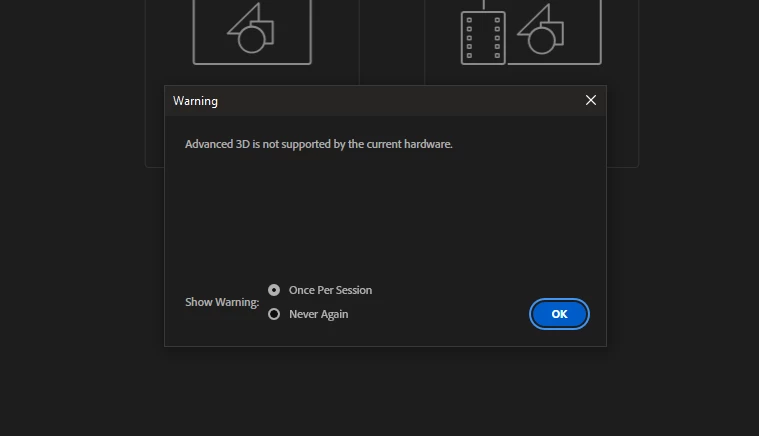


Similar notifications have happened before, so I updated my display drivers to the latest nvidia Studio Driver and restarted.


I did not receive the notification, but when attempting to create a composition from a video clip, I received this notification as After Effects crashed.
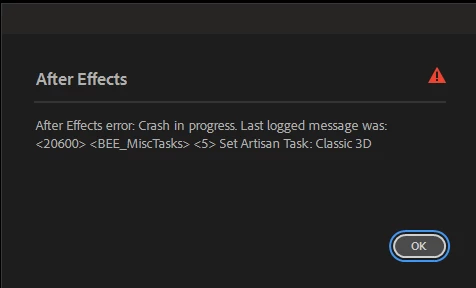
I checked the Discussion forums and did not identify a solution for this, so I posted there.


I then uninstalled After Effects and reinstalled. No change. Attempted to create a composition from a video clip, instant crash.


I uninstalled After Effects, reinstalled the nvidia Studio Driver, reinstalled After Effects and removed all plugins (of which none were loaded). Same result, different number.
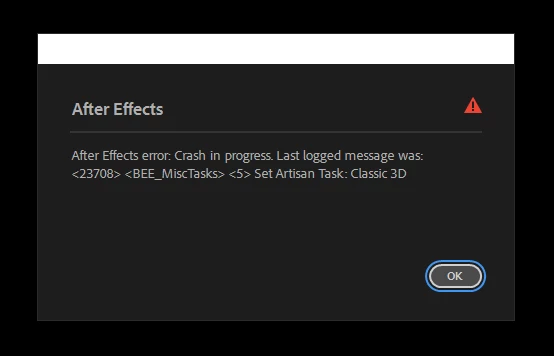
I uninstalled After Effects. I removed all After Effects folders from my system. I uninstalled every version of Maxon on my system. I did clean install of the nvidia Studio Driver (wipes all display driver data, loads default Windows display driver, restarts the system) and reinstalled the Studio driver.


I reinstalled After Effects. New same / different popups before crashing.
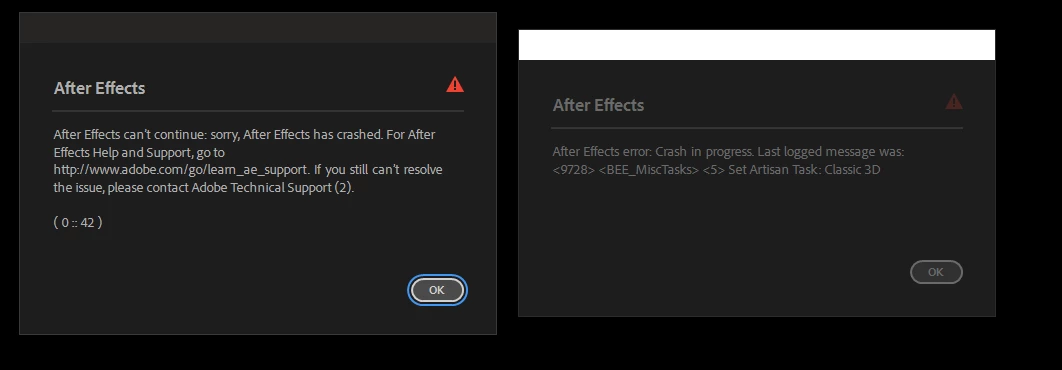
Note the website, which does not exist.


My computer hardware has been more than sufficient for my work for the past five-six years. I cannot concieve of a situation where After Effects would require all of the resources my system has availalbe to it.


The issue also exists with Premiere Pro.


This is a new development. 


Here is the latest crash message.
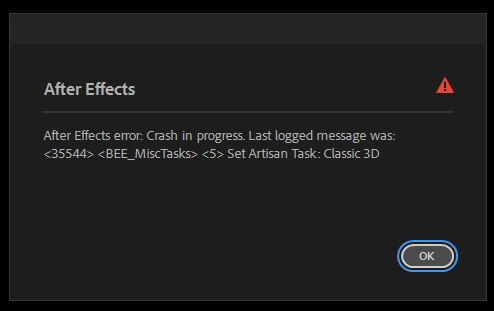


This development is making it impossible to do my work. I cannot run either After Effects or Premiere Pro.


I can't believe that I am the only user suffering from this issue.


Would appreciate a fix ASAP as I cannot work.


Correct answer RP_Schmidt

Removed the nvlink. Everything is running correctly again and nothing is throwing errors.


Thanks again for the suggestions John. I really appreciate it!

6 replies

RP_SchmidtAuthorCorrect answer
Inspiring
March 26, 2025

Removed the nvlink. Everything is running correctly again and nothing is throwing errors.


Thanks again for the suggestions John. I really appreciate it!

Inspiring
March 26, 2025

So I just restarted my computer in Safe Mode and ran DDU from Guru3d.


Then I installed nvidia studio driver 512.59.


It installed with zero issues and correctly identified both GPUs.


After Effects and Premiere Pro still open warning me that my GPU is unidentified and has an insufficient RAM.


24gb of DDR6. Insufficient.


I'm getting a new system, but not tomorrow. I would really like to be able to use the software I pay monthly for now, especially since I have never previously had these issues with either application (unless I needed a driver update).


After Effects System Report:

System Components:
 
[Operating System] Windows v.10.0.19045.1
 
----------------------------------------------------------------------------
[Video] NVIDIA TITAN RTX v.30.0.15.1259
ISSUES:
1. NVIDIA has identified a bug in your driver which might cause random crashes in your Adobe application. Please follow the instructions listed in the linked article.
ID:  jira:DVAAP-1394
2. Your video driver does not meet system requirements for this Adobe application. Please follow the directions in the link below to update your driver.
ID:  jira:DVAAP-1507-CUDA11_8
 
----------------------------------------------------------------------------
[Audio] NVIDIA High Definition Audio v.1.4.0.1
[Audio] Oculus Virtual Audio Device v.0.12.6.503
[Audio] Realtek High Definition Audio v.6.0.1.8186
 
----------------------------------------------------------------------------
[Network] Intel(R) Dual Band Wireless-AC 8265 v.20.70.7.1
[Network] Intel(R) I211 Gigabit Network Connection v.12.15.184.1
[Network] Intel(R) I211 Gigabit Network Connection #2 v.12.15.184.1
[Network] Microsoft Kernel Debug Network Adapter v.10.0.19041.1
[Network] Microsoft Wi-Fi Direct Virtual Adapter v.10.0.19041.1
[Network] Microsoft Wi-Fi Direct Virtual Adapter #2 v.10.0.19041.1
[Network] WAN Miniport (IKEv2) v.10.0.19041.1
[Network] WAN Miniport (IP) v.10.0.19041.1
[Network] WAN Miniport (IPv6) v.10.0.19041.1
[Network] WAN Miniport (L2TP) v.10.0.19041.1
[Network] WAN Miniport (Network Monitor) v.10.0.19041.1
[Network] WAN Miniport (PPPOE) v.10.0.19041.1
[Network] WAN Miniport (PPTP) v.10.0.19041.1
[Network] WAN Miniport (SSTP) v.10.0.19041.1
 
____________________________________________________________________________
 
    Debug database settings:
        AEDebugDatabaseVersion: Current: 2 Default: 0
        Enable_Theme_Colorizing: Current: false Default: 
        ExporterCalcMaxRequests.OverrideMaxRequests: Current: 1 Default: 
        LegacyQTCodecsAndGamma: Current: false Default: 


Premiere Pro System Report:


System Components:
 
[Operating System] Windows v.10.0.19045.1
 
----------------------------------------------------------------------------
[Video] NVIDIA TITAN RTX v.30.0.15.1259
ISSUES:
1. NVIDIA has identified a bug in your driver which might cause random crashes in your Adobe application. Please follow the instructions listed in the linked article.
ID:  jira:DVAAP-1394
2. Your video driver does not meet system requirements for this Adobe application. Please follow the directions in the link below to update your driver.
ID:  jira:DVAAP-1507-CUDA11_8
 
----------------------------------------------------------------------------
[Audio] NVIDIA High Definition Audio v.1.4.0.1
[Audio] Oculus Virtual Audio Device v.0.12.6.503
[Audio] Realtek High Definition Audio v.6.0.1.8186
 
----------------------------------------------------------------------------
[Network] Intel(R) Dual Band Wireless-AC 8265 v.20.70.7.1
[Network] Intel(R) I211 Gigabit Network Connection v.12.15.184.1
[Network] Intel(R) I211 Gigabit Network Connection #2 v.12.15.184.1
[Network] Microsoft Kernel Debug Network Adapter v.10.0.19041.1
[Network] Microsoft Wi-Fi Direct Virtual Adapter v.10.0.19041.1
[Network] Microsoft Wi-Fi Direct Virtual Adapter #2 v.10.0.19041.1
[Network] WAN Miniport (IKEv2) v.10.0.19041.1
[Network] WAN Miniport (IP) v.10.0.19041.1
[Network] WAN Miniport (IPv6) v.10.0.19041.1
[Network] WAN Miniport (L2TP) v.10.0.19041.1
[Network] WAN Miniport (Network Monitor) v.10.0.19041.1
[Network] WAN Miniport (PPPOE) v.10.0.19041.1
[Network] WAN Miniport (PPTP) v.10.0.19041.1
[Network] WAN Miniport (SSTP) v.10.0.19041.1
 
____________________________________________________________________________
 
    Debug database settings:
        dvaworkspace.FrameAndPanelClipOSChildren: Current: true Default: 


Anything after 536.40 produces the crash errors without the warning and system report.


Going to try removing the nvlink; it's the last thing I haven't tried.

Inspiring
March 26, 2025

Okay.


I confirmed what I was pretty certain about (but not 100%) that my motherboard (Gigabyte Designare Ex X399) does not have on onboard video chipset.


So that's not the issue.


I uninstalled the nvidia drivers on my system and removed all nvidia products from my system.


I installed an earlier version of the drivers (516.59).


After Effects did not crash, but also failed to identify my GPU, failed to identify the RAM... just in general failed.


It also warned me that I couldn't use 3d.


This is seriously frustrating. 

Inspiring
March 26, 2025

Thank you very much for your reply, John. I really appreciate it.


I've been dealing with this issue since upgrading both applications to 2025. I even uninstalled all of my plugins, but no results.


It's a shame, because I've had to pass over quite a few projects due to this issue because there was just no way for me to work on them.


I disabled my onboard integrated video quite some time ago (my system is a bit long in the tooth) but I will check the BIOS and Windows again to make sure that it is disabled.


I will also unlink the cards (perhaps the new drivers don't support nvLink any more) and if necessary, roll back the driver.


Thank you for these suggestions and I will report back my results.

JohnColombo17100380
Community Manager
Community Manager
March 26, 2025

Hi @RP_Schmidt,

Thank you for reporting these issues, our apologies that After Effects and Premiere are crashing so often on your system. Thank you as well for sending in a crash report from Premiere—that's extremely helpful.

The crash report you submitted appears to indicates the crash involves the GPU—since you've already uninstall/reinstalled the latest drivers, it's possible an older driver might be more stable with your hardware. You might also try unlinking your GPUs to see if the issues still occur.


Additionally, you may also want to disable any integrated GPU on your motherboard (if there is one), since you are seeing the "Advanced 3D is not supported..." message when you seem to have supported hardware. That message sometimes indicates that the integrated GPU is being picked up before any discreet GPUs.

Thanks again for reporting and for your patience with our response,

- John, After Effects Engineering Team 

Inspiring
March 26, 2025

I am still having this same issue with After Effects. Premiere Pro is also crashing continuously for no apparent reason.


Two of the most important applications in my work refuse to function.


Can I get some assistance of some kind, please?