

Inspiring
May 17, 2024
Answered

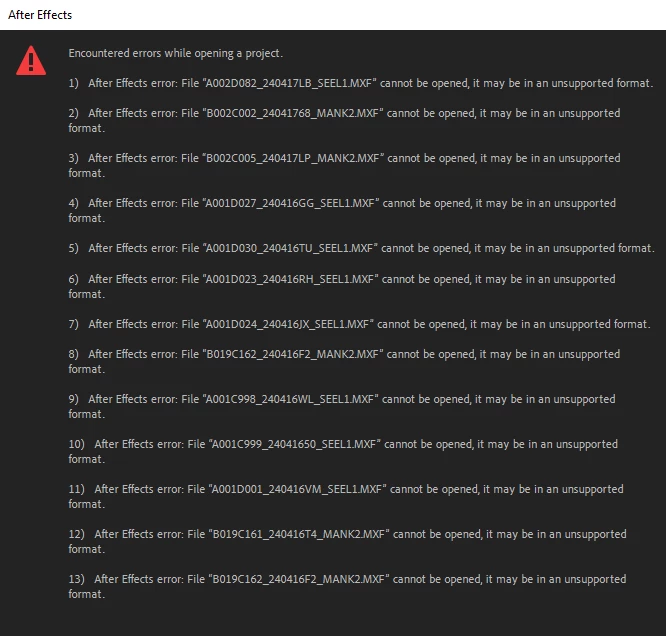
MXF import error. Can't use MXF files in After Effects.

  • May 17, 2024
  • 8 replies
  • 2599 views

Was working on a project with MXF footage in After Effects. Updated, and now I get this error.


I have a workaround.

Correct answer jasonz76628015

@JohnColombo17100380After several days the problem cropped back up in the previous version of After Effects. Safe Mode did not help. I followed your suggestion of deleting the hidden Media and Disk Cache folder contents and that seems to have done the trick for now. Thank you.

8 replies

Participant
September 14, 2024

I too am having this issue. Was working on a project where I imported a Premiere timeline into After Effects which contained .mxf media (Canon). For the last month no issue (it's an ongfoing project). Yesterday, I had to make a change. Started Premiere, made the change, went to After Effects and did my import as usual and the above error message appeared. The only thing that changed on my system was updating AE. I haven't tried the cache solution yet due to time constraints so I downgraded to an eralier version of AE for now, but this is a major problem going forward. Is anything being done to address the issue?

Participant
June 19, 2024

It looks like it's a name/path error: if you rename and keep everything simple, AE imports them with no issues.

PLEASE FIX IT, there are projects that aren't working anymore because of this issue!

JohnColombo17100380
Community Manager
Community Manager
May 20, 2024

Thanks, @nishu_kush!

@jasonz76628015, you may also want to try clearing the Media Cache Files located at C:\Users\<your username>\AppData\Roaming\Adobe\Common\Media Cache Files. These are not cleared when you use "Clean Database & Cache" in Preferences >  Media & Disk Cache.


- John, After Effects Engineering Team 

Inspiring
May 20, 2024

I will test this when I return to the latest version.

nishu_kush
Legend
May 20, 2024

That's strange! I can import the file without any problem. Can you try running After Effects in Safe Mode and see if that brings any change?

Let us know.

I'll move the thread from Bugs to Discussions for troubleshooting.


Thanks,

Nishu

Inspiring
May 20, 2024

I've rolled back a version so I'm not able to test now. If I get down time I'll try to test and update here. Thanks.

Inspiring
May 20, 2024

Rolling back 1 version did fix the problem.

Inspiring
May 20, 2024

Did a fresh install of AE and still cannot import MXF.


Inspiring
May 17, 2024

Machine info below.


Link to download clip from dropbox: https://www.dropbox.com/scl/fi/qxwy6yayrjlouz765anm1/A001D038_24041682_SEEL1.MXF?rlkey=qk6veehtb6gdwx7e0xg0f71a1&dl=0


This issue began when I updated After Effects.


Workaround is rendering .mov from Premiere.


JohnColombo17100380
Community Manager
Community Manager
May 17, 2024

Hi @jasonz76628015,

Thank you for reporting this issue. Would you be able to share one of the MXF footage files with us so we can try to reproduce the failure?

Also, what are your system specs and the workaround you mentioned?

Thanks for any additional info,

- John, After Effects Engineering Team
