Participant
Apr 23, 2020 8:08 PM UTC
Answered

My Mask Disappears when it becomes a 3d layer

Hey Everyone,


I'm working on a project and in the project I am suppose to  take a solid and make it into a ring using masks. I have no problem making the ring, but the next thing I have to do is make it into a 3D layer. Once i do that, I can see the lines for my mask, but the mask itself is gone. It becomes a solid again. The project has it set that the masks are set to both subtracted, and one is inverted. Can I get some help into what could be causing this and how to fix it please?


Thank you.


(Solid Shape as the Start)

(Use Masks to make the Ring Shape) (Change to a 3D Layer, and I lose the Masks...)

Rick GerardCorrect answer
Community Expert
Apr 24, 2020 12:29 PM UTC

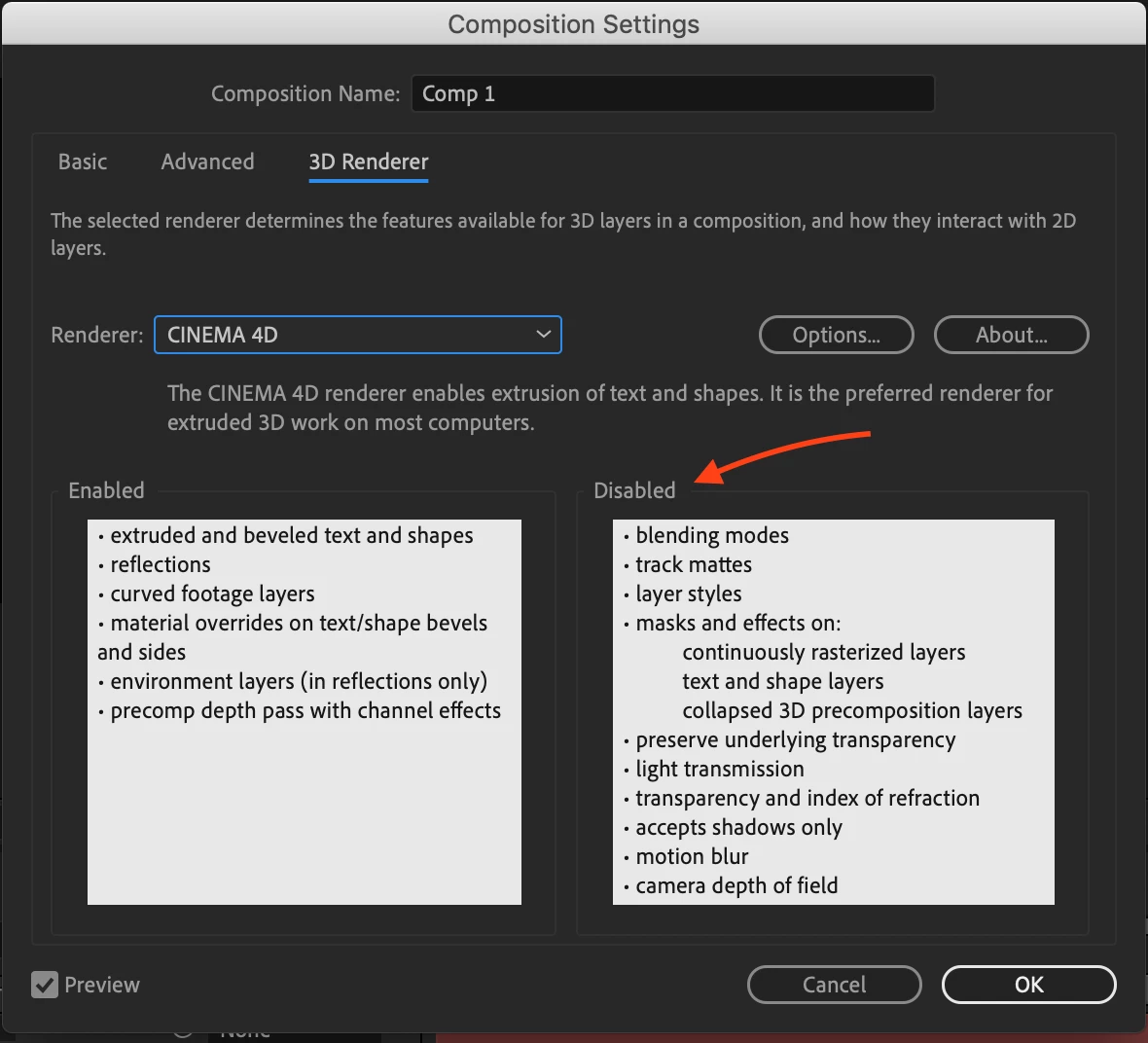
If the masks are not working then the blue layer is not a solid (pixels) but it is either Pre-composed with Continuous Rasterize turned on or it is a shape layer. You can solve the problem by changing the 3D rendering option to Classic 3D or using a Solid as the blue layer or pre-composing the shape layer before you add the masks, or Pre-composing the shape layer with the mask and making the nested comp (pre-comp) a 3D layer.


It is important that you check the notes when you change the Render Settings. There are a lot of things disabled when you enable the C4D rendering option.

8 replies

Rick GerardCommunity ExpertCorrect answer
Community Expert
Apr 24, 2020 12:29 PM UTC

If the masks are not working then the blue layer is not a solid (pixels) but it is either Pre-composed with Continuous Rasterize turned on or it is a shape layer. You can solve the problem by changing the 3D rendering option to Classic 3D or using a Solid as the blue layer or pre-composing the shape layer before you add the masks, or Pre-composing the shape layer with the mask and making the nested comp (pre-comp) a 3D layer.


It is important that you check the notes when you change the Render Settings. There are a lot of things disabled when you enable the C4D rendering option.

Translate
DianaHartAuthor
Participant
Apr 24, 2020 5:55 PM UTC

Thank you, I will be sure to apply this!

Translate
nishu_kush
Legend
Apr 24, 2020 11:20 AM UTC

Hi there,


Thanks for reaching out. I see that you are having trouble with Mask in After Effects.

I tried this at my end but everything worked as it should. Is there a certain action that triggers this? Is it happening randomly or in all the projects? Also, what is the exact version of After Effects are you using: https://community.adobe.com/t5/after-effects/faq-how-to-find-the-exact-version-of-after-effects-you-re-using/td-p/9972137?page=1

Let us know, we're here to help.


Thanks,

Nishu

Translate
DianaHartAuthor
Participant
Apr 24, 2020 5:58 PM UTC

Thank you! This really helped!

Translate