
Participant
October 13, 2024
Question

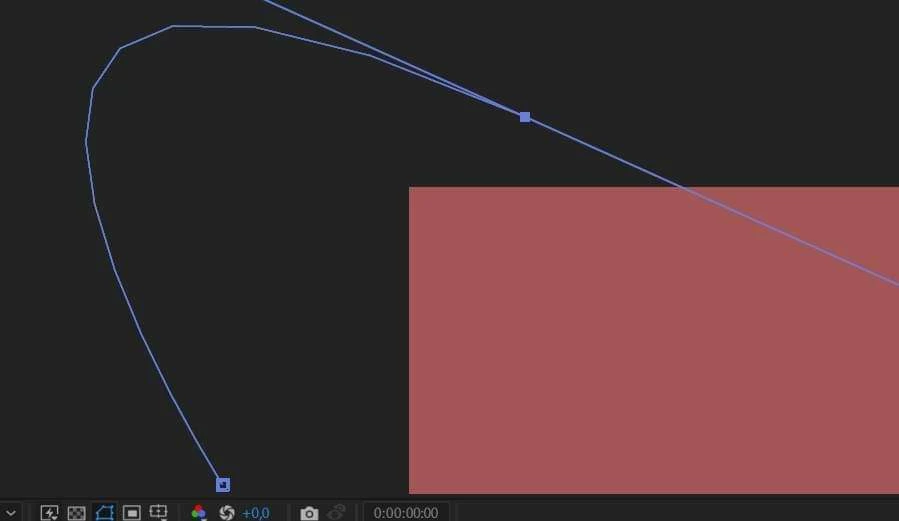
My rounded lines are not round

  • October 13, 2024
  • 1 reply
  • 132 views

Hello I'm a beginner editor and I've encountered a very annoying problem that I can't solve. When I use the Pen Tool to make my path, it doesn't seem to round, but when I attach an object to the path to move it, it moves around the curve correctly. It's visually very tiring, can it be fixed? The picture shows how angular the path is, but it shouldn't be like that. Regards and please help 😕😕
This topic has been closed for replies.

1 reply

Community Expert
October 14, 2024

Your composition magnification ratio is set to 800 or 1600%. You're just seeing pixel-based artifacts in the vector curve because there are large blocks of pixels, and After Effects is not a vector-based app. 


You will see similar artifacts in Illustrator if you zoom in more than 100% and turn on Pixel Preview in the View Menu. When laying out graphics for video in Illustrator, it is critical that you look at the Pixel Preview (Ctrl/Cmnd + Alt/Option) at 200 to 400% and have Snap To Pixel turned on if your design relies on thin horizontal and vertical lines. You must ensure they line up with the pixel grid to keep the thin lines from changing color because they are anti-aliased between multiple pixels. You cannot do much to single-pixel-width curved or diagonal lines. Your black or white lines become greys when thin details are not aligned with the pixel grid.