Question
My time indicator is slightly out of place, anyone know how to fix this?
I am currently trying to make an edit on AE but my time indicator is slightly out of place and I don't know what I've done to make it do this. I don't think this is a problem with my After Effects because I saved this one as an aep so that I could make another edit, but my time indicator wasn't out of place there. I'm using After Effects 2020 and I will provide screenshots.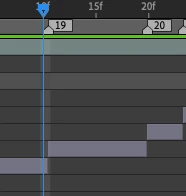
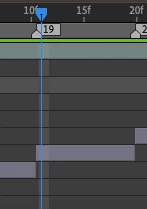
This wasn't happening at the start because my clips are right on the markers so I'm not sure what's happened. Please note that I have only been using AE for a month or two so don't judge if this is a simple problem lol.
 AdChoices