Participant
October 31, 2023
Answered

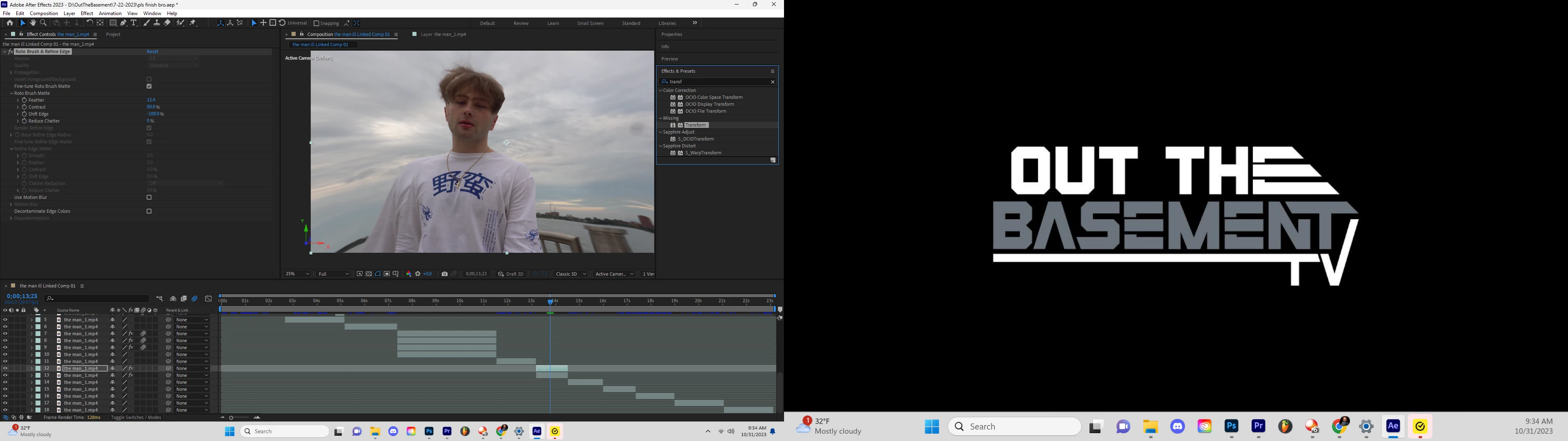
My transform effect is missing from the panel

  • October 31, 2023
  • 2 replies
  • 1922 views

After effects says my transform effect is missing from the effects and presets menu. Is there a way to reinstall it or would i have to delete the program and re download to get it back?

This topic has been closed for replies.
Correct answer JohnColombo17100380

When you open Effects > Manage Effects..., try disabling "Show Only 3rd Party Effects", then search for "Transform". Is the Transform effect enabled or disabled? If it is disabled, you can enable it here and relaunch After Effects to see it show up in the Effects & Presets panel.


- John, After Effects Engineering Team  

2 replies

nishu_kush
Community Manager
Community Manager
April 27, 2024

Did the suggestion above help?

Feel free to reach out. Moving this thread from Bugs to Discussions for now.


Thanks,

Nishu

JohnColombo17100380
Community Manager
Community Manager
October 31, 2023

Hi @Out The Basem286009357a3f,

If you open Effects > Manage Effects..., is the Transform effect disabled? Try enabling it from there and relaunching After Effects.


Thanks for reporting this issue and for any further information you can provide,

- John, After Effects Engineering Team 

Participant
May 1, 2024

This happened to me and transform effect isn't even listen in the effects panel anymore where do I reenable it 

JohnColombo17100380
Community Manager
JohnColombo17100380Community ManagerCorrect answer
Community Manager
May 1, 2024

When you open Effects > Manage Effects..., try disabling "Show Only 3rd Party Effects", then search for "Transform". Is the Transform effect enabled or disabled? If it is disabled, you can enable it here and relaunch After Effects to see it show up in the Effects & Presets panel.


- John, After Effects Engineering Team