
myDropDownList.onChange hide/visible buttons, staticText etc but scroll through to top all the components
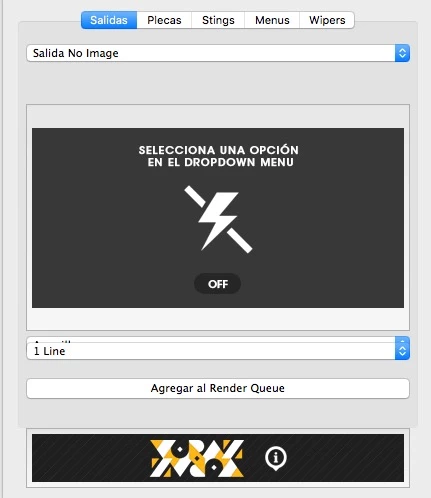
Here is my code, but the thing is when i change my ddList all the panel objects stay in the same place, so the thing is that i want to hide things but scroll up that things to have more ordered my panel.
// ToolKit C5 v1.0
// An After Effects Script by Adrian Wulfrath
// Estudio Voraz
//VARIABLES PARA LLAMAR A LAS DISTINTAS IMÁGENES
var imageName0 = "_vorazimg/voraz.png";
var imagePath0 = File($.fileName).path + "/" + escape(imageName0);
var imageName1 = "_vorazimg/off.png";
var imagePath1 = File($.fileName).path + "/" + escape(imageName1);
var imageName2 = "_vorazimg/sni.png";
var imagePath2 = File($.fileName).path + "/" + escape(imageName2);
var imageName3 = "_vorazimg/sna.png";
var imagePath3 = File($.fileName).path + "/" + escape(imageName3);
var imageName4 = "_vorazimg/proyectoBtn.png";
var imagePath4 = File($.fileName).path + "/" + escape(imageName4);
var imageName5 = "_vorazimg/sva.png";
var imagePath5 = File($.fileName).path + "/" + escape(imageName5);
//Explorer Voraz Button
var winBrowserCmd = "C:/Program Files/Internet Explorer/iexplore.exe";
var macBrowserCmdStart = "osascript -e 'open location \"";
var macBrowserCmdEnd = "\"'";
//AQUÍ EMPIEZA A CREARSE LA VENTANA DEL PANEL
{
function myScript(thisObj){
function myScript_buildUI(thisObj){
var myPanel = (thisObj instanceof Panel) ? thisObj : new Window("palette","Panel Estudio Voraz",undefined,{resizable:true});
res = "group{orientation:'column',\
groupOne: Panel{text:'Master', orientation:'column',alignment:['fill','fill'],alignChildren:['fill','fill'],\
ddPanel: DropDownList{properties:{items:['OFF','Salida No Image','Salida No Asterix','Salida Ventana Asterix','----------']}},\
},\
groupTwo: Panel{text:'Template:', orientation:'column',alignment:['fill','top'],alignChildren:['fill','fill'],\
imageDemo: IconButton{text:'Template Salida No Image',},alignment:['fill','fill'],\
},\
groupThree: Panel{text:'Color System + Line Selector', orientation:'column',alignment:['fill','fill'],alignChildren:['fill','fill'],\
ddColorSystem: DropDownList{properties:{items:['Amarillo','Morado','LightBlue','MidBlue','DarkBlue','Rojo']}},\
ddLineSelector: DropDownList{properties:{items:['1 Line','1 Line + Hashtag','1 Line + Info','1 Line + Info + Hashtag','----------','2 Lines','2 Lines + Hashtag','2 Lines + Info','2 Lines + Info + Hashtag','----------','3 Lines','3 Lines + Hashtag','3 Lines + Info','3 Lines + Info + Hashtag']}},\
},\
BtnGroup: Panel{text:'Botones',orientation:'row',alignment:['fill','top'],\
editText: Button{text:'Edit Texto',alignment:['fill','left'], preferredSize:[80,25]},\
editCaritas: Button{text:'Edit Caritas',alignment:['fill','left'], preferredSize:[80,25]},\
editIconos: Button{text:'Edit Iconos',alignment:['fill','left'], preferredSize:[80,25]},\
editImage: Button{text:'Cambiar Imagen',alignment:['fill','left'], preferredSize:[100,25]},\
},\
groupFour: Panel{text:'Caritas / Iconos', orientation:'column',alignment:['fill','fill'],alignChildren:['fill','fill'],\
ddArreglosAsterix: DropDownList{properties:{items:['OFF','Caritas Asterix','Iconos Asterix']}},\
},\
groupChecker: Panel{text:'Opciones', orientation:'row',alignment:['fill','fill'],alignChildren:['fill','fill'],\
ddPatterns: DropDownList{properties:{items:['Patterns OFF','----------','Accion','Comedia','Deportes','Girly','Geek','Todo','----------','EXTRA','----------','ASTERIX']}},\
CBfoto: Checkbox{text:'Foto'},\
CBWipper: Checkbox{text:'Wipper In'},\
CBSting: Checkbox{text:'Hashtag Sting'},\
},\
groupRender: Panel{text:'Agregar al Render Queue', orientation:'row',alignment:['fill','fill'],alignChildren:['fill','fill'],\
renBtn: Button{text:'Agregar al Render Queue'},\
},\
groupVoraz: Panel{text:'www.estudiovoraz.com', orientation:'column',alignment:['fill','fill'],alignChildren:['fill','fill'],\
myIconButton: IconButton{text:'IconButton',},\
},\
}";
myPanel.grp = myPanel.add(res);
//Defaults (Practicamete es nada más para indicar en que posición por default va a permanecer cada cosa).
myPanel.grp.groupOne.ddPanel.selection = 0
myPanel.grp.groupFour.ddArreglosAsterix.selection = 0
myPanel.grp.groupThree.ddColorSystem.selection = 0
myPanel.grp.groupThree.ddLineSelector.selection = 0
myPanel.grp.groupChecker.ddPatterns.selection = 0
myPanel.grp.groupVoraz.myIconButton.image = imagePath0
myPanel.grp.groupTwo.imageDemo.image = imagePath1
myPanel.layout.layout(true);
//Default de Inicio
myPanel.grp.groupTwo.visible = true;
myPanel.grp.groupThree.visible = false;
myPanel.grp.BtnGroup.visible = false;
myPanel.grp.groupFour.visible = false;
myPanel.grp.groupRender.visible = false;
myPanel.grp.groupChecker.visible = false;
myPanel.grp.groupTwo.imageDemo.image = imagePath1
//AL HACER CLICK EN LA IMAGEN MANDA UNA ALERTA
myPanel.grp.groupTwo.imageDemo.onClick = function ()
{
alert("Primero debes seleccionar una opción del DropDown Menu. Advertencia esto sólo funciona con la paquetería de Canal 5.\
Si necesitas más información puedes consultarlo con www.estudiovoraz.com");
}
//A partir de aquí se añade todo el código que quieras con sus variables y mandas a llamar desde tus variables y funciones.
//Subpanels: (Cuando mandas a llamar con un nombre de variable a algo específico de tu UI)
var BtnURL= myPanel.grp.groupVoraz.myIconButton
var BtnText = myPanel.grp.BtnGroup.editText
var BtnCaritas = myPanel.grp.BtnGroup.editCaritas
var BtnIconos = myPanel.grp.BtnGroup.editIconos
var BtnImagen = myPanel.grp.BtnGroup.editImage
var ddSelectPanel = myPanel.grp.groupOne.ddPanel
var ddColor = myPanel.grp.groupThree.ddColorSystem
var ddPatterns = myPanel.grp.groupChecker.ddPatterns
var ddLineSelector = myPanel.grp.groupThree.ddLineSelector
var ddOpciones = myPanel.grp.groupFour.ddArreglosAsterix
var rendaBtn = myPanel.grp.groupRender.renBtn
var CFoto = myPanel.grp.groupChecker.CBfoto
var CWipper = myPanel.grp.groupChecker.CBWipper
var CSting = myPanel.grp.groupChecker.CBSting
var patInp = myPanel.grp.groupFour.patInp
//HANDLER PARA QUE SE VEAN O SE ESCONDAN LAS COSAS DEL PANEL
ddSelectPanel.onChange = function()
{
switch(ddSelectPanel.selection.text)
{
//PRIMER CASE --------- SALIDA NO IMAGE ---------
case "Salida No Image":
myPanel.grp.groupTwo.visible = true;
myPanel.grp.groupTwo.imageDemo.image = imagePath2
myPanel.grp.groupThree.visible = true;
myPanel.grp.BtnGroup.visible = true;
myPanel.grp.BtnGroup.editImage.visible = false;
myPanel.grp.groupFour.visible = true;
myPanel.grp.groupRender.visible = true;
myPanel.grp.groupChecker.visible = true;
myPanel.grp.BtnGroup.editCaritas.visible = true;
myPanel.grp.BtnGroup.editIconos.visible = true;
myPanel.grp.BtnGroup.editImage.visible = false;
myPanel.grp.groupChecker.CBSting.visible = false;
myPanel.grp.groupChecker.CBfoto.visible = false;
//CUANDO SE SELECCIONA EN EL DROPDOWN SALIDA NO IMAGE O LO QUE CORRESPONDE, LO ABRE EN EL VIEWER
projectItem("_Render Salida No Image").openInViewer();
//CUANDO SE HACE CLICK EN LA IMAGEN ABRE LA COMP CORRESPONDIENTE
myPanel.grp.groupTwo.imageDemo.onClick = function ()
{
projectItem("_Render Salida No Image").openInViewer();
}
//ACCION CHECKBOX WIPPER
CWipper.onClick = function ()
{
if(CWipper.value == true)
{
projectItem("Salida No Image").layer("_Control").property("Effects").property("Control v2").property("Wipper In").setValue([1]);
}
if(CWipper.value == false)
{
projectItem("Salida No Image").layer("_Control").property("Effects").property("Control v2").property("Wipper In").setValue([0]);
}
}
//DROPDOWN COLOR SYSTEM
ddColor.onChange = function ()
{
switch (ddColor.selection.text)
{
case "Amarillo":
projectItem("Salida No Image").layer("_Control").property("Effects").property("Control v2").property("Color System").setValue([1]);
break;
case "Morado":
projectItem("Salida No Image").layer("_Control").property("Effects").property("Control v2").property("Color System").setValue([2]);
break;
case "LightBlue":
projectItem("Salida No Image").layer("_Control").property("Effects").property("Control v2").property("Color System").setValue([3]);
break;
case "MidBlue":
projectItem("Salida No Image").layer("_Control").property("Effects").property("Control v2").property("Color System").setValue([4]);
break;
case "DarkBlue":
projectItem("Salida No Image").layer("_Control").property("Effects").property("Control v2").property("Color System").setValue([5]);
break;
case "Rojo":
projectItem("Salida No Image").layer("_Control").property("Effects").property("Control v2").property("Color System").setValue([6]);
break;
default:
alert("Error: Quizás no has seleccionado ninguna opción, intenta de nuevo...");
break;
}
}
//DROPDOWN LINE SELECTOR
ddLineSelector.onChange = function ()
{
switch (ddLineSelector.selection.text)
{
case "1 Line":
projectItem("Salida No Image").layer("_Control").property("Effects").property("Control v2").property("Line Selector").setValue([1]);
break;
case "1 Line + Hashtag":
projectItem("Salida No Image").layer("_Control").property("Effects").property("Control v2").property("Line Selector").setValue([2]);
break;
case "1 Line + Info":
projectItem("Salida No Image").layer("_Control").property("Effects").property("Control v2").property("Line Selector").setValue([3]);
break;
case "1 Line + Info + Hashtag":
projectItem("Salida No Image").layer("_Control").property("Effects").property("Control v2").property("Line Selector").setValue([4]);
break;
case "2 Lines":
projectItem("Salida No Image").layer("_Control").property("Effects").property("Control v2").property("Line Selector").setValue([6]);
break;
case "2 Lines + Hashtag":
projectItem("Salida No Image").layer("_Control").property("Effects").property("Control v2").property("Line Selector").setValue([7]);
break;
case "2 Lines + Info":
projectItem("Salida No Image").layer("_Control").property("Effects").property("Control v2").property("Line Selector").setValue([8]);
break;
case "2 Lines + Info + Hashtag":
projectItem("Salida No Image").layer("_Control").property("Effects").property("Control v2").property("Line Selector").setValue([9]);
break;
case "3 Lines":
projectItem("Salida No Image").layer("_Control").property("Effects").property("Control v2").property("Line Selector").setValue([11]);
break;
case "3 Lines + Hashtag":
projectItem("Salida No Image").layer("_Control").property("Effects").property("Control v2").property("Line Selector").setValue([12]);
break;
case "3 Lines + Info":
projectItem("Salida No Image").layer("_Control").property("Effects").property("Control v2").property("Line Selector").setValue([13]);
break;
case "3 Lines + Info + Hashtag":
projectItem("Salida No Image").layer("_Control").property("Effects").property("Control v2").property("Line Selector").setValue([14]);
break;
default:
alert("Error: Quizás no has seleccionado ninguna opción, selecciona una opción del Line Selector");
break;
}
}
//DROPDOWN CARITAS / ICONOS
ddOpciones.onChange = function ()
{
switch (ddOpciones.selection.text)
{
case "OFF":
projectItem("Salida No Image").layer("_Control").property("Effects").property("Control v2").property("Caritas Asterix").setValue([0]);
projectItem("Salida No Image").layer("_Control").property("Effects").property("Control v2").property("Iconos Asterix").setValue([0]);
break;
case "Caritas Asterix":
projectItem("Salida No Image").layer("_Control").property("Effects").property("Control v2").property("Caritas Asterix").setValue([1]);
projectItem("Salida No Image").layer("_Control").property("Effects").property("Control v2").property("Iconos Asterix").setValue([0]);
break;
case "Iconos Asterix":
projectItem("Salida No Image").layer("_Control").property("Effects").property("Control v2").property("Caritas Asterix").setValue([0]);
projectItem("Salida No Image").layer("_Control").property("Effects").property("Control v2").property("Iconos Asterix").setValue([1]);
break;
default:
alert("Error: Quizás no has seleccionado ninguna opción, intenta de nuevo...");
break;
}
}
//EDIT TEXTO BOTON
BtnText.onClick = function ()
{
projectItem("_EditTxt SNI").openInViewer();
}
//EDIT CARITAS BOTON
BtnCaritas.onClick = function ()
{
projectItem("_EditCaritas SNI").openInViewer();
}
//EDIT ICONOS BOTON
BtnIconos.onClick = function ()
{
projectItem("_EditIconos SNI").openInViewer();
}
//DROPDOWN PATTERNS
ddPatterns.onChange = function ()
{
switch (ddPatterns.selection.text)
{
case "Patterns OFF":
projectItem("Salida No Image").layer("_Control").property("Effects").property("Control v2").property("Patterns").setValue([1]);
break;
case "Accion":
projectItem("Salida No Image").layer("_Control").property("Effects").property("Control v2").property("Patterns").setValue([3]);
break;
case "Comedia":
projectItem("Salida No Image").layer("_Control").property("Effects").property("Control v2").property("Patterns").setValue([4]);
break;
case "Deportes":
projectItem("Salida No Image").layer("_Control").property("Effects").property("Control v2").property("Patterns").setValue([5]);
break;
case "Girly":
projectItem("Salida No Image").layer("_Control").property("Effects").property("Control v2").property("Patterns").setValue([6]);
break;
case "Geek":
projectItem("Salida No Image").layer("_Control").property("Effects").property("Control v2").property("Patterns").setValue([7]);
break;
case "Todo":
projectItem("Salida No Image").layer("_Control").property("Effects").property("Control v2").property("Patterns").setValue([8]);
break;
case "EXTRA":
projectItem("Salida No Image").layer("_Control").property("Effects").property("Control v2").property("Patterns").setValue([10]);
break;
case "ASTERIX":
projectItem("Salida No Image").layer("_Control").property("Effects").property("Control v2").property("Patterns").setValue([12]);
break;
default:
alert("Error: Quizás no has seleccionado ninguna opción, intenta de nuevo...");
break;
}
}
//ACCION CHECKBOX FOTO
CFoto.onClick = function ()
{
if(CFoto.value == true)
{
projectItem("Salida No Image").layer("_Control").property("Effects").property("Control v2").property("Foto").setValue([1]);
}
if(CFoto.value == false)
{
projectItem("Salida No Image").layer("_Control").property("Effects").property("Control v2").property("Foto").setValue([0]);
}
}
//ADD TO RENDER QUEUE
rendaBtn.onClick = function ()
{
var QTtemplate = "Lossless"; //Selecciona el Template
var sel1 = projectItem("_Render Salida No Image"); //Busca la Comp que va a Renderizar por su Nombre
var newPath = ("Salida No Image"); //Este es el nombre del Path que le asigna para su salida de Render
if (sel1 != null && sel1 instanceof CompItem) {
var theRender = app.project.renderQueue.items.add(sel1);
if (sel1 == sel1) {
theRender.outputModules[1].applyTemplate(QTtemplate);
theRender.outputModules[1].file = new File(newPath);
}
}
}
break;
//SEGUNDO CASE --------- SALIDA NO ASTERIX ---------
case "Salida No Asterix":
myPanel.grp.groupTwo.visible = true;
myPanel.grp.BtnGroup.editImage.visible = true;
myPanel.grp.groupTwo.imageDemo.image = imagePath3
myPanel.grp.groupThree.visible = true;
myPanel.grp.BtnGroup.visible = true;
myPanel.grp.groupFour.visible = true;
myPanel.grp.groupRender.visible = true;
myPanel.grp.groupChecker.visible = true;
myPanel.grp.groupChecker.CBSting.visible = false;
myPanel.grp.groupChecker.CBfoto.visible = false;
myPanel.grp.groupFour.visible = false;
myPanel.grp.BtnGroup.editCaritas.visible = false;
myPanel.grp.BtnGroup.editIconos.visible = false;
myPanel.grp.BtnGroup.editImage.visible = false;
//CUANDO SE SELECCIONA EN EL DROPDOWN SALIDA NO IMAGE O LO QUE CORRESPONDE, LO ABRE EN EL VIEWER
projectItem("_Render Salida No Asterix").openInViewer();
//CUANDO SE HACE CLICK EN LA IMAGEN ABRE LA COMP CORRESPONDIENTE
myPanel.grp.groupTwo.imageDemo.onClick = function ()
{
projectItem("_Render Salida No Asterix").openInViewer();
}
//ACCION CHECKBOX WIPPER
CWipper.onClick = function ()
{
if(CWipper.value == true)
{
projectItem("Salida No Asterix").layer("_Control").property("Effects").property("Control v2").property("Wipper In").setValue([1]);
}
if(CWipper.value == false)
{
projectItem("Salida No Asterix").layer("_Control").property("Effects").property("Control v2").property("Wipper In").setValue([0]);
}
}
//DROPDOWN COLOR SYSTEM
ddColor.onChange = function ()
{
switch (ddColor.selection.text)
{
case "Amarillo":
projectItem("Salida No Asterix").layer("_Control").property("Effects").property("Control v2").property("Color System").setValue([1]);
break;
case "Morado":
projectItem("Salida No Asterix").layer("_Control").property("Effects").property("Control v2").property("Color System").setValue([2]);
break;
case "LightBlue":
projectItem("Salida No Asterix").layer("_Control").property("Effects").property("Control v2").property("Color System").setValue([3]);
break;
case "MidBlue":
projectItem("Salida No Asterix").layer("_Control").property("Effects").property("Control v2").property("Color System").setValue([4]);
break;
case "DarkBlue":
projectItem("Salida No Asterix").layer("_Control").property("Effects").property("Control v2").property("Color System").setValue([5]);
break;
case "Rojo":
projectItem("Salida No Asterix").layer("_Control").property("Effects").property("Control v2").property("Color System").setValue([6]);
break;
default:
alert("Error: Quizás no has seleccionado ninguna opción, intenta de nuevo...");
break;
}
}
//DROPDOWN LINE SELECTOR
ddLineSelector.onChange = function ()
{
switch (ddLineSelector.selection.text)
{
case "1 Line":
projectItem("Salida No Asterix").layer("_Control").property("Effects").property("Control v2").property("Line Selector").setValue([1]);
break;
case "1 Line + Hashtag":
projectItem("Salida No Asterix").layer("_Control").property("Effects").property("Control v2").property("Line Selector").setValue([2]);
break;
case "1 Line + Info":
projectItem("Salida No Asterix").layer("_Control").property("Effects").property("Control v2").property("Line Selector").setValue([3]);
break;
case "1 Line + Info + Hashtag":
projectItem("Salida No Asterix").layer("_Control").property("Effects").property("Control v2").property("Line Selector").setValue([4]);
break;
case "2 Lines":
projectItem("Salida No Asterix").layer("_Control").property("Effects").property("Control v2").property("Line Selector").setValue([6]);
break;
case "2 Lines + Hashtag":
projectItem("Salida No Asterix").layer("_Control").property("Effects").property("Control v2").property("Line Selector").setValue([7]);
break;
case "2 Lines + Info":
projectItem("Salida No Asterix").layer("_Control").property("Effects").property("Control v2").property("Line Selector").setValue([8]);
break;
case "2 Lines + Info + Hashtag":
projectItem("Salida No Asterix").layer("_Control").property("Effects").property("Control v2").property("Line Selector").setValue([9]);
break;
case "3 Lines":
projectItem("Salida No Asterix").layer("_Control").property("Effects").property("Control v2").property("Line Selector").setValue([11]);
break;
case "3 Lines + Hashtag":
projectItem("Salida No Asterix").layer("_Control").property("Effects").property("Control v2").property("Line Selector").setValue([12]);
break;
case "3 Lines + Info":
projectItem("Salida No Asterix").layer("_Control").property("Effects").property("Control v2").property("Line Selector").setValue([13]);
break;
case "3 Lines + Info + Hashtag":
projectItem("Salida No Asterix").layer("_Control").property("Effects").property("Control v2").property("Line Selector").setValue([14]);
break;
default:
alert("Error: Quizás no has seleccionado ninguna opción, selecciona una opción del Line Selector");
break;
}
}
//DROPDOWN PATTERNS
ddPatterns.onChange = function ()
{
switch (ddPatterns.selection.text)
{
case "Patterns OFF":
projectItem("Salida No Asterix").layer("_Control").property("Effects").property("Control v2").property("Patterns").setValue([1]);
break;
case "Accion":
projectItem("Salida No Asterix").layer("_Control").property("Effects").property("Control v2").property("Patterns").setValue([3]);
break;
case "Comedia":
projectItem("Salida No Asterix").layer("_Control").property("Effects").property("Control v2").property("Patterns").setValue([4]);
break;
case "Deportes":
projectItem("Salida No Asterix").layer("_Control").property("Effects").property("Control v2").property("Patterns").setValue([5]);
break;
case "Girly":
projectItem("Salida No Asterix").layer("_Control").property("Effects").property("Control v2").property("Patterns").setValue([6]);
break;
case "Geek":
projectItem("Salida No Asterix").layer("_Control").property("Effects").property("Control v2").property("Patterns").setValue([7]);
break;
case "Todo":
projectItem("Salida No Asterix").layer("_Control").property("Effects").property("Control v2").property("Patterns").setValue([8]);
break;
case "EXTRA":
projectItem("Salida No Asterix").layer("_Control").property("Effects").property("Control v2").property("Patterns").setValue([10]);
break;
case "ASTERIX":
projectItem("Salida No Asterix").layer("_Control").property("Effects").property("Control v2").property("Patterns").setValue([12]);
break;
default:
alert("Error: Quizás no has seleccionado ninguna opción, intenta de nuevo...");
break;
}
}
//EDIT TEXTO BOTON
BtnText.onClick = function ()
{
projectItem("_EditTxt SNA").openInViewer();
}
//ADD TO RENDER QUEUE
rendaBtn.onClick = function ()
{
var QTtemplate = "Lossless"; //Selecciona el Template
var sel2 = projectItem("_Render Salida No Asterix"); //Busca la Comp que va a Renderizar por su Nombre
var newPath = ("Salida No Asterix"); //Este es el nombre del Path que le asigna para su salida de Render
if (sel2 != null && sel2 instanceof CompItem) {
var theRender = app.project.renderQueue.items.add(sel2);
if (sel2 == sel2) {
theRender.outputModules[1].applyTemplate(QTtemplate);
theRender.outputModules[1].file = new File(newPath);
}
}
}
break;
//TERCER CASE --------- SALIDA VENTANA ASTERIX ---------
case "Salida Ventana Asterix":
myPanel.grp.groupTwo.visible = true;
myPanel.grp.groupTwo.imageDemo.image = imagePath5
myPanel.grp.groupThree.visible = true;
myPanel.grp.BtnGroup.visible = true;
myPanel.grp.BtnGroup.editImage.visible = true;
myPanel.grp.groupFour.visible = false;
myPanel.grp.groupRender.visible = true;
myPanel.grp.groupChecker.visible = true;
myPanel.grp.BtnGroup.editCaritas.visible = false;
myPanel.grp.BtnGroup.editIconos.visible = false;
myPanel.grp.BtnGroup.editImage.visible = true;
myPanel.grp.groupChecker.CBSting.visible = false;
myPanel.grp.groupChecker.CBfoto.visible = true;
//CUANDO SE SELECCIONA EN EL DROPDOWN SALIDA NO IMAGE O LO QUE CORRESPONDE, LO ABRE EN EL VIEWER
projectItem("_Render Salida Ventana Asterix").openInViewer();
//CUANDO SE HACE CLICK EN LA IMAGEN ABRE LA COMP CORRESPONDIENTE
myPanel.grp.groupTwo.imageDemo.onClick = function ()
{
projectItem("_Render Salida Ventana Asterix").openInViewer();
}
//ACCION CHECKBOX WIPPER
CWipper.onClick = function ()
{
if(CWipper.value == true)
{
projectItem("Salida Ventana Asterix").layer("_Control").property("Effects").property("Control v2").property("Wipper In").setValue([1]);
}
if(CWipper.value == false)
{
projectItem("Salida Ventana Asterix").layer("_Control").property("Effects").property("Control v2").property("Wipper In").setValue([0]);
}
}
//DROPDOWN COLOR SYSTEM
ddColor.onChange = function ()
{
switch (ddColor.selection.text)
{
case "Amarillo":
projectItem("Salida Ventana Asterix").layer("_Control").property("Effects").property("Control v2").property("Color System").setValue([1]);
break;
case "Morado":
projectItem("Salida Ventana Asterix").layer("_Control").property("Effects").property("Control v2").property("Color System").setValue([2]);
break;
case "LightBlue":
projectItem("Salida Ventana Asterix").layer("_Control").property("Effects").property("Control v2").property("Color System").setValue([3]);
break;
case "MidBlue":
projectItem("Salida Ventana Asterix").layer("_Control").property("Effects").property("Control v2").property("Color System").setValue([4]);
break;
case "DarkBlue":
projectItem("Salida Ventana Asterix").layer("_Control").property("Effects").property("Control v2").property("Color System").setValue([5]);
break;
case "Rojo":
projectItem("Salida Ventana Asterix").layer("_Control").property("Effects").property("Control v2").property("Color System").setValue([6]);
break;
default:
alert("Error: Quizás no has seleccionado ninguna opción, intenta de nuevo...");
break;
}
}
//DROPDOWN LINE SELECTOR
ddLineSelector.onChange = function ()
{
switch (ddLineSelector.selection.text)
{
case "1 Line":
projectItem("Salida Ventana Asterix").layer("_Control").property("Effects").property("Control v2").property("Line Selector").setValue([1]);
break;
case "1 Line + Hashtag":
projectItem("Salida Ventana Asterix").layer("_Control").property("Effects").property("Control v2").property("Line Selector").setValue([2]);
break;
case "1 Line + Info":
projectItem("Salida Ventana Asterix").layer("_Control").property("Effects").property("Control v2").property("Line Selector").setValue([3]);
break;
case "1 Line + Info + Hashtag":
projectItem("Salida Ventana Asterix").layer("_Control").property("Effects").property("Control v2").property("Line Selector").setValue([4]);
break;
case "2 Lines":
projectItem("Salida Ventana Asterix").layer("_Control").property("Effects").property("Control v2").property("Line Selector").setValue([6]);
break;
case "2 Lines + Hashtag":
projectItem("Salida Ventana Asterix").layer("_Control").property("Effects").property("Control v2").property("Line Selector").setValue([7]);
break;
case "2 Lines + Info":
projectItem("Salida Ventana Asterix").layer("_Control").property("Effects").property("Control v2").property("Line Selector").setValue([8]);
break;
case "2 Lines + Info + Hashtag":
projectItem("Salida Ventana Asterix").layer("_Control").property("Effects").property("Control v2").property("Line Selector").setValue([9]);
break;
case "3 Lines":
projectItem("Salida Ventana Asterix").layer("_Control").property("Effects").property("Control v2").property("Line Selector").setValue([11]);
break;
case "3 Lines + Hashtag":
projectItem("Salida Ventana Asterix").layer("_Control").property("Effects").property("Control v2").property("Line Selector").setValue([12]);
break;
case "3 Lines + Info":
projectItem("Salida Ventana Asterix").layer("_Control").property("Effects").property("Control v2").property("Line Selector").setValue([13]);
break;
case "3 Lines + Info + Hashtag":
projectItem("Salida Ventana Asterix").layer("_Control").property("Effects").property("Control v2").property("Line Selector").setValue([14]);
break;
default:
alert("Error: Quizás no has seleccionado ninguna opción, selecciona una opción del Line Selector");
break;
}
}
//EDIT TEXTO BOTON
BtnText.onClick = function ()
{
projectItem("_EditTxt SVA").openInViewer();
}
BtnImagen.onClick = function ()
{
projectItem("_EditFootage SVA").openInViewer();
}
//DROPDOWN PATTERNS
ddPatterns.onChange = function ()
{
switch (ddPatterns.selection.text)
{
case "Patterns OFF":
projectItem("Salida Ventana Asterix").layer("_Control").property("Effects").property("Control v2").property("Patterns").setValue([1]);
break;
case "Accion":
projectItem("Salida Ventana Asterix").layer("_Control").property("Effects").property("Control v2").property("Patterns").setValue([3]);
break;
case "Comedia":
projectItem("Salida Ventana Asterix").layer("_Control").property("Effects").property("Control v2").property("Patterns").setValue([4]);
break;
case "Deportes":
projectItem("Salida Ventana Asterix").layer("_Control").property("Effects").property("Control v2").property("Patterns").setValue([5]);
break;
case "Girly":
projectItem("Salida Ventana Asterix").layer("_Control").property("Effects").property("Control v2").property("Patterns").setValue([6]);
break;
case "Geek":
projectItem("Salida Ventana Asterix").layer("_Control").property("Effects").property("Control v2").property("Patterns").setValue([7]);
break;
case "Todo":
projectItem("Salida Ventana Asterix").layer("_Control").property("Effects").property("Control v2").property("Patterns").setValue([8]);
break;
case "EXTRA":
projectItem("Salida Ventana Asterix").layer("_Control").property("Effects").property("Control v2").property("Patterns").setValue([10]);
break;
case "ASTERIX":
projectItem("Salida Ventana Asterix").layer("_Control").property("Effects").property("Control v2").property("Patterns").setValue([12]);
break;
default:
alert("Error: Quizás no has seleccionado ninguna opción, intenta de nuevo...");
break;
}
}
//ACCION CHECKBOX FOTO
CFoto.onClick = function ()
{
if(CFoto.value == true)
{
projectItem("Salida Ventana Asterix").layer("_Control").property("Effects").property("Control v2").property("Foto").setValue([1]);
}
if(CFoto.value == false)
{
projectItem("Salida Ventana Asterix").layer("_Control").property("Effects").property("Control v2").property("Foto").setValue([0]);
}
}
//ACCION CHECKBOX FOTO
CWipper.onClick = function ()
{
if(CWipper.value == true)
{
projectItem("Salida Ventana Asterix").layer("_Control").property("Effects").property("Control v2").property("Wipper In").setValue([1]);
}
if(CWipper.value == false)
{
projectItem("Salida Ventana Asterix").layer("_Control").property("Effects").property("Control v2").property("Wipper In").setValue([0]);
}
}
//ADD TO RENDER QUEUE
rendaBtn.onClick = function ()
{
var QTtemplate = "Lossless"; //Selecciona el Template
var sel1 = projectItem("_Render Salida Ventana Asterix"); //Busca la Comp que va a Renderizar por su Nombre
var newPath = ("Salida Ventana Asterix"); //Este es el nombre del Path que le asigna para su salida de Render
if (sel1 != null && sel1 instanceof CompItem) {
var theRender = app.project.renderQueue.items.add(sel1);
if (sel1 == sel1) {
theRender.outputModules[1].applyTemplate(QTtemplate);
theRender.outputModules[1].file = new File(newPath);
}
}
}
break;
//DEFAULT CASE --------- DEFAULT CASE APAGA TODO ---------
default:
myPanel.grp.groupTwo.visible = true;
myPanel.grp.groupThree.visible = false;
myPanel.grp.BtnGroup.visible = false;
myPanel.grp.groupFour.visible = false;
myPanel.grp.groupRender.visible = false;
myPanel.grp.groupChecker.visible = false;
myPanel.grp.groupTwo.imageDemo.image = imagePath1
//AL HACER CLICK EN LA IMAGEN MANDA UNA ALERTA
myPanel.grp.groupTwo.imageDemo.onClick = function ()
{
alert("Primero debes seleccionar una opción del DropDown Menu. Advertencia esto sólo funciona con la paquetería de Canal 5.\
Si necesitas más información puedes consultarlo con www.estudiovoraz.com");
}
break;
}
}
//ACCION PARA EL LINK DE ESTUDIO VORAZ
BtnURL.onClick = LinkToURL;
function LinkToURL()
{
alert("http://www.estudiovoraz.com");
var URL = "http://www.estudiovoraz.com"; // your web page
if ($.os.indexOf("Windows") != -1)
system.callSystem(winBrowserCmd + " " + URL);
else
system.callSystem(macBrowserCmdStart + URL + macBrowserCmdEnd);
}
//FUNCION QUE DETECTA TODOS LOS PROJECT ITEM Y EN LUGAR DE ASIGNARLE UN NÚMERO DEL INDEX LO DETECTA POR SU NOMBRE
function projectItem(name)
{
var items = app.project.items;
i = 1;
while (i <= items.length) {
if (items.name == name)
{
return app.project.item(i);
break;
}
i++;
}
}
//END PANEL --------------------------- NO PONER NADA ABAJO DE ESTA LÍNEA -------------------------------
return myPanel;
}
var myScriptPal = myScript_buildUI(thisObj);
if((myScriptPal != null) && (myScriptPal instanceof Window)){
myScriptPal.center();
myScriptPal.show();
}
}
myScript(this);
}
 AdChoices