


Participant
Jul 7, 2017 9:14 PM UTC
Answered

Need help extending clips that are slowed down.

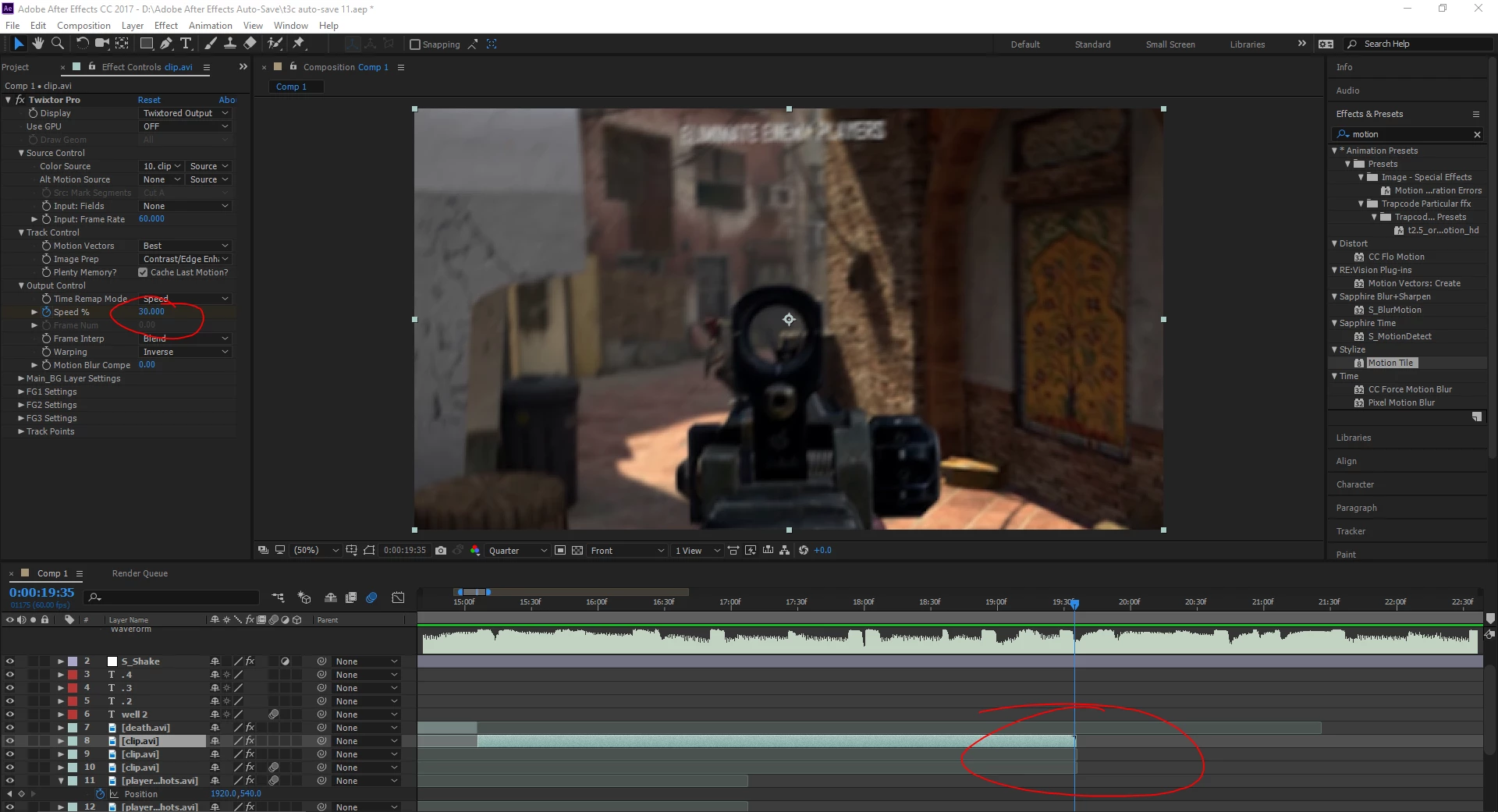
So I'm making a Call Of Duty edit, but I'm having an issue.  I have applied Twixtor Pro to sync the clips, I slowed down the clips to 30% speed, but the issue I'm having is that the actual clips stops before the footage does, (example picture below).  Please help me fix this because this edit is going very well and I really do not want to scrap it.  Thank you!
FranPianoCorrect answer
Participant
Apr 29, 2022 5:32 AM UTC

"Twixtor requires training. It's far to complex of a 3rd party effect to just jump in and start wiggling the knobs." There are some people in this world...


For anyone wanting a straight forward answer:

Just duplicate the video you want to slow down as many times as your speed (50% = duplicate 2 times, 30% = about 3 times) and nest the resulting videos into ONE sequence. Apply twixtor.

7 replies

Participant
Sep 6, 2025 6:00 AM UTC

There's actually a really simple solution! Time remapping and precomposing duplicates will make it choppy, so I wouldn't recommend those.


Create a separate composition longer than your footage, add your footage to this, then add this composition into your main composition. Add the twixtor effect to your sub-composition and you can slow it to your heart's content, keeping the footage!

Translate
FranPianoCorrect answer
Participant
Apr 29, 2022 5:32 AM UTC

"Twixtor requires training. It's far to complex of a 3rd party effect to just jump in and start wiggling the knobs." There are some people in this world...


For anyone wanting a straight forward answer:

Just duplicate the video you want to slow down as many times as your speed (50% = duplicate 2 times, 30% = about 3 times) and nest the resulting videos into ONE sequence. Apply twixtor.

Translate
Melaamory
Participant
Jul 7, 2022 7:50 PM UTC

That worked! Thank you!

Translate
Mylenium
Legend
Jul 8, 2017 6:51 AM UTC

You have to pre-compose the clips to a longer comp and apply the effect to this pre-comped layer. As Szalam said, it might be useful to actualyl read the help for Twixtor. Effects cannot extend layers, only AE's native time-remapping can.

Mylenium

Translate
Community Expert
Jul 8, 2017 1:16 PM UTC

I never apply Twixtor to a movie, I add it to a solid and select the movie layer as the source. That way you can slide the in and out point of the twitter layer around as much as you like and not have the problems you are having. Twixtor requires training. It's far to complex of a 3rd party effect to just jump in and start wiggling the knobs.

Translate
Szalam
Community Expert
Community Expert
Jul 7, 2017 10:30 PM UTC

You need to look into Twixtor's help documentation for how to use it.

Translate