1954 Godzilla is my hero!
Known Participant
July 3, 2019
Question

Need help finding/inserting slider expression into existing expression so no decimal and add comma

  • July 3, 2019
  • 3 replies
  • 418 views

Hello all experts!

I've got an expression (see below) in an AE template for 3D Bars, and it contains an expression for the numbers to count up, but for the life of me, I can't find the right expression to add, and the right place to insert it, so that the numbers 1) don't have the decimal point, and 2) do include the comma inserted.  The numbers do not go higher than 100,000. Appreciate all the help!

Here's the existing expression:

d1s = inPoint;

d2s = 0;

d2e = effect(3)("Slider");

d3s = outPoint;

trans = 1;

if (marker.numKeys==2)

   {

   d3e = marker.key(2).time;

   d1e = marker.key(1).time;

   }

else

   {

   d3e = outPoint - trans;

   d1e = inPoint + trans;

   }

ease(time, d1s, d1e, d2s, d2e) - ease(time, d3s, d3e, d2s, d2e);

And a picture of the A/E comp:
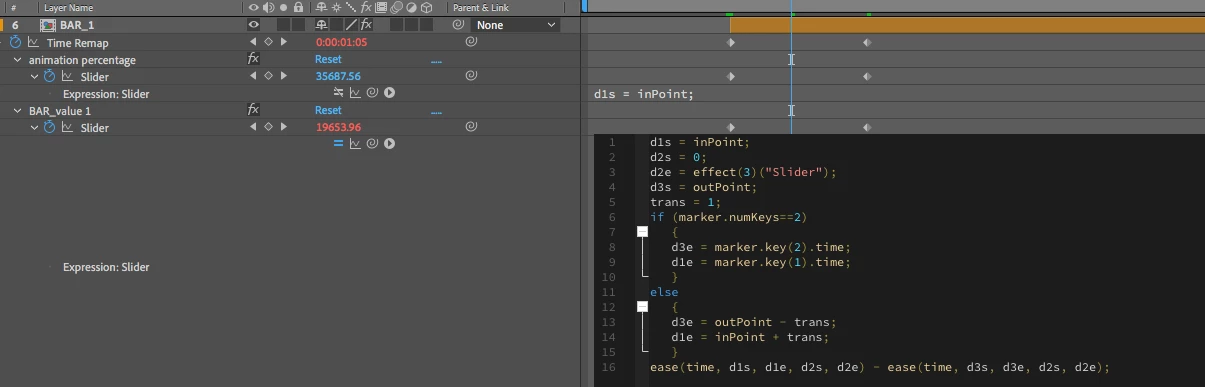
Thanks!

This topic has been closed for replies.

3 replies

1954 Godzilla is my hero!
Known Participant
July 4, 2019

Thanks for the help. I think all I need to do is insert:

commas = true;

into the script, and that'll get the job done. If not, I'll just pop 'the comma in on a text layer and snug it in between the numbers.

Mylenium
Legend
July 4, 2019

The expression itself does nothing to actually process the numeral string. It just generates a value and is totally irrelevant to the problem. Whatever expression you may require will have to be applied to the text layer inside the pre-comp constituting the layer, but as Andrew already said, without the slightest clue how the project is actually structured nobody can tell you much.

Mylenium

Andrew Yoole
Inspiring
July 4, 2019

It's hard to know what it is you're trying to achieve without seeing the preview window of your comp, to understand what it is you're animating.  I presume you're talking about a numeric value that is rendered with the 3D graph as it changes.

But off the top of my head, I don't think you're looking at the right comp, if you need to adjust numbers that appear visually in your comp.  The expression you've presented seems to only adjust the timing of the precomped animation.

You'll need to open the precomp shown in your screen grab, and burrow down until you find the text layer that generates the numbers.