

Question
Need Help w/ Expression (Sound Keys Plugin is Used)
I have a question, it is with java code in after effects.
so my code for my bars right now is
X = 90
Y = thisComp.layer("Sound Keys 33").effect("Sound Keys")("Output 1") + 1;
[X, Y]
This is bar 37
I want Y to only go up to a maximum of 105% of bar 38, which for that bar my expression is
X = 90
Y = thisComp.layer("Sound Keys 19").effect("Sound Keys")("Output 2") + 1;
[X, Y]
I could easily do this, but the problem is, the bars are not static, they are reacting to a song using keyframes making Y go higher and lower.
A screenshot of the bars I'm working with
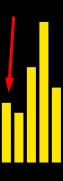 The arrow is pointing at bar 37, the one right to that one is bar 38.
I would greatly appreciate any help at all, but would also like a quick response, since I want to get this done ASAP! Thanks!
 AdChoices