Known Participant
July 8, 2023
Answered

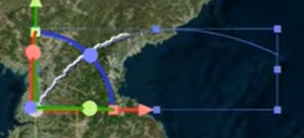
Need to open controls as depicted in image below for shape layer

  • July 8, 2023
  • 2 replies
  • 290 views

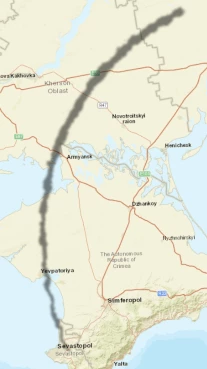
So below is a shape layer I created that for lack of better descriptive ability doesnt have the rectangle around it allowig manipulation and the other one does, how can I open that for the first one?

appreciate help.
 

This topic has been closed for replies.
Correct answer Ishan Y

Hi ArkhamGames,

Do you see the Layer Controls when you double-click on the layer? Please ensure the layer controls are not hidden (Win: Ctrl + Shift + H, macOS: Command + Shift + H to hide/unhide layer controls). Sorry if I misunderstood your question. If that's the case, please share more details. 


Thanks,

Ishan

2 replies

Ishan Y
Ishan YCorrect answer
Inspiring
July 8, 2023

Hi ArkhamGames,

Do you see the Layer Controls when you double-click on the layer? Please ensure the layer controls are not hidden (Win: Ctrl + Shift + H, macOS: Command + Shift + H to hide/unhide layer controls). Sorry if I misunderstood your question. If that's the case, please share more details. 


Thanks,

Ishan

Known Participant
July 9, 2023

Legend, you saved me!

Ishan Y
Inspiring
July 9, 2023

Glad I could help! Feel free to reach out if there's anything else we can help you with. 

Known Participant
July 8, 2023

Apologies for the basic question but I am in a rush. I have a shape layer that i need to alter but I have forgotten how to bring up the visual shape layer for quick changes, as i am unsure of the correct term it is the rectangle with the right angle at bottom left with the red, green and a blue quarter of a circle. I need to bring it up so i can alter the path of the shape and yet have no clue. any help would be greatly appreciated.


Kind regards