
Participant
January 15, 2022
Question

New Null object not working

  • January 15, 2022
  • 4 replies
  • 393 views

I'm trying to make a new NULL object and the tutorial I'm following says I right-click on the window that looks like this:
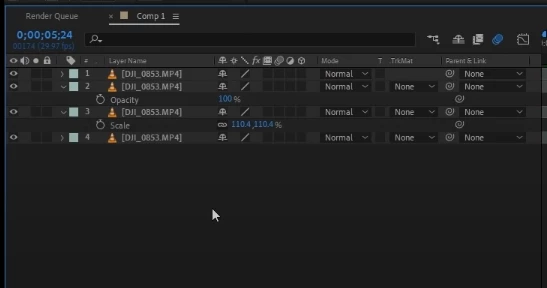
But I do not have that window, I've tried resetting my windows, I've looked everywhere to see what that window is called and I can not find it. Please help! What is that window called or how do I make a new Null object.


This topic has been closed for replies.

4 replies

Community Expert
January 16, 2022

What tutorial? I hate to say it, but most of the new tutorials that I see that give people problems have been created by enthusiasts, and many of them have inadequate explanations and poor workflows. The tutorial your following failed to provide you with the shortcut (Shift + Ctrl/Cmnd  + y) or point you to the menu or show you exactly where in the timeline to right/click. 


It would be a good idea to spend some time with the User Guide or open up the Learn workspace to learn how to navigate and use the UI and efficiently work with layers.

ShiveringCactus
Community Expert
Community Expert
January 16, 2022

Andrew has you covered, but if you're still learning AE and want a different approach to tutorials, I recorded these sessions showing my wife the basics:

https://youtu.be/27wvMxkjMPg

Including going through all the panels.

Andrew Yoole
Inspiring
January 15, 2022

The window you've screengrabbed is the left side of the timeline.  You can turn columns on and off in this window so yours may look a bit different.  Every composition in your project has its own timeline.  Without the timeline visible it wouyld be virtually impossible to do anything in After Effects.


You can also create a null from Layer > New > Null Object.


You will find After Effects a lot less frustrating if you start at the beginning and learn the basics.

https://helpx.adobe.com/au/after-effects/get-started.html


Ann Bens
Community Expert
Community Expert
January 15, 2022

Moved from Premiere to Ae forum.