

Participant
April 6, 2025
Answered

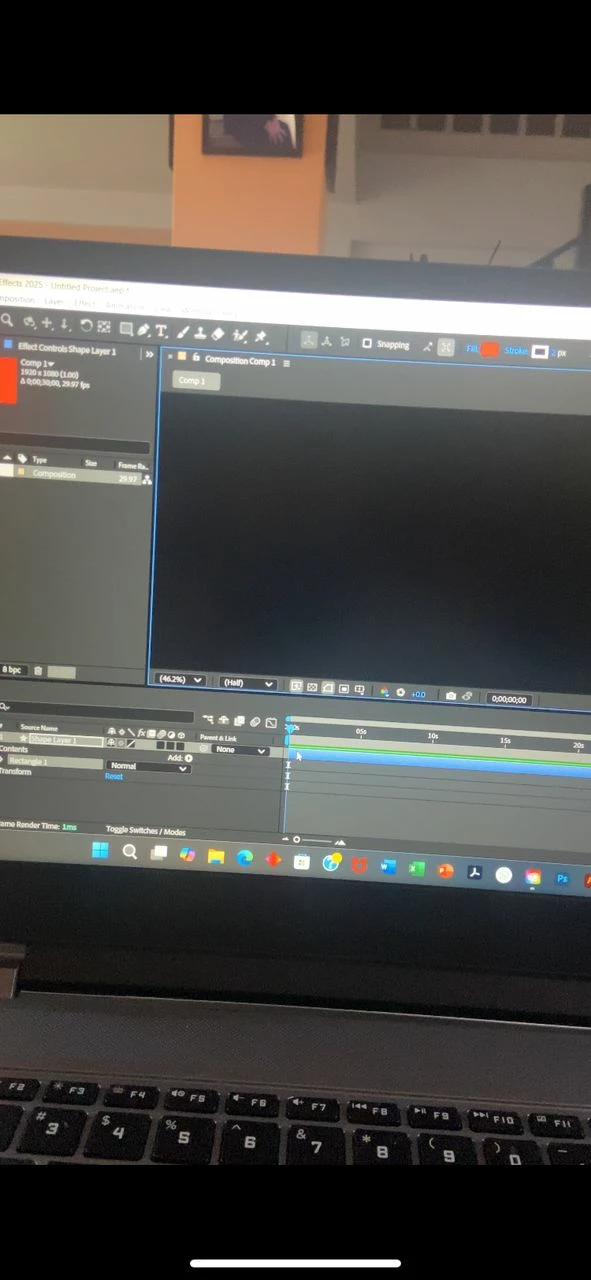
No composition, just a black screen in after effects 2025

  • April 6, 2025
  • 3 replies
  • 759 views

I pay an Adobe subscription and have only been able to use my after effects ONCE, I'm so upset.


Whenever I open my ae and create a composition there is a black screen and I can't see anything, even if I import footage, NOTHING WORKS, I've uninstalled and installed, older and newer versions, my computer is brand new and great specs (HP Omen 17) and I used to use ae everyday on my old computer with way worse specs and this never happened. I've followed more than 5 youtube videos on different things to do and absolutely nothing has worked please help.
 

Correct answer nishu_kush

Sorry to hear about the issue Ana.

Do you mind sharing your system specifications (CPU, GPU, RAM, OS version)? If your laptop has an Intel CPU with integrated graphics, try the following steps:

• Close After Effects
• Go to the Device Manager (Run >> devmgmt.msc)
• Select Display Adapter, Right click on the "Intel UHD graphic card".
• Select "Update Driver"
• Select "Browse my Computer"
• Select "Let me Pick from a list of available drivers on my Computer".
• Select "Microsoft Display Adapter".
•  Launch After Effects.

Let us know how it goes.


Thanks,
Nishu

3 replies

Participant
April 9, 2025

Yes of course, here is the side of the box my laptop came in with all the info

nishu_kush
Community Manager
Community Manager
June 5, 2025

Did you try the steps suggested above? Did it help?

Moving this thread from Bugs to Discussions for troubleshooting.


Thanks,
Nishu

Participant
June 5, 2025

OMG sorry for not responding, YES it did work thank you so much

nishu_kush
Community Manager
nishu_kushCommunity ManagerCorrect answer
Community Manager
April 7, 2025

Sorry to hear about the issue Ana.

Do you mind sharing your system specifications (CPU, GPU, RAM, OS version)? If your laptop has an Intel CPU with integrated graphics, try the following steps:

• Close After Effects
• Go to the Device Manager (Run >> devmgmt.msc)
• Select Display Adapter, Right click on the "Intel UHD graphic card".
• Select "Update Driver"
• Select "Browse my Computer"
• Select "Let me Pick from a list of available drivers on my Computer".
• Select "Microsoft Display Adapter".
•  Launch After Effects.

Let us know how it goes.


Thanks,
Nishu

lambiloon
Community Expert
Community Expert
April 7, 2025

Hi, can you share a full screenshot so we can see what is ur composition or layers..regards

Ali Sajjad / Graphic Design Trainer / Freelancer / Adobe Certified Professional