
MRSeif123
Participant
April 26, 2017
Answered

No Real time playback in After Effect

  • April 26, 2017
  • 4 replies
  • 17760 views

Hello everyone,

I have a very big problem !
My PC specs are : 64gb RAM , core i7 6850k, GTX 1080 Ti 11gb, 500gb SSD ,Windows 10 pro
I Have After Effect 2017.2
My problem is that when I'm working on a video or something i click on space-bar (to preview my work), But it doesnt start normally it usually tells me that the FPS is 15 fps and it lags too much!
Although i give the adobe applications 50gb RAM and I enabled CUDA for GTX 1080 Ti with 8gb of Texture Memory and Ray Tracing is on GPU and Disk Cache is 100GB
Please Help me!!
Thanks
    This topic has been closed for replies.
    Correct answer kirubhas98

    I found a way who are searching for, even when this solution doesn't work,

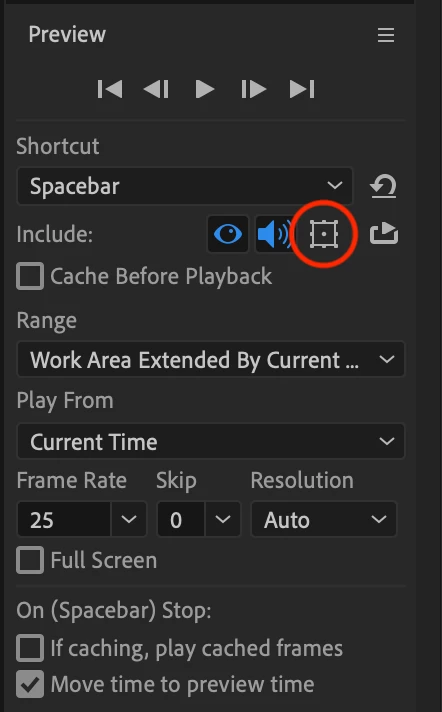
     please unselect the circled option which enables motion controls while previewing, its slows down playback even if full timeline is cached.

    4 replies

    Participant
    March 5, 2023

    Hi! You have to set your monitor resolution to 1920x1080. Than you should get you full fps playback if you play you cached ram. After Effects still can't handle higher resolutions well. With 1080p you also get rid of the UI lag. It's obviously bad programming or ubscaling process from Adobe. 

    Participant
    March 5, 2023

    there is also a difference if you use AFX windowed or fukll screen on you monitor (Windows 10). Don't know about mac.

    Participant
    March 6, 2023

    after testing a little bit it seems to depend only on your window size of afx, no matter what resolution your monitor is set to

    Participant
    May 5, 2021

    I have been working with After Effects since it was Cosa Effects. Maybe version 2, I can't remember now. However, this is a huge workflow fail on Adobe's part. No designer, animator or editor can justify or rationalize this fail in playback workflow. I haven't worked with After Effects in a while and I'm stunned to see such a downgrade in effeciency. Even if the visuals would fail, there's no reason audio playback should slow or slur. It's seems embarassinly horrible to think a client could hear their audio playback could sound like a dying battery or stalling car engine. It's simply poor programming and design.  It's a lack of regard to time tested and true workflow. Under "no" circumstances should a 12core MacPro be unable able to play audio on time. No software love or ego can make sense of this level of dysfunctionality. I can simulate 3D destruction effect in Houdini, Maya and real time, MoCap characters in MotionBuilder with real Time audio playing in the background yet slur, sluggish audio in After Effects? Where is the "Adobe Blank Face" Feature?  It would be smarter.

    kirubhas98
    kirubhas98Correct answer
    Participant
    March 7, 2021

    I found a way who are searching for, even when this solution doesn't work,

     please unselect the circled option which enables motion controls while previewing, its slows down playback even if full timeline is cached.

    Inspiring
    March 8, 2021

    Thanks, but I don't think that is a solution. Most of the time people don't want the controls in their previews, so that option is switched off in 99,999% of the cases, at least in my situation. More: I really never used it in 20+ years.

    Dave_LaRonde
    Inspiring
    April 26, 2017

    I think the only big problem you have is lack of AE knowledge. 

    First, you can NEVER expect to work like a video editing application,  where you just press the space bar and everything plays back in real time. AE IS NOT A VIDEO EDITOR.  It's an effects, compositing and motion graphics application, used for very different purposes than a video editor,  It functions differently than a video editor. Particularly in the way you view your work -- you don't play, you PREVIEW.  tOTALLY DIFFERENT.

    I encourage you to go to AE Help and look at the section on Viewing and Previewing.  There are a WHOLE lot of ways to preview that can help.

    A good deal of quality time spent here won't hurt, either.....

    After Effects tutorials | Learn how to use After Effects CC

    Participating Frequently
    October 9, 2017

    Exactly which video on this help page is supposed to help?  I have the same problem.  I'm not looking learned everything before I can learn something.  And, I am NOT pressing the space bar.  I push play.  The video sometimes stops and replays the same section but always it says not in real time.  The video was created in CS5.  I am using CC.  I seem to see this when the original video is somewhat sophisticated in its effects and not for simpler videos.  Again, I'm not looking to study everything on the help site.  I am looking for straightforward help with what should be a common and obvious issue with playback.