Dario de Judicibus
Known Participant
June 3, 2017
Answered

No way to create a live text in After Effect

  • June 3, 2017
  • 1 reply
  • 1837 views

I am trying to create a live text in the latest version of After Effect to be imported in Premiere Pro, but there is no way. In fact:

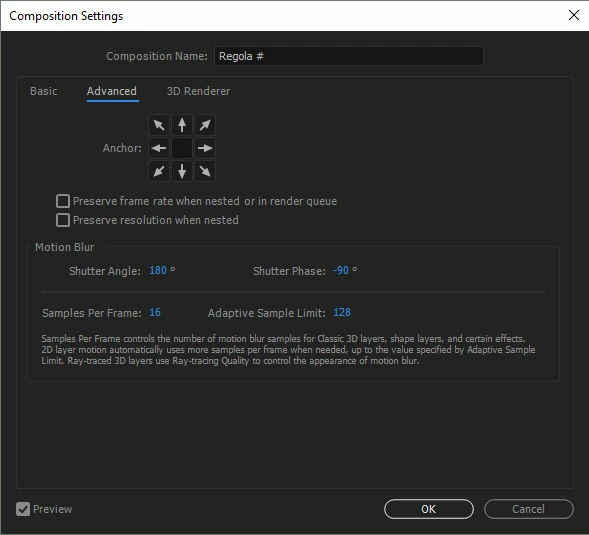
1. there is no more the TEMPLATE switch in the Advanced tab of Composition settings

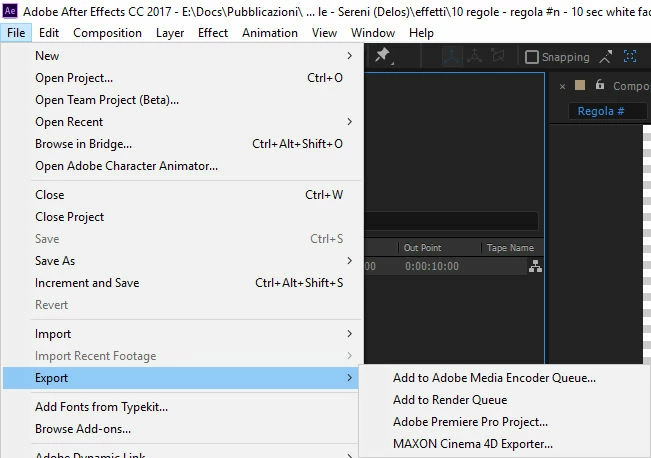
2. there is no more File > Export > Composition as Text Template menu item

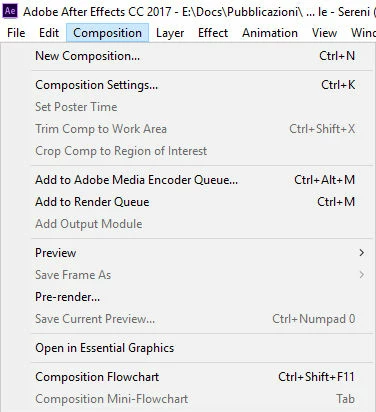
3. There is no more Composition > Export Composition as Text Template menu item

This topic has been closed for replies.
Correct answer Roei Tzoref
I am trying to create a live text in the latest version of After Effect to be imported in Premiere Pro, but there is no way

there is a way. import the aep file to premiere, select a composition that has a text layer in it and premiere will create a clip from it, and you will be able to edit the text in premiere in the effects controls tab.

1. there is no more the TEMPLATE switch in the Advanced tab of Composition settings

2. there is no more File > Export > Composition as Text Template menu item

that's right.

1. it was redesigned in CC2017 14.0 and there is no need to select this checkbox anymore because any composition that has a text layer can potentially be a live text template. no checkbox needed.

2. this feature has been removed and replaced by the motion graphics template workflow. so you can't export an aecap file from Ae which is a compressed file that contains all the media to be used by the editor. the only way to use live text templates in 14.2 is to import the aep file to premiere and select the composition you want to use and get the live text template from it. not the same thing as aecap, but this is what it is.

1 reply

Roei Tzoref
Roei TzorefCorrect answer
Legend
June 3, 2017
I am trying to create a live text in the latest version of After Effect to be imported in Premiere Pro, but there is no way

there is a way. import the aep file to premiere, select a composition that has a text layer in it and premiere will create a clip from it, and you will be able to edit the text in premiere in the effects controls tab.

1. there is no more the TEMPLATE switch in the Advanced tab of Composition settings

2. there is no more File > Export > Composition as Text Template menu item

that's right.

1. it was redesigned in CC2017 14.0 and there is no need to select this checkbox anymore because any composition that has a text layer can potentially be a live text template. no checkbox needed.

2. this feature has been removed and replaced by the motion graphics template workflow. so you can't export an aecap file from Ae which is a compressed file that contains all the media to be used by the editor. the only way to use live text templates in 14.2 is to import the aep file to premiere and select the composition you want to use and get the live text template from it. not the same thing as aecap, but this is what it is.