Participant
July 12, 2021
Answered

Noise automatically being added to composition after exporting

  • July 12, 2021
  • 1 reply
  • 510 views

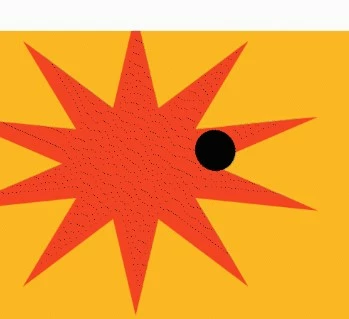
Hello! After exporting an After Effects composition, an odd sort of noise/ grain is getting added to certain shapes. The file was created using Illustrator but all layers were converted into shapes. I'm using Adobe Encoder, and the output is in the form of .GIFs. Thank you in advance!


(Screenshots from the exported file) - 
This topic has been closed for replies.
Correct answer Mylenium

You are using the most unsuitable tools to generate GIFs. It's as simple as that. Pretty much any other tool, including free online GIF converters does a better job. Within the Adobe world the best way to proceed is to use the frame animation features in Photoshop and export from there, after you have imported your pre-rendered AE image sequence or clip onto the timeleine. That aside you may want to generally study up on how GIFs work technically and how to minimize dithering by optimizing the color palette and motion.


Mylenium

1 reply

Mylenium
MyleniumCorrect answer
Legend
July 12, 2021

You are using the most unsuitable tools to generate GIFs. It's as simple as that. Pretty much any other tool, including free online GIF converters does a better job. Within the Adobe world the best way to proceed is to use the frame animation features in Photoshop and export from there, after you have imported your pre-rendered AE image sequence or clip onto the timeleine. That aside you may want to generally study up on how GIFs work technically and how to minimize dithering by optimizing the color palette and motion.


Mylenium

Participant
July 12, 2021

Oh, alright! That makes a lot of sense; a lot left to learn there then, haha! Thank you!