


Inspiring
November 10, 2023
Question

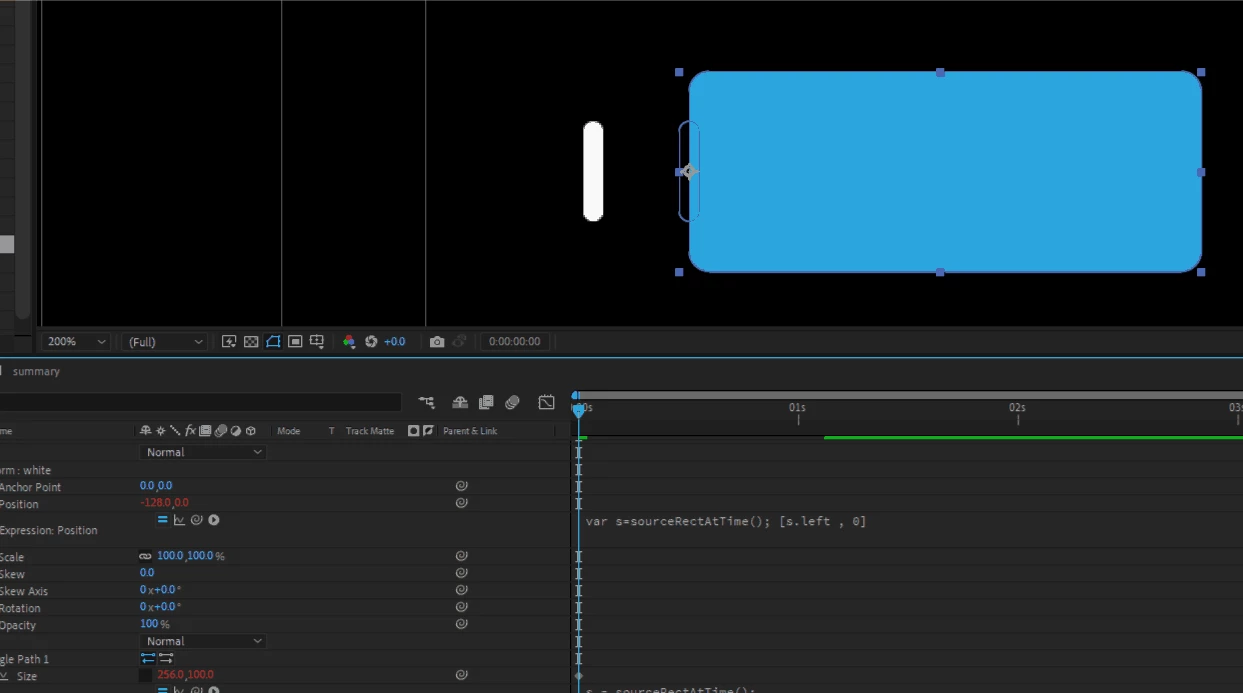
object misplaced after adding sourceRect expression
  • November 10, 2023
  • 1 reply
  • 283 views

i'm literally gonna sulk and cry when this happens. please people. just tell me where's the wrong and what to do. i love attach things . i do respect the code/expression. but the inconsistency in the comp Panel is making me crazy. this happens a lot tho.. 

yes i'm a dumb in term of expression, just learning about it. i think expression is cool. so please educate me.

This topic has been closed for replies.

1 reply

Mylenium
Legend
November 10, 2023

Check your group transforms and also the layer transforms. This happens if stuff isn't zeroed out properly and the outline of the shape suggests exactly that - you manually placed it before applying the expressions and the coordinates thus have an extra offset.


Mylenium

Inspiring
November 10, 2023

i'm curious, is there any script to make this happens? simple scriptlet which will zero out all property available to adjust

Community Expert
November 10, 2023

After you create the shape layer, press the U key twice. This will reveal all modified properties. You'll find transform properties for each shape. All you have to do is reset (zero) them all out.  


I don't know of a script that does it.