
boldis85570332
Participant
May 17, 2017
Question

Only Black Screen shows up when I import .psd or .ai files!

  • May 17, 2017
  • 5 replies
  • 12245 views

Hi!

I would like to make a logo animation. I designed a logo to animate it. I imported thed psd file to AE with layer separation and only the Black Screen effect shows up. This is the same when I try with .ai. AE understands and knows there are layers but doesn't show anything just the black screen. Of course i tried with different importing settings...
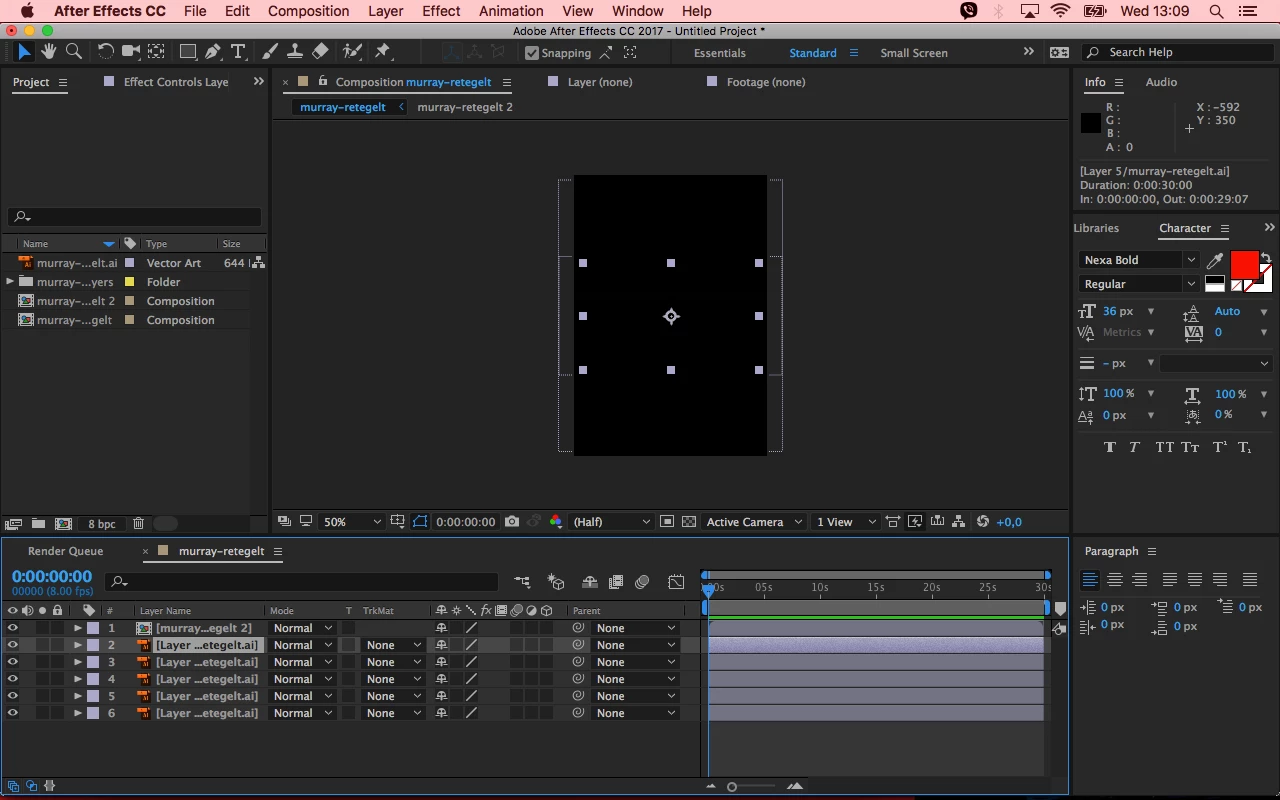
Please help! I use the 2017 CC version.

5 replies

Participant
June 13, 2019

I had this problem on a document that had multiple artboards.

When I moved the shapes to a new file with one artboard it worked in AE.

Could be unrelated, but you could give it a shot.

Participant
April 4, 2022
quote

I had this problem on a document that had multiple artboards.

When I moved the shapes to a new file with one artboard it worked in AE.

Could be unrelated, but you could give it a shot.


By @brendann9158727


Hi, I had the same issue just now trying to import layers from AI into AE. Seems AE doesn't deal with AI artboards well and this fixed all my issues.  Thanks for posting your comment. Life saver!

Participant
May 25, 2018

I got the same problem this morning with with a client file. You need to change the colour profile setting.

In Photoshop you go in the menu Edit/Convert to profile...

and then you select under destination space menu : Working RGB - sRGB IEC61966-2.1

Then save your file with another name and reimport it in After Effects - Composition Retain layer size - Merge layers style into footage or if you need to edit select the other option.

Let me know if it works out. For me it works fine and now animating the file.

Best,

P

Kevin-Monahan
Community Manager
Community Manager
July 18, 2017

Hi Boldi S,

Did you ever solve this issue? What did you do to fix it? Let us know.

Thanks,
Kevin

Kevin Monahan - Sr. Community & Engagement Strategist – Pro Video and Audio
Participant
January 31, 2018

Im having the same problem at work too. I think maybe its a memory problem as my Mac is ancient at work. I opened .psd files with transparency then tried to open another one in the same project. Now any picture I try to open is showing up as black. Ill re-boot my tired old Mac pro and see what happens .I hope this is not some serious bug. ( AE CC 2017)

Dave_LaRonde
Inspiring
May 17, 2017

Y'know,  if this logo happens to be black you won't be able to see it over a black background.  Have you checked for transparency?

boldis85570332
Participant
May 17, 2017

Hi! This is not about the transparency. I can select the elements of the original files but they are invisible.

Szalam
Community Expert
Community Expert
May 17, 2017

What happens when you enable the transparency button for your comp window?

Mylenium
Legend
May 17, 2017

Start by checking your document color modes. AE only handles RGB documents, not CMYK.

Mylenium

boldis85570332
Participant
May 17, 2017

Hey! I used RGB