matthiasb53089381
Participant
April 28, 2018
Answered

Opacity overlay half cut randomly

  • April 28, 2018
  • 3 replies
  • 1833 views

Hello,

I'm not quite sure how to explain this properly as this is a bit of a strange problem and I couldn't find similar cases in the forum.

Basically, I put an image on top of an other one and turned down the opacity to just see it on transparence but when I do that the image on the top just cut itself in half in a random place and the effect I want to apply on the whole frame only works for half of it or so. Individually both images are completely fine, I did not apply any other effects on them. So I don't know if this is an options I clicked on by mistake but it's the first time I'm facing something like this and I can't explain it.

Here is a screen shot (opacity turned back to max so you can clearly see the cut)
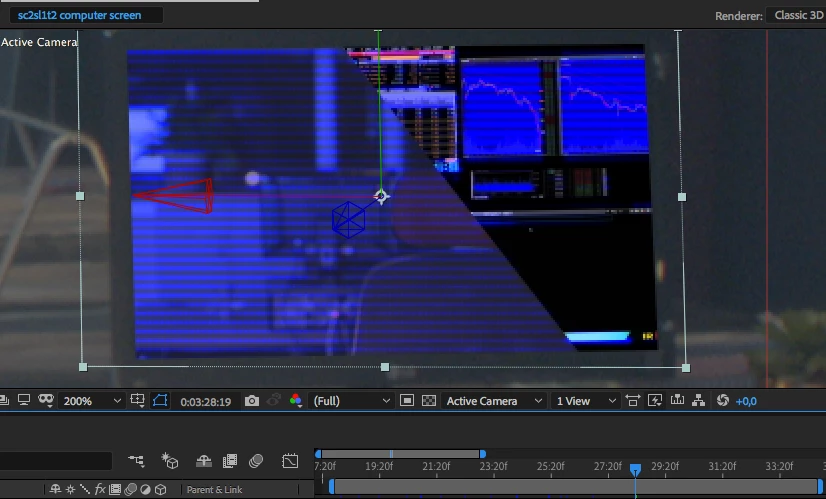
Does anyone have an idea or knows what this is about?

Kind regards,

Matthias.

    This topic has been closed for replies.
    Correct answer kirkeric

    It cut in half because it's 3D and you rotated it slightly (or the background image is rotated).  When you rotate and images are directly on top of one another, you basically slice it through the other image, placing that part behind the other.  If you take that top image and pull it forward in Z space, you should see what I'm talking about.

    That's what it looks to me.

    3 replies

    kirkeric
    kirkericCorrect answer
    Inspiring
    April 29, 2018

    It cut in half because it's 3D and you rotated it slightly (or the background image is rotated).  When you rotate and images are directly on top of one another, you basically slice it through the other image, placing that part behind the other.  If you take that top image and pull it forward in Z space, you should see what I'm talking about.

    That's what it looks to me.

    matthiasb53089381
    Participant
    April 29, 2018

    That was the problem indeed and it makes complete sense now that I think about it. Thanks Kirkeric, thought it would be more complicated than that .

    kirkeric
    Inspiring
    April 29, 2018

    Excellent,  glad i could help.

    Eric

    Mylenium
    Legend
    April 29, 2018

    Aside from what Dave already said regarding the zoom, you have not provided any useful info and to boot you have made your screenshot useless by cropping away the timeline, which might have revealed critical clues. Sorry, but that's complete rubbish. You need to make an effort to provide actual details rather than let people guess around.

    Mylenium

    matthiasb53089381
    Participant
    April 29, 2018

    Sorry, I'm quiet a novice. I'm zoomed in because that's the part I'm working on in the image.

    That's really nice if you want to help but there is no need to be rude and pretentious please, people are here to learn, let's make it friendly.

    Here is the image less zoomed in and including my timeline :

    Let me know what informations I can provide to help understand the issu, as I said, I'm kind of learning while I'm doing it so I'm really no expert.

    Thanks a lot,

    Matthias.

    Dave_LaRonde
    Inspiring
    April 29, 2018

    Why are you zoomed to 200%?