


kennethb66408761
Participant
May 4, 2017
Answered

Open GL not recognizing GPU

  • May 4, 2017
  • 2 replies
  • 2738 views

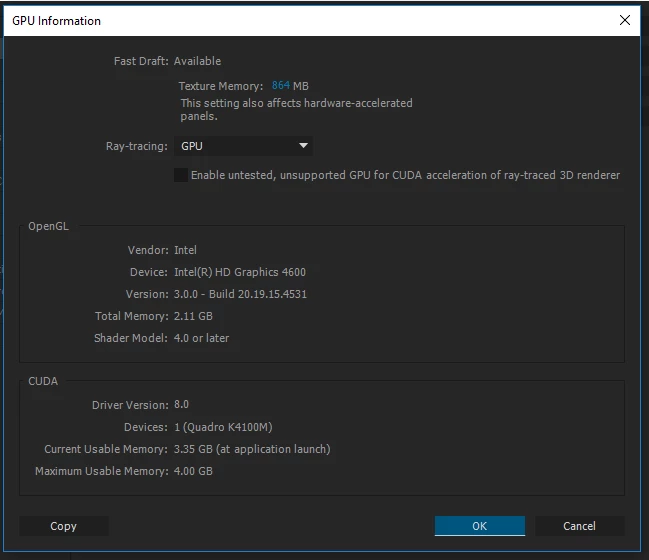
I recently upgraded from CS6 to 2014 and the problem I'm having is it will not recognize my GPU for Open GL. As you can see in the image below, AE is picking up my GPU for CUDA just fine but I can't get it set for Open GL. I've tried going to the Nvidia Control Panel and setting the GPU to be used for AE but after I save it, it always resets back to the Integrated Graphics setting. At first I thought it was Nvidia and contacted their support which didn't help, but then I noticed the Nvidia CP issue is only with AE and Premiere. So I'm wondering if AE and Premiere is blocking Nvidia somehow from setting it to the GPU. The main reason this is an issue for me is because I can't get the Element 3D plugin to work without Open GL being set to my GPU. It was all working fine with CS6 but it hasn't worked yet for 2014. Any assistance would be greatly appreciated. Thanks.
This topic has been closed for replies.
Correct answer kennethb66408761

Found a way to fix the problem. In the Nvidia Control Panel, setting After Effects to use High-performance Nvidia processor was changing to Integrated Graphics after saving and closing panel. So I tried setting After Effects to Integrated Graphics and after saving and closing the panel, it changed to the High-performance Nvidia processor. Not sure why, but After Effects is now using Nvidia as Open GL and can run Element 3D without errors.

2 replies

kennethb66408761
kennethb66408761AuthorCorrect answer
Participant
May 17, 2017

Found a way to fix the problem. In the Nvidia Control Panel, setting After Effects to use High-performance Nvidia processor was changing to Integrated Graphics after saving and closing panel. So I tried setting After Effects to Integrated Graphics and after saving and closing the panel, it changed to the High-performance Nvidia processor. Not sure why, but After Effects is now using Nvidia as Open GL and can run Element 3D without errors.

Participant
January 10, 2024

You're a life saver! Thank you!

Mylenium
Legend
May 5, 2017

Simply turn off the intel GPU in the BIOS. This has nothing to do with obscure conspiracy theories, it's simply how OpenGL works - it will always use the primary display client.

Mylenium

kennethb66408761
Participant
May 5, 2017

Thanks for your response. I did consider disabling the Intel GPU altogether but thought there was still some benefit for keeping it on for other functions and applications. If not, this will be my solution. Thanks

kennethb66408761
Participant
May 12, 2017

Looked at turning off Intel GPU as solution and while this does work, I don't think its a good long-term solution. This is because I have a Dell Precision M6800 which, from what I read on Dell's support forums, doesn't have a normal BIOS area. It runs everything off there loaded software and doesn't give me an option to disable the Intel GPU there. I can only disable it in the Device Manger, which works but causes other problems. The Dell support forums also indicated that even though I have a secondary Nvidia GPU, it'll still runs thru the Intel GPU as an adapter. This seems to be true because when I disable the Intel GPU in the Device Manager, the Nvidia Control Panel is no longer accessible and it gives me a popup stating something along those lines.

If any other solutions can be provided, I would much appreciate it. Ideally, I think it would be best if I could keep the Intel GPU running and just get AE to use my Nvidia GPU. Still don't know if this is an Nvidia or an Adobe AE issue. I guess it could also be a Windows 10 issue.

thanks