Inspiring
July 6, 2026
Answered

option to Lock Mask

  • July 6, 2026
  • 2 replies
  • 16 views

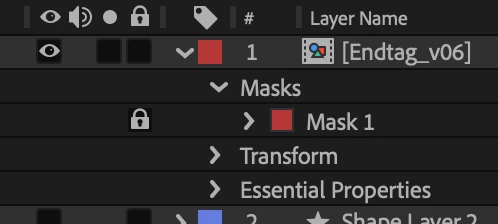
When creating multiple masks on a layer, it comes in very handy to be able to lock a mask, to prevent it from being changed accidentally.

    Correct answer sskaz

    You can lock masks, make sure the “A/V Features” timeline column is visible. Also available via the menubar > Layer > Mask > Locked.

    Do you mean something else like shape layers?


    2 replies

    Inspiring
    July 6, 2026

    Someone’s already mentioned this is available - it’s also available as a Shortcut and with additional related Shortcuts too - BTW, the Keyboard Visualizer is a good spot to look for features. 


    sskaz
    sskazCorrect answer
    Inspiring
    July 6, 2026

    You can lock masks, make sure the “A/V Features” timeline column is visible. Also available via the menubar > Layer > Mask > Locked.

    Do you mean something else like shape layers?