



Over-write pre existing rendered file
Hi all
I use CC (AE 26.3.0) and previously, when i have rendered a file, then at a later time updated that composition, and re-rendered it, it use to ask me if i wanted to over-write (which I do) then over-wrote the original file, thus keeping the name right, and Prem Pro happy when looking for that graphic (normally a Mov file with a transparent background - ie lower thirds). For context I film and edit football matches, so will do graphics initially, then alter them with changes to times etc).
Recently it has started to not over-write, but add in a ‘_1’ to the name, which means prem pro will need to be altered to find the new file, or me deleting the file, and renaming the new one. Both more work than I previously had to do.
My render output is ‘[projectFolder]\graphics\[compName].[fileextension]’ (saved as a default called project folder). Each project (match) has its own dedicated folder, with its own AE file within that folder. So when i render a graphic it will automatically create a folder called graphics, and put them all in. Previously, it would then just over-write them for the relevant match, but now it sometimes over-writes, and sometimes just creates new.
Also I have seen it adding the _1 after the name on initial render, when even the graphic folder is not created. But not always (I have a score board single frame for example - shown below) - all created in a brand new folder, not yet rendered, but scoreboard 01 has _01 added, the others don’t).
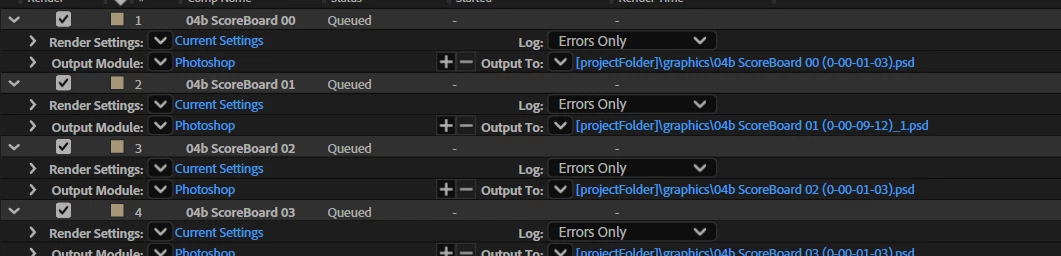
Can anyone explain why this is happening, or (even better) how to fix it?
If I were to click on the down arrow next to output to, and choose the default output, it then makes it right, but it will be a pain having to do this for every graphic.
Any help appreciated
 AdChoices