
Participating Frequently
August 8, 2017
Answered

Parenting Puppet Tool to Null

  • August 8, 2017
  • 1 reply
  • 19128 views

Hey All!

I've spent the better part of a day trying to figure this out and am now reaching out for help.

I'm trying to parent my puppet tools to a null following a tutorial.  I followed everything to a T (so I think!), and it's just not working.  I've used the code:

n=thisComp.layer("null_layer_name")

nullpos=n.toComp(n.anchorPoint);

fromComp(nullpos);

I've attached a screen shot of my timeline -
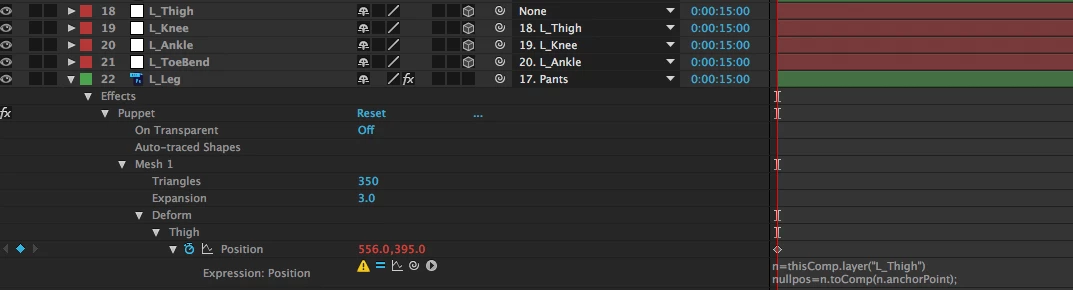
Any ideas on how to go about correcting it so it works?

Correct answer David Arbor

+1 to everything Rick said, but a quicker way to parent a Puppet Pin to a null, especially if you'll be doing this a lot, is to install DUIK tools, which is an amazing and free script for character animation. The Bones button will do exactly what you're looking for—you click on a layer, hit the Bones button, and little red nulls are automatically generated which control your puppet pins. Alternatively, you can click on a single Puppet Pin and hit the Bones button for just one null. This is using the same expressions you mentioned in your original post.

DUIK is an amazing and complex set of tools (and you should consider donating if you think it's been good to you), and it takes time to learn properly, but the Bones functionality is a simple, one-click solution.

1 reply

Community Expert
August 8, 2017

Cropped screenshots are not much good when diagnosing problems. What is the error message? What are you trying to do? What is going on with the L_Thigh layer?

I notice some parenting going on and assume that the "L_Thigh" layer is a null but don't know for sure. Because you have parenting going on you do need a to world or to comp method but that's how you set one up. It's also a little odd to have puppet pin set up on 3D layers or to drive puppet pins from 3D layers because Puppet Pin is strictly a 2D effect. You will also run into trouble if you animate a move on one of the parents because puppet pin's mesh is based on the first frame of the layer and you can't be moving layers around and expect the mesh to follow.  You can move puppet pins by linking them to other layers or positions but you probably want to use a value+ statement in the expression to take the original position of the puppet pin and add the movement of the parented layer to it. Again, if I had any idea what you were trying to do it would help. Your layout looks a little odd.

A link to your tutorial would help. Did you vet the person giving the training? There are more ineffective and inefficient tutorials on YouTube now than there are ones from people that know what they are doing.

If all you want to do is copy the position of the L_Thigh layer to the Thigh deformer all you have to do is write:

toComp(thisComp.layer("L_Thigh").position)

A better way to do that may be to write:

toWorld(thisComp.layer("L_Thigh").anchorPoint)

This would prevent position changes if the source was not parented to another layer.

But then again I don't know what you are trying to accomplish so neither of these suggestions are probably not going to be of much help.

David ArborCorrect answer
Inspiring
August 8, 2017

+1 to everything Rick said, but a quicker way to parent a Puppet Pin to a null, especially if you'll be doing this a lot, is to install DUIK tools, which is an amazing and free script for character animation. The Bones button will do exactly what you're looking for—you click on a layer, hit the Bones button, and little red nulls are automatically generated which control your puppet pins. Alternatively, you can click on a single Puppet Pin and hit the Bones button for just one null. This is using the same expressions you mentioned in your original post.

DUIK is an amazing and complex set of tools (and you should consider donating if you think it's been good to you), and it takes time to learn properly, but the Bones functionality is a simple, one-click solution.

Participating Frequently
August 8, 2017

Hey David,

I'm trying to solve this problem without Durik, it's a long story; but thank you for that suggestion!  I'm only doing the legs and toe bend, a total of four points.

If I can't find a solution, I might end up moving forward with this.

Many thanks,

Emily