
StanClaas
Participant
June 28, 2019
Answered

Pen tool: Making a straight line after a curved line?

  • June 28, 2019
  • 1 reply
  • 66451 views

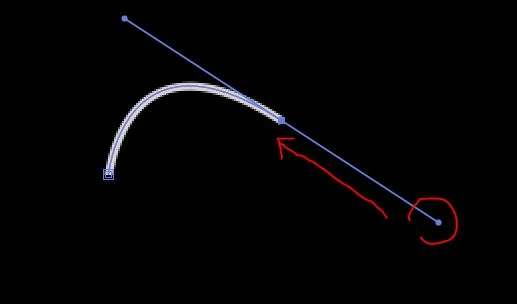
So I'm using the pen tool in after effects to draw a line that follows a path on a map, but I'm running into an issue. After I make a curved line, when I go to draw the next point it'll be automatically curved. This happens in programs like Illustrator too, but there you can just deselect the line an then reselect the line and the next point you'll draw will be straight. After effects doesn't do that, or at least not with the method I use in Illustrator. Anyone know how to do this?

This topic has been closed for replies.
Correct answer Omar.Fathy

Using the pen tool and holding Alt + click and drag the direction line point toward the anchor point ( release the mouse button just over the anchor point ).


You can just click to draw a straight line.

You can also finish your path anyway and edit it using the pen tool + Alt to break down the direction line.

1 reply

Omar.Fathy
Community Expert
Omar.FathyCommunity ExpertCorrect answer
Community Expert
June 28, 2019

Using the pen tool and holding Alt + click and drag the direction line point toward the anchor point ( release the mouse button just over the anchor point ).


You can just click to draw a straight line.

You can also finish your path anyway and edit it using the pen tool + Alt to break down the direction line.

StanClaas
StanClaasAuthor
Participant
June 28, 2019

That worked, thanks!