Participating Frequently
Apr 24, 2019 9:36 AM UTC
Answered

Perspective transform in After Effects

Hi all,

How can I do a perspective transform in AE just like in Photoshop?

Thank you!

    Byron CortezCorrect answer
    Community Expert
    Apr 20, 2020 10:52 PM UTC

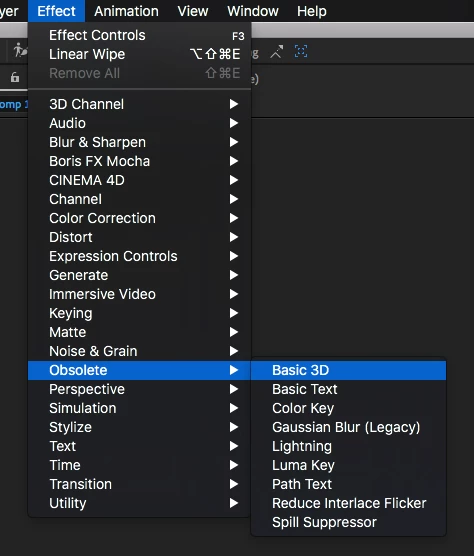
    Go to menu Effect / Obsolete / Basic 3D. Then go to Effect Controls panel and adjust the Tilt, or Swivel.


    Byron.

    6 replies

    Community Expert
    Sep 4, 2020 3:52 PM UTC

    If you want to get an accurate (true) perspective on a shape or layer, the easiest thing to do is make the layer 3D and then add a camera. Perspective is controlled by camera position, framing by focal length. The vanishing point depends on the geometry in the scene and the angle of the camera. Once you fiddle with the camera and focal length it is pretty easy to match perspective in a shot. If the camera is moving the Camera Tracker is very good at figuring things out very quickly.


    I don't have the time to go through the details but the basic workflow is to add a comp sized solid, add a grid to the solid, make the layer 3D, rotate the grid until it kind of matches the perspective of some of the geometry in a scene, then add a camera with a fairly wide lens and start moving the camera straight in and out of the scene until the lines on the grid start to line up with the geometry in the scene. When you get close you start raising and lowering the camera while keeping the point of interest at the comp center. When the grid matches up, adjust the focal length (zoom) of the camera so that the framing matches up, add your text layer, make it 3D, then shift + parent the layer to the reference grid layer. You're done.

    Translate
    Participant
    Feb 15, 2025 3:26 PM UTC

    Select the layer with the shot and perform a 3d Camera Solve on the shot. Once it's done select one of the tracking points and create a new camera and solid from the solve. Have a separate comp that contains your image or type and alt + drag to replace the newly created solid with your nested comp. Now your nested footage should be in the proper positioning to move around and frame it how you'd like. 

    Translate
    Byron CortezCommunity ExpertCorrect answer
    Community Expert
    Apr 20, 2020 10:52 PM UTC

    Go to menu Effect / Obsolete / Basic 3D. Then go to Effect Controls panel and adjust the Tilt, or Swivel.


    Translate
    Byron.
    Participating Frequently
    Sep 4, 2020 11:40 AM UTC

    thank you for this answer! I found most tutorials are for editing the text perspective onto a video but this technique worked with a still image just great. thank you again

    Translate
    Roei Tzoref
    Legend
    Apr 24, 2019 11:23 AM UTC

    you can use the Corner Pin effect or CC Power pin effect, but if these are vector shapes (Ps Shapes), then using a perspective effect might not be what you are looking for... in Ae you can't have the same Ps flexibly and free transform freely each of the points individually. you can select the path and press Ctrl+T to get a free transform handles but you can't Ctrl+click to get an individual control of the handle. in this case (vector shapes that have a path parameter) you might as well manipulate the shape manually using the path parameter (Ps shapes come to Ae as mask shapes).

    Translate
    Participant
    Apr 20, 2020 7:33 PM UTC

    Is it possible to change the perspective of text like in Photoshop? Can't seem to find an easy answer...

    Translate