
philt95067733
Participant
July 3, 2021
Answered

Pixel values within After Effects not making sense

  • July 3, 2021
  • 1 reply
  • 740 views

I can't seem to figure out what is going wrong here. I am trying to edit shape dimensions by pixel value and the placement and size within my composition doesn't seem to line up with the values I've set. 
I'm finding it hard to fully explain so I'll include images as well.
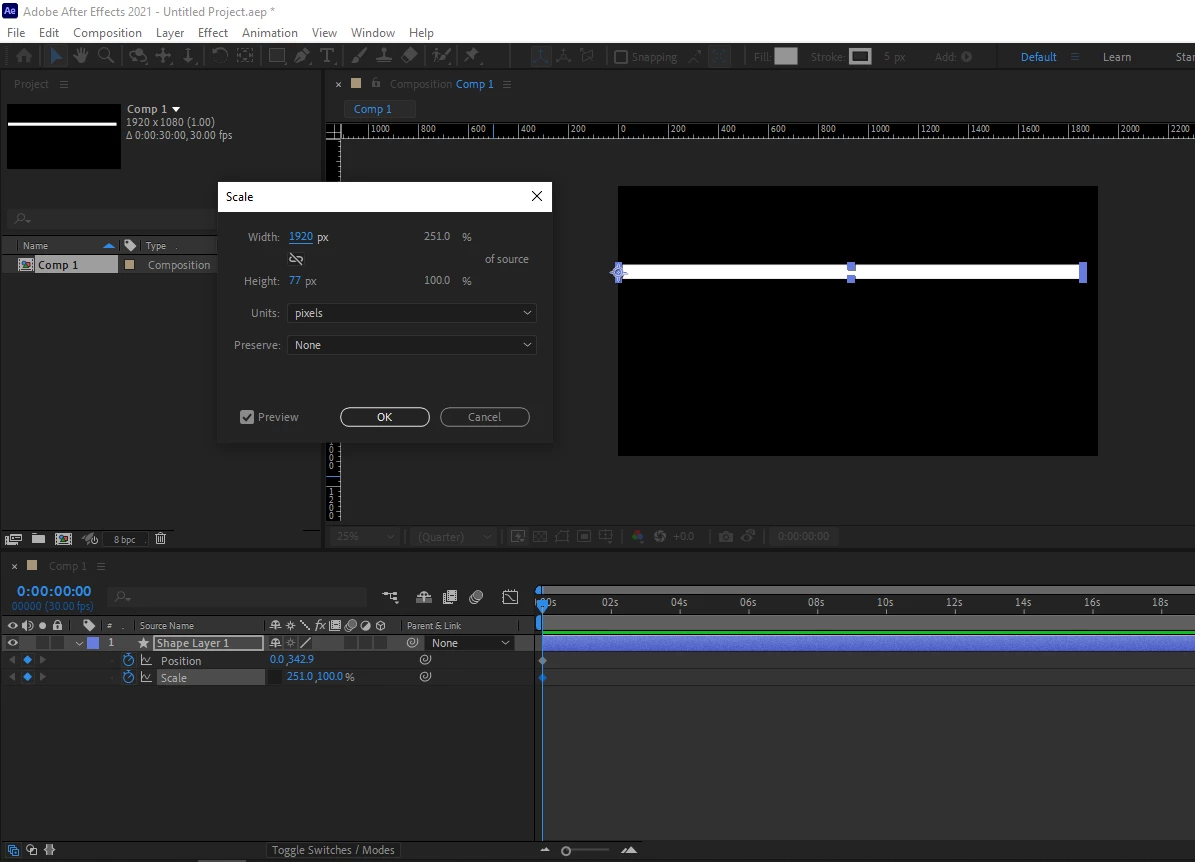
So here I have a 1920px x 1080px composition. I've created a shape and set its width to 1920px, and its x position to 0px. I'm confused as to why this block doesn't cover the entire length of my composition but instead ends at around the 1860-1865px.
I feel like there's something very basic I'm missing here, any help is appreciated.

This topic has been closed for replies.
Correct answer Szalam

You have to remember that there are multiple places to adjust transformation values in a shape layer. There are the transform properties of the layer itself, but there are also transform properties for each shape group and transform properties for certain types of parametric shapes. But I'm a bit confused why you're messing with the scale property instead of the size of a rectangle shape. That would keep things neater (and easier to read what you're doing since you can see the size without having to do a popup like this).

1 reply

Szalam
Community Expert
SzalamCommunity ExpertCorrect answer
Community Expert
July 3, 2021

You have to remember that there are multiple places to adjust transformation values in a shape layer. There are the transform properties of the layer itself, but there are also transform properties for each shape group and transform properties for certain types of parametric shapes. But I'm a bit confused why you're messing with the scale property instead of the size of a rectangle shape. That would keep things neater (and easier to read what you're doing since you can see the size without having to do a popup like this).

philt95067733
Participant
July 3, 2021

I'm still quite a beginner with the software and most if not all of what I've learned so far has used the scale to adjust shape sizes. Even searching "adjust shape size by pixel after effects" the first answer instructs to right-click the Scale setting and adjust from the pop-up menu. 
Regardless your way makes WAY more sense, and 100% fixes my problem. Thanks so much!

Szalam
Community Expert
Community Expert
July 3, 2021

Glad to help!