
January 11, 2019
Question

Placing 30,000 little squares one by one (Motion tracking question)

  • January 11, 2019
  • 1 reply
  • 1592 views

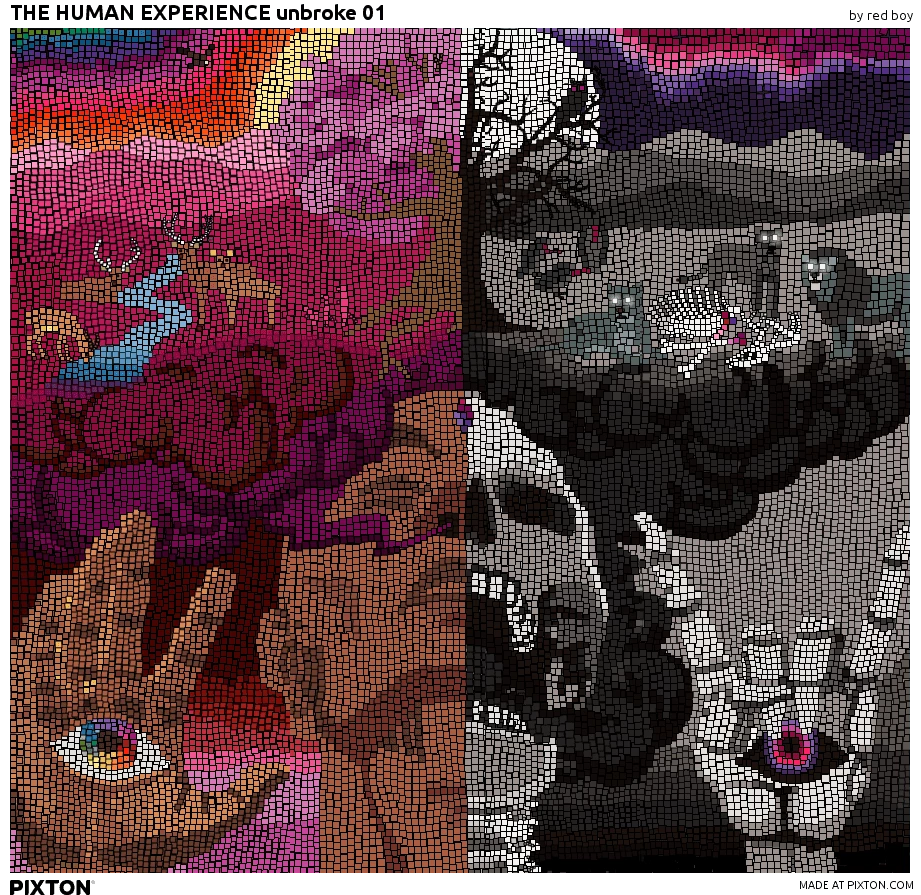
I'm making a video of a time lapse of me placing squares one by one, tracing the photo behind it (pictures below). What i want to do is track and block out the picture im tracing in the background, and replace it with just white. I just need to know if AE motion tracking can handle tracking the background image and blocking only that precisely while still allowing you to see the little squares and the mouse placing them?
    This topic has been closed for replies.

    1 reply

    Andrew Yoole
    Inspiring
    January 11, 2019

    I'm having difficulty understanding what you want to do.  It'd be helpful if you could explain more thoroughly what material you have, and what you want to achieve.

    Your image looks like a composite of many other elements/images.   Do you have access to all those individual elements?  Or is the artwork flattened? IS it stills, or video footage?  What do you want to cover with white - all the background elements except the human head?  Other things as well?  What makes you think tracking will be necessary?

    January 11, 2019

    The background is indeed many photos, but you can look at it as one big solid photo, or flattend, in the back of the squares (since again, this will be a time lapse video of me placing the squares over the photo/photos in the background)  i want the background photo/squarless part to be whitened out, so it looks like im just placing the squares blind. The squares eventually cover everything in the back (the photos) not just specific things like oa head etc...I dont know how else to describe it.

    Andrew Yoole
    Inspiring
    January 11, 2019

    The squares arent an effect, they are a prop on a site called "pixton" where you make comics. They have car props you can use, houses, people, cirlces and other shapes etc...I uploaded the photos you see behind the squares to the site, and then i took each square prop and placed them one by one with my mouse cursor on the screen (not my body). Each square is independent. I clicked and dragged all of them in pkace over the images until the images were fully covered. Then i downloaded the completed work from the site and uploaded it here.

    I wanna track the images behind the squares so the background can continuesly be blocked out as i place the squares. So it just looks like im placing the squares blind and/or doesnt look like im tracing the photos behind it.


    But what motion are you tracking?  What elements are moving?

    Sorry if I'm being slow, I just don't get what you want to do.  I think maybe there are some terminology issues here.

    Let me try and break this down for you.

    Firstly, what actual elements do you have to work with?

    From what I understand, you have 1 - your original flattened artwork, and 2 - the flat artwork you've created and exported from the Pixton website.  What format are these files?  Or is the Pixton file NOT flattened, ie provided in a layered format like PSD?  You said the little square tiles are "independent", but in what way?  Can you individually control them once they are imported to After Effects?  Can you import them so that each tile becomes a layer?

    Secondly, what will the final result look like, SPECIFICALLY.

    You have referred several times to seeing yourself in time-lapse, eg "So it just looks like im placing the squares blind and/or doesnt look like im tracing the photos behind it."  

    But do you mean that you will visually see yourself in the end result (like your full body positioning tiles, or just a hand positioning tiles?)   In which case, motion tracking may be required.

    Or do you mean you just want the square tiles to appear one by one on a white background, gradually, without seeing yourself in the shot?  In which case, I can't see any purpose whatsoever for tracking.

    Or, ignoring everything above, are you saying you have a screen recording of the creation process on the Pixton website, where we see your cursor dragging each tile over the original artwork, and you want to eliminate the original art from that screen capture so that you only see the tiles being placed?  If this is correct, once again there is no tracking involved at all, just some intricate rotoscoping/masking. Or, possibly, if the footage is high quality, it may be achieved easily using a Difference key.