

MahaB82A_
May 14, 2026
Answered

Playhead

  • May 14, 2026
  • 1 reply
  • 62 views

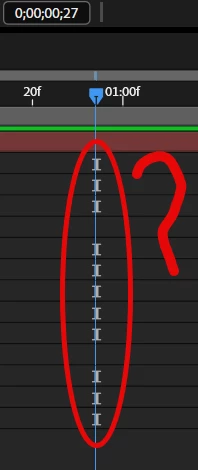
What is the reason this “I” like icons are in front of play head. is there any way to hide this? . This icons are smothering keyframes [KF] when play head is over the KF.


    Correct answer Kevin-Monahan

    Hi,

    I talked with the team. They said:

    Those are the indicators that a property doesn't have any keyframes, and they allow you to select those properties without changing your focus over to the left column of the Timeline.


    I hope that helps.


    Thanks,
    Kevin

    1 reply

    Community Manager
    May 14, 2026

    Hey Maha,

    Thanks for the question. I'll have to ask the team behind the nuance of this piece of the UI, as this question is out of my purview. I hope we can get a response from you soon.


    Thanks,
    Kevin

    Kevin-MonahanCommunity ManagerCorrect answer
    Community Manager
    May 14, 2026

    Hi,

    I talked with the team. They said:

    Those are the indicators that a property doesn't have any keyframes, and they allow you to select those properties without changing your focus over to the left column of the Timeline.


    I hope that helps.


    Thanks,
    Kevin

    MahaB82A_
    MahaB82A_Author
    May 14, 2026

    Thanks for the reply. And I wish the team could make it possible to have keyframe of default color of user choice.
