ItsRaty
Participant
January 6, 2017
Answered

Playhead playing at 0.5 speed. HELP?

  • January 6, 2017
  • 1 reply
  • 756 views

I'm quite new to after effects so i'm hoping I'm just being stupid and this is an easy fix. After Effects has been running fine up until yesterday where i changed a few settings to help my preview run nicer. Whenever I now try to preview my work the playhead moves at 0.5 speed. The area above the playhead, which is usually green, is blue as well. Please help.

specs

MacBook Pro early 2015

2.9 GHz Intel Core i5

Memory 8 GB 1867 MHz DDR3

running 2017 after effects
This topic has been closed for replies.
Correct answer Roei Tzoref
until yesterday where i changed a few settings to help my preview run nicer.

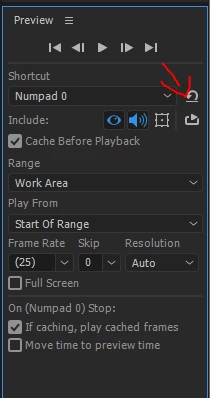
you can reset your preview panel here:

Whenever I now try to preview my work the playhead moves at 0.5 speed

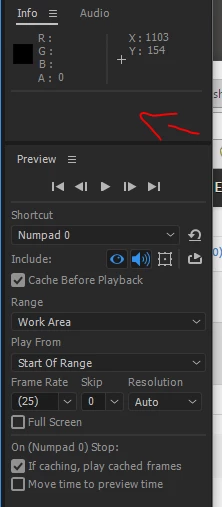
after your reset your panel, check again and show us a screenshots of what it sayes in the info panel about your playback

The area above the playhead, which is usually green, is blue as well

that's not related. blue means the frames are stored to disk and Ae will now save them to RAM instead of re-render them all over again.

you should read here about what to expect when playing back in After effects:

Preview without rendering in After Effects

watch this:

Preview without rendering in After Effects

and this:

After Effects CS6 Preview panel

and comeback if you still have questions.

1 reply

Dave_LaRonde
Inspiring
January 6, 2017

itsraty wrote:

After Effects has been running fine up until yesterday where i changed a few settings to help my preview run nicer.

Change it back.

ItsRaty
ItsRatyAuthor
Participant
January 6, 2017

I've changed everything back (apart from emptying cache) and it's still going at half the speed

Roei Tzoref
Roei TzorefCorrect answer
Legend
January 6, 2017
until yesterday where i changed a few settings to help my preview run nicer.

you can reset your preview panel here:

Whenever I now try to preview my work the playhead moves at 0.5 speed

after your reset your panel, check again and show us a screenshots of what it sayes in the info panel about your playback

The area above the playhead, which is usually green, is blue as well

that's not related. blue means the frames are stored to disk and Ae will now save them to RAM instead of re-render them all over again.

you should read here about what to expect when playing back in After effects:

Preview without rendering in After Effects

watch this:

Preview without rendering in After Effects

and this:

After Effects CS6 Preview panel

and comeback if you still have questions.