Thanks for your input. I know it can be done because someone did it. Deconstructing how they did it is my goal. It does not have to be exact as long as its fairly similar. I have been able to make something somewhat similar but its not there yet. Any other suggestions?
That effect was done with Particular and multiple emitters. I showed you a simple way to get producers (emitters) pointing in different directions. You could animate the Z position of each emitter and turn gravity to Zero. If you were using Particular you could get the particles to explode around the emitter by increasing the birth rate, decreasing the number of particles and animating the physics. You cannot reproduce that exact effect with the particle generators included in AE but you can get a similar pattern with multiple copies of the CC Particle world effect as I demonstrated.
If you use Trapcode particular you can have multiple emitters so not as many copies of particular would be required. The biggest problem with reproducing that effect would be the render time and exhausting system resources because particles add up fast and render times start to go up exponentially.
Here is how to start using only CC Particle world. It will get you close. Both streams are moving at the same speed to keep the illustration as simple as possible.
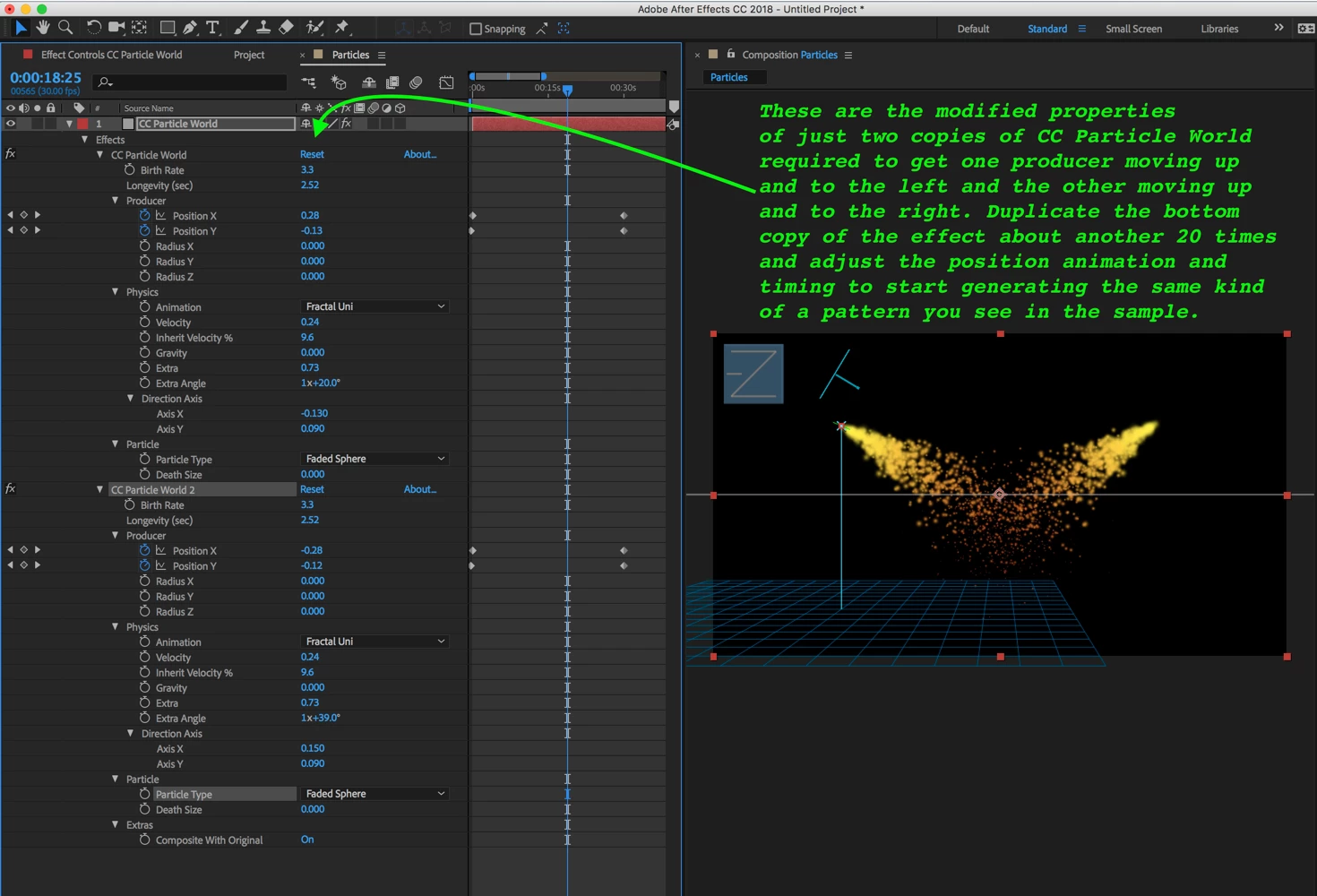
You should be able to duplicate this by adjusting the properties that I modified. Then work on the look of the particles, add animation to the producer (emitter) to make it bigger and animate the physics, lifespan and whatever other properties you need to animate to get the bursting and dying particles at the end of the motion path, then duplicate it again 100 times adjusting paths of each of the producers and the timing to get the look you want, then if your system does not die you will have come close to the same look using a standard effect.
Your system will probably die so make as many as you can, but make them in a square comp, then render the comp with an alpha channel, import the render and start stacking up copies and rotating them until you get the look you like. The add or screen blend mode may help.
If you decide to try Particular you'll need a light added to the comp for each emitter and animate the position of each light to get your emitter paths. You will also need multiple copies of Particular to get the different timings and spread rates that are in the sample. You will also probably have to render a version with fewer paths then use the same stack, rotate, and blend mode trick to fill in the holes.

 AdChoices