Plotting points from json file - more efficient method?
Hello,
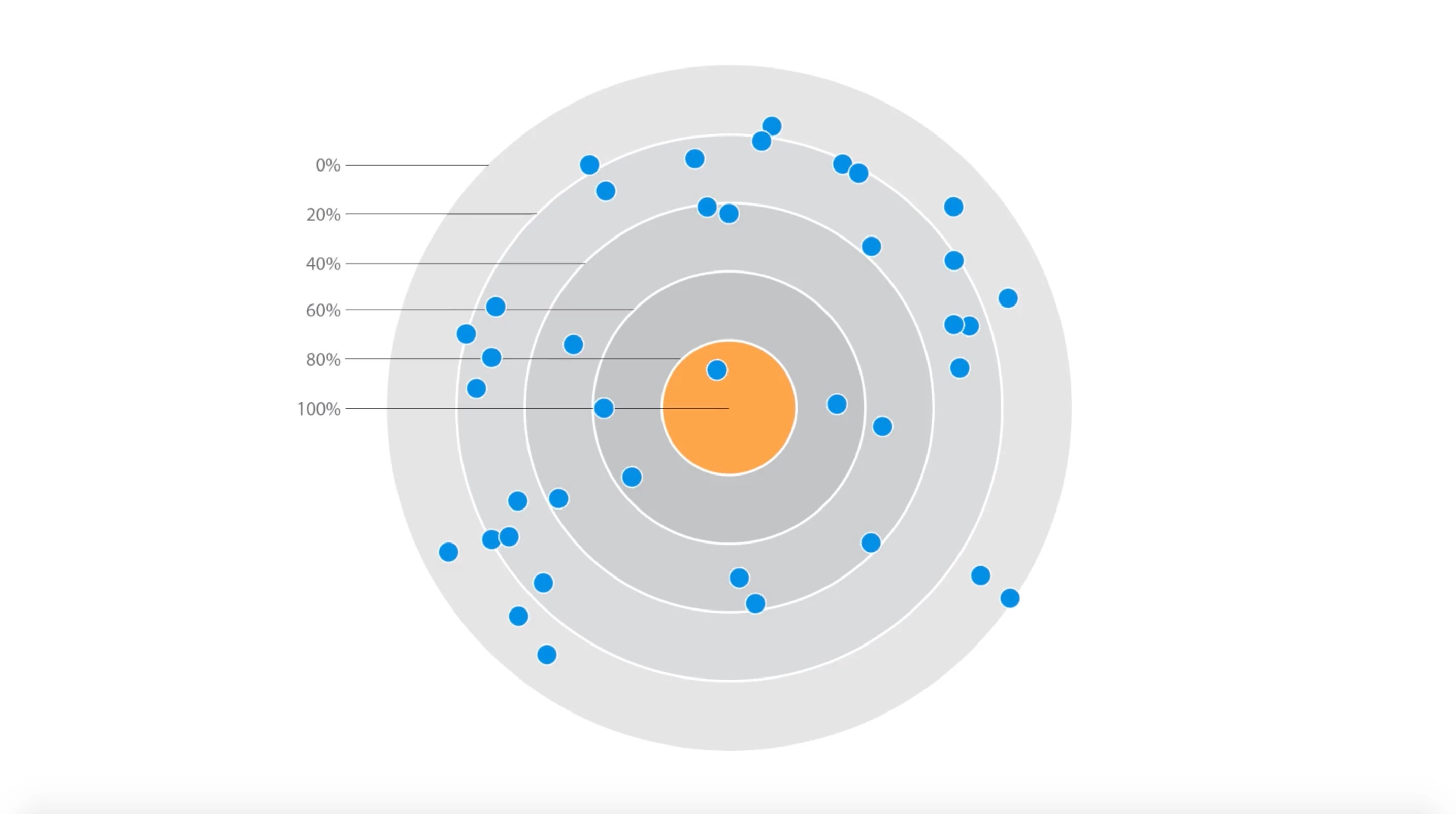
I am currently working on a project where I'm plotting points from a json file on a 'bullseye' type graph. In this graph, each dot represents someone's score between 0 and 100. The closer the dot is to the center, the better their score is, and then the dots are distributed around the bullseye randomly.
This is my first attempt at connecting data to AE and I also have limited experience with expressions. I've been able to make it work as I intended, but as soon as I hit about 40 layers/dots, everything gets really slow (on my laptop at least). I've tried on a desktop gaming computer as well and that doesn't slow down until a few hundred dots in.
Each dot, which is a circular shape layer I created, has two expressions on it - one on the anchor point and one on the rotation. For the anchor point, I pull a value for each score/dot that represents the distance from the center and apply that to the y value. On rotation, I pull a random number between 0 and 360 to distribute the dots around the bullseye.
My question is - is there a more efficient way of doing this? This setup won't be sustainable for me, especially if I need to plot hundreds or thousands of data points. Can I attach these data values to particles instead? I have no experience with particle systems but it seems like that would be more efficient than shape layers.
Any help is greatly appreciated.
 AdChoices