Participant
December 11, 2016
Answered

Position Interpolation path disappeared

  • December 11, 2016
  • 1 reply
  • 1275 views

Hi,

The motion path that shows the different position keyframes and interpolation of a layer is not visible.. I don't know when or how it happened, but all I can see when I select a position keyframe is the outline of the shape Layer (see picture below)

Because of that, I also can not change the curve of the position path which is really frustrating..

Also, there is something weird going on with the shape path, it doens't seem to follow the actual shape.. (see picture below)
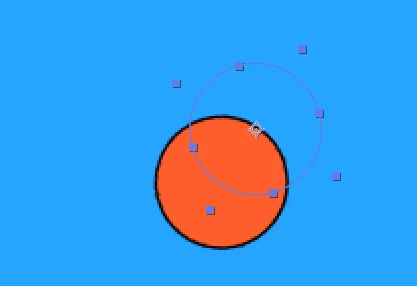
There probably is an easy solution for this, but I couldn't seem to find the answer to this online.

All help is appreciated!

thanks!

This topic has been closed for replies.
Correct answer Roei Tzoref

Exact Ae version and Os?

cropped screenshots is usually a bad idea - there's a lot of useful information we are missing here.  show us a FULL screenshot of all your Ae interface. select your shape layer and type UU so we can see all modified keyframes. check your view options (click on the composition panel and Ctrl+Alt+U) and see to that you got the checkbox in all the layer controls.

1 reply

Roei Tzoref
Roei TzorefCorrect answer
Legend
December 11, 2016

Exact Ae version and Os?

cropped screenshots is usually a bad idea - there's a lot of useful information we are missing here.  show us a FULL screenshot of all your Ae interface. select your shape layer and type UU so we can see all modified keyframes. check your view options (click on the composition panel and Ctrl+Alt+U) and see to that you got the checkbox in all the layer controls.

Participant
December 11, 2016

I already fixed it, some boxes in the view options were unchecked. But thanks for your reply though!

Roei Tzoref
Legend
December 11, 2016

Great! I wonder what about that shape path and position offset. what was it?