Inspiring
May 27, 2020
Answered

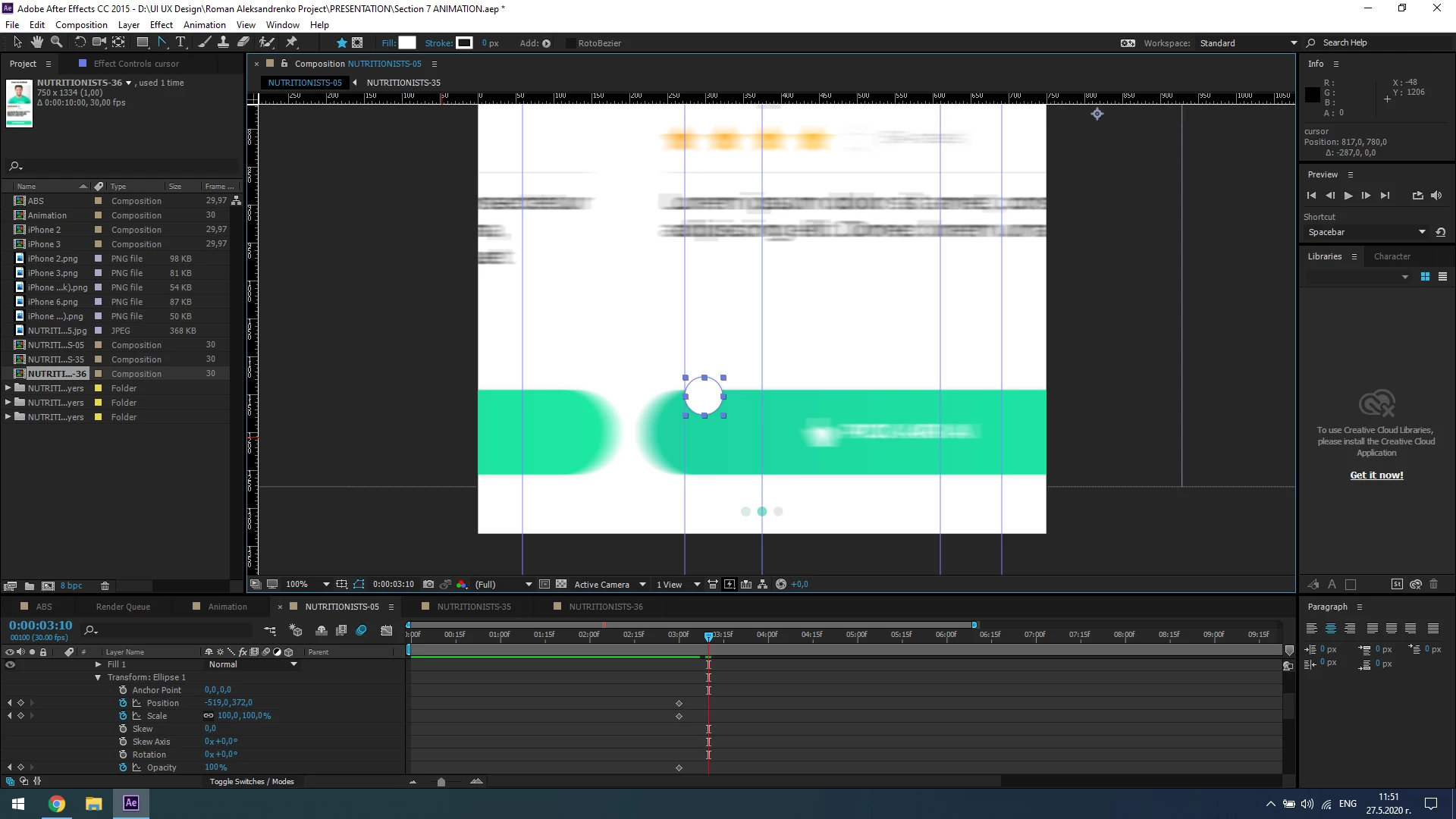
Position Keyframe don't want to move??

  • May 27, 2020
  • 2 replies
  • 1197 views

Hello,


When I am changing the position of an object the position remains the same and the keyframe doesnt save it's current position. 

Checked Google for the answer but couldnt find anything. 

See the screenshots attached:



This topic has been closed for replies.
Correct answer iliyani84496382

The Answer: After Effects just bugged (don't know why) and that's why I couldn't save my Keyframe. I restarted it and now it works fine again. Thanks

2 replies

iliyani84496382AuthorCorrect answer
Inspiring
May 27, 2020

The Answer: After Effects just bugged (don't know why) and that's why I couldn't save my Keyframe. I restarted it and now it works fine again. Thanks

Mylenium
Legend
May 27, 2020

A single keyframe isn't going to animate anything. It might help if you actually read the online help on the basics.


Mylenium

Inspiring
May 27, 2020

The thing is that I am moving the Cursor from one position (the already shown keyframe in the timeline) to another position and the keyframe doesnt want to show up in the timeline. I also move the cursor to the desired place and clicked on the Shape (before the Position icon) and it still can't save the desired keyframe. I did it this way before but now it just stopped working.