

MahaB82A
April 30, 2025
Question

Position & Rotation

  • April 30, 2025
  • 2 replies
  • 1052 views

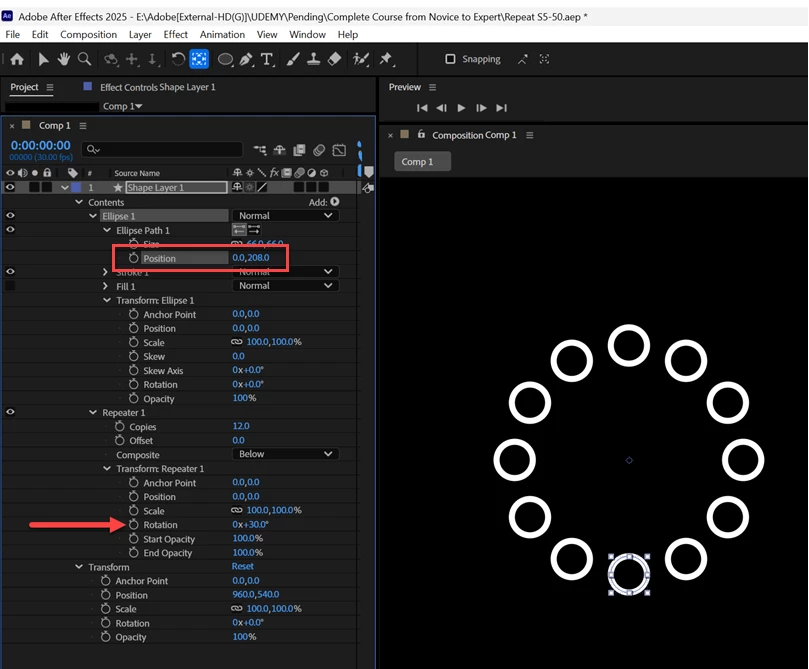
In this composition there are 12 rings one over other with a rotation of 30 degrees. With the positional change only it create a visible rotation. How can it be explained? Video and file also uploaded.

https://easyupload.io/e3rdwg


2 replies

Community Expert
May 1, 2025

Adding a Group and a simple expression that divides 360º by the number of copies in the Repeater will allow you to offset the position of the original ellipse, add copies that fill the circle, and then rotate the entire array. If you want the copies to grow from the original, do the rotation math first and then animate the number of copies. 

You can see all of the modified properties.


Here is the workflow:

  1. Press the "q" key until you get the ellipse tool, double click to create an ellipse with all properties at the default values
  2. Adjust the size, fill, and stroke of the ellipse
  3. Use the Add button to add a Group to the shape layer and slide the Ellipse into the Group
  4. Select the Ellipse and add a repeater, and set the Position to 0,0 then add the following expression for Repeater/Rotation
    c = content("Group 1").content("Ellipse 1").content("Repeater 1").copies;
    360/c;​
  5. Offset the Ellipse/Position to move the first circle to the desired radius for your graphic
  6. Set the number of copies
  7. Fiddle with the rotation angle and other values to animate the number of copies, position, and rotation as needed to create your animated graphic


That should get you started. Animation is always about properly linking the elements and their controls, layers, anchor points, positions, and keyframes, even if you use an app that uses nodes instead of layers. 

MahaB82A
MahaB82AAuthor
May 1, 2025

What does Position values mean? It is not X & Y coordinates. Because ruler does not show that. 


ShiveringCactus
Community Expert
Community Expert
May 1, 2025

These position values are pixels from the centre of the shape, rather than the comp's dimensions 

Kevin J. Monahan Jr.
Community Manager
Community Manager
April 30, 2025

Hey Maha,

Thanks for the post. I apologize that I do not understand the problem you are having. Can you explain your issue in more detail. I downloaded your project and the shape layer appears to be functioning as expected. I like this comp, though. It can make some unique geometric patterns. Let the community know.


Thanks,
Kevin


Kevin Monahan - Sr. Community and Engagement Strategist – Adobe Pro Video and Audio
MahaB82A
MahaB82AAuthor
April 30, 2025

-In the first image Position 0.0,0.0 & Rotation 0x30.0 but rings are in the same Position as one over other.

-In the second image Position 0.0,200.0 & Rotation is same as above but rings take circular path.

How can a single positional change (0 to 200) can determine a different position to 12 of those rings?


nishu_kush
Legend
May 1, 2025

That's because changing the position that you've highlighted in the screenshot changes the position of the Ellipse (not the position of its layer). Since the main Ellipse changes the position, its copies will follow.

Hope that helps.


Thanks,
Nishu