MahaB82A
April 15, 2026
Answered

Position working but rotation not

  • April 15, 2026
  • 1 reply
  • 115 views

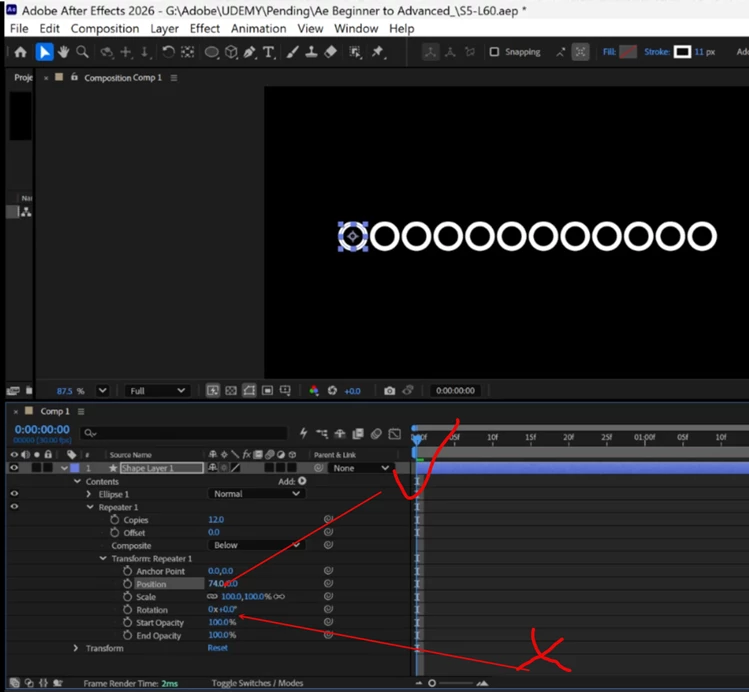
I add 12 repeater to a shape layer. Position works but rotation doesn’t work. How to fix it?

Video is attached as well. 


    Correct answer Roland Kahlenberg

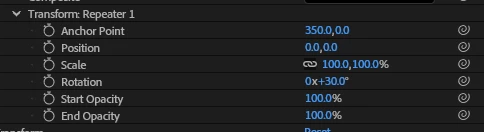
    If you want to distribute the repeated instances in a circle then you need to adjust the Anchor Point in the Repeater’s Transform Group - see image. To distribute the layers fully around the circle, you divide 360 by the number of repeaters and put this number into the Rotation parameter in the Transform Group.

    HTH


    1 reply

    Dan Ebberts
    Community Expert
    Community Expert
    April 15, 2026

    I think the rotation is probably working but you can’t see it because of the symmetry of the circle. Try a square to verify.

    MahaB82A
    MahaB82AAuthor
    April 15, 2026

    You can see forming a line of 12 circles when you change it’s position similarly forming a big circles of 12 small circles when you change it’s rotational values, it is in the tutorial. I am unable to attached tutorial screenshot because all image is blackout when I take screenshot. I do not have cell at the moment to take picture as well. 


    12 circles are there but one over other. Issue is how to get separated it.  

    MahaB82A
    MahaB82AAuthor
    April 15, 2026

    Ellipse image response video is attached.