
nilleg57851248
Inspiring
January 5, 2019
Question

Preset is limited or not showing
  • January 5, 2019
  • 1 reply
  • 3353 views

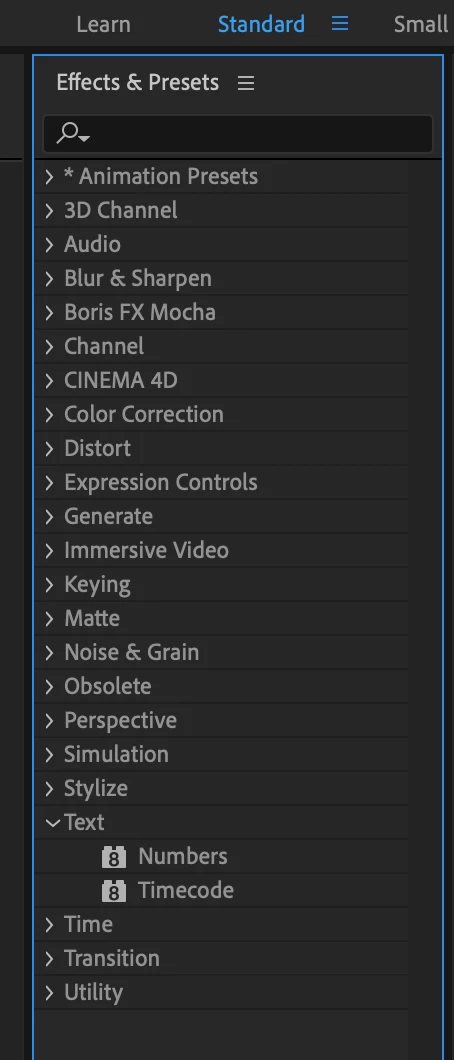
I try to use preset in AE but only e few shows up. Why? - like only 2 in text preset!
Also I wonder if the preview in Bridge will be fixed? Now it do not run.

I use macOS Mojave 10.14.2

    This topic has been closed for replies.

    1 reply

    imeilfx
    Inspiring
    January 5, 2019

    You are confusing two things :
    - Animation pressets that you can find in Animation presset folder and there is much more of them than 2 (and I guess you are looking for text pressets so you have to open Text folder in Animation pressets folder

    - with effects/plugins and there f.e. in Text effects/pluins folder you can find only two of them

    As for previewing animation pressets in Bridge - last time I checked everything worked fine

    nilleg57851248
    Inspiring
    January 5, 2019

    Oh! So I have to go via Bridge to see them all?

    imeilfx
    Inspiring
    January 5, 2019

    What do you mean "see". To see list of your pressets go to Animation Pressets folder and open folder with kind of pressets you need.
    As I showed you on screenshots.

    If you wish to preview your pressets (look how it will work when you apply it to your layer just click on top right corner of Effects and Pressets panel in AE and chose Browse Presets - if you have Bride installed - Bridge should start and show you all presset folders with all of standard AE pressets in them.