Participant
Mar 28, 2023 4:58 AM UTC
Question

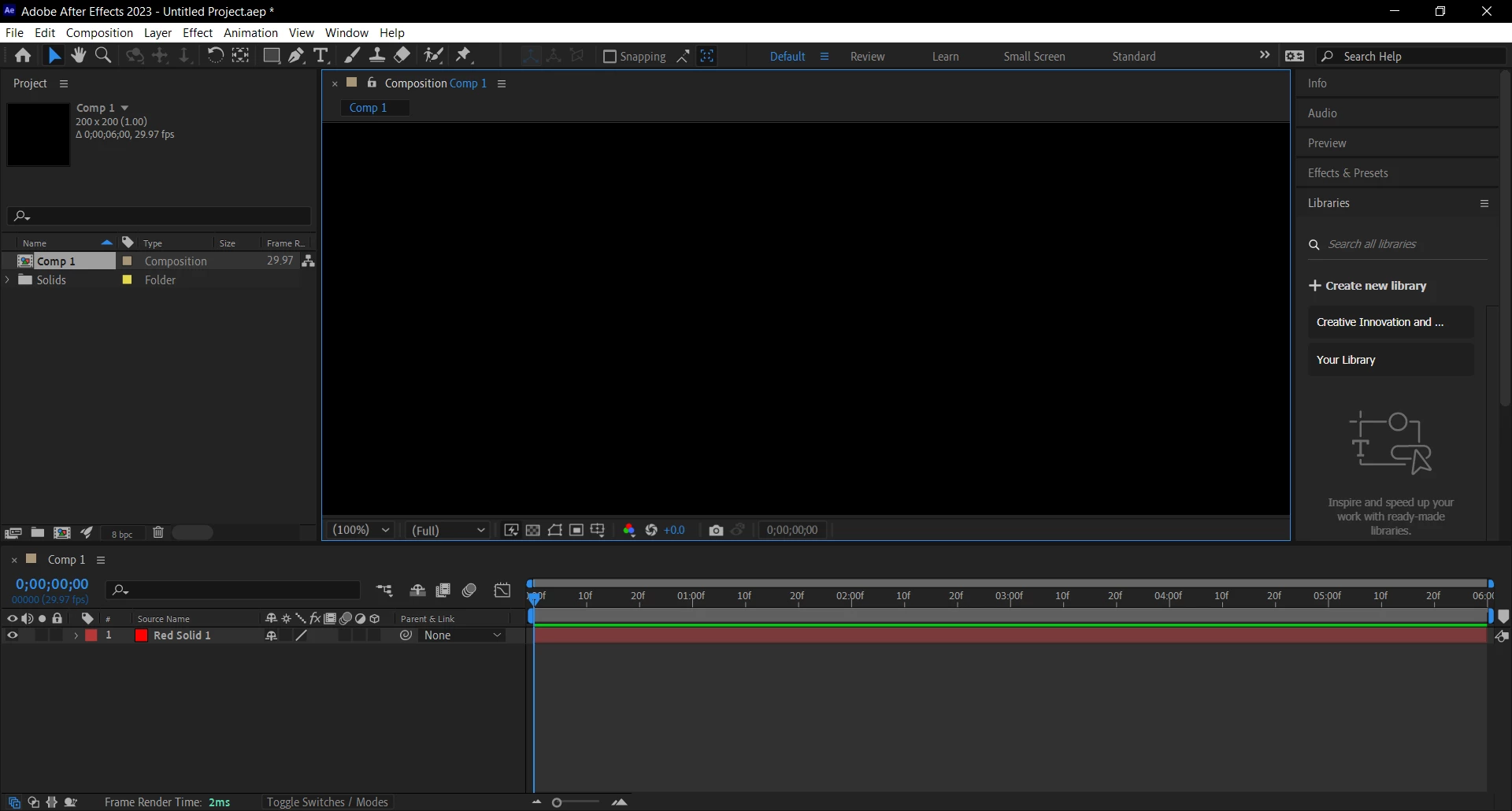
Preview composition window is black and not showing anything

As you can see in the screenshot, it doesn't show anything in the preview composition window. I've tried everything and nothing seems to be working. Anyone got any ideas?

 

This topic is closed to new replies. Start a new post to keep the conversation going.

7 replies

nishu_kush
Legend
Mar 28, 2023 7:51 PM UTC

Hi Damian28699033x29k,


We're here to help.

Could you share your system specifications (CPU, GPU, RAM, OS version)? What's the exact version of After Effects you're using? Are you using any third-party plug-ins?

Try this - Go to After Effects Preferences > Display > disable Hardware Accelerated Composition, Layer, and Footage Panels.

Let us know if that help.


Thanks,

Nishu


Translate
Participant
Mar 31, 2023 3:33 AM UTC

Hi, no problem. 

CPU: Intel i7-8705G 3.10GHz
GPU: AMD Radeon RX Vega M GL
RAM: 16 GB 2400 MHz
OS Version: Windows 10 Home, 19044.2604

I'm using the latest version of After Effects, disabling Hardware Acceleration didn't do anything, in fact it was already disabled.

Thanks,
Damian

Translate
nishu_kush
Legend
Mar 31, 2023 3:14 PM UTC

Thanks for sharing the details. Is it happening in a particular project or all of them? Are there any third-party plug-ins installed? Can you try switching to Mercury Software Only in File > Project Settings?

As basic maintenance, try clearing the preferences. Here's how: https://community.adobe.com/t5/after-effects-discussions/faq-how-to-reset-trash-preferences-in-after-effects/td-p/10634342

Let us know the results.


Thanks,

Nishu

Translate
JohnColombo17100380
Community Manager
Community Manager
Mar 28, 2023 5:33 PM UTC

Hi @Damian28699033x29k,

A blank/blank Composition panel usually indicates incompatible GPU drivers. What GPU hardware are you using and what driver version?


Thanks for any further info,

- John, After Effects Engineering Team 

Translate
Participant
Mar 31, 2023 3:22 AM UTC

Thanks for your reply, I'm using a laptop which has a AMD Radeon RX Vega M GL graphics card. The driver version is 26.20.15029.15007.

Thanks,
Damian

Translate