



Juan Barrilete
Inspiring
January 29, 2022
Question

Preview on v22 not realtime when playing rendered footage

  • January 29, 2022
  • 2 replies
  • 1253 views

I recently upgraded to 2022 and find that I am unable to preview in realtime some footage on some of my projects, even though they appear to have been rendered correctly. See attached image - playhead is clearly under green line but you can see in the upper right the previewing is NOT in realtime:
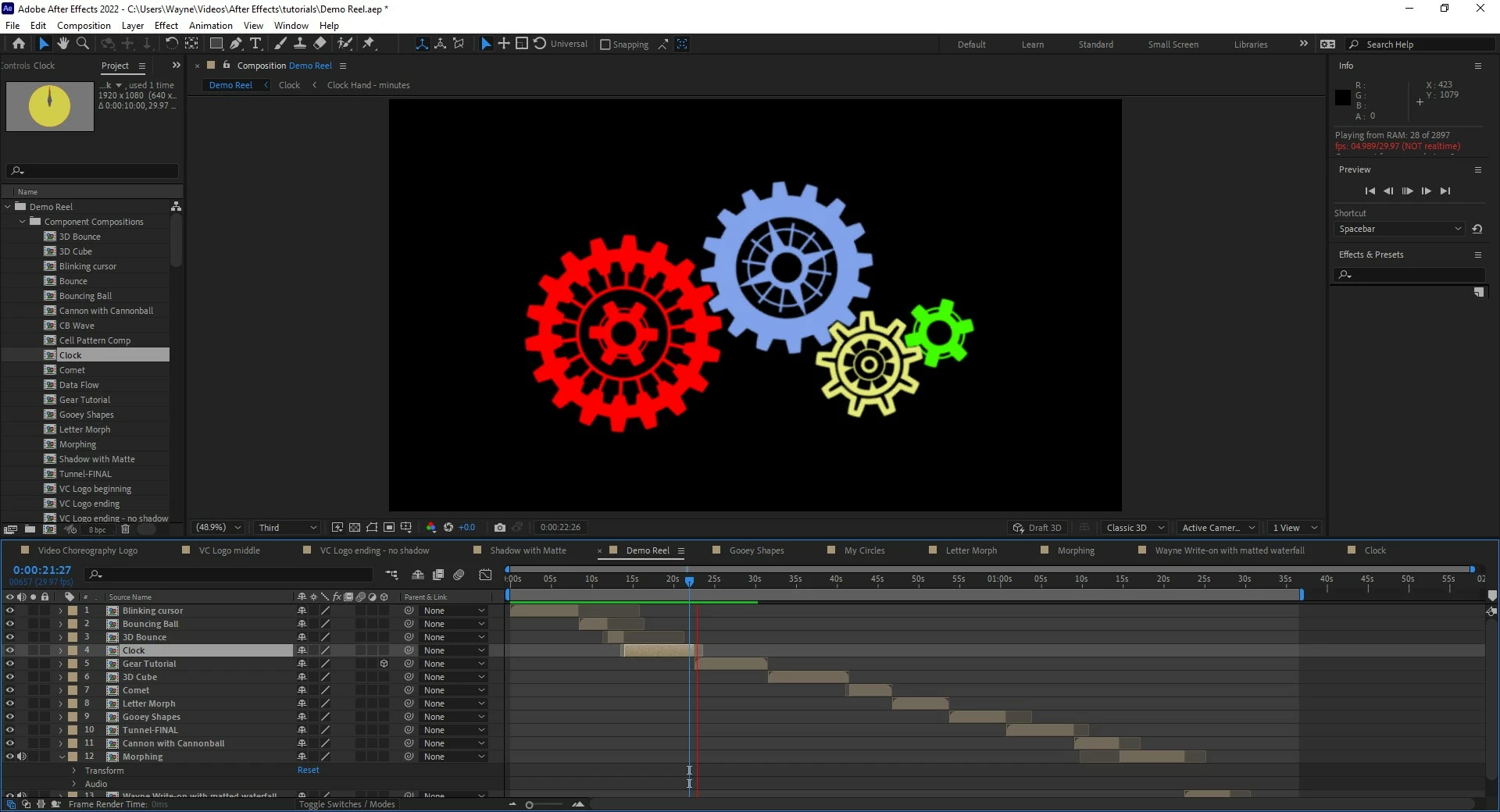


I've tried clearing the media cache and DB, switching to different preview speeds, nothing seems to help.


I've tried editing the same projects in AE 2020 and don't see this problem so it must have been introduced recently.

This topic has been closed for replies.

2 replies

Known Participant
February 27, 2022

I have the exact same experience with v22.


​With Mulit-Frame Rendering ENABLED, previewing a simple .MP4 file is much slower to cache than without the feature enabled. Disabling mulit-frame works instantly - previews are fine.


​​This is a very simple test, and I've reproduced it on two builds of CC 2022, on two different workstations.

I import a .MP4 video file (1280 x 720, 25fps), and simply try to preview it in a comp.

With Multi-Frame Rendering turned OFF, the preview is fast and smooth - everything normal.

With Multi-Frame Rendering turned ON, the preview is slow to cache frames, and quickly the preview will not play in real time while the frames are cached. In the Information panel, it shows that multiple frames are being processed, but when looking at CPU usage via Task Manager in Windows, there is LESS CPU usage compared to CPU usage when Multi-Frame Rendering is turned OFF.

This is just using a blank project, importing a video file, placing that in a comp, and doing a preview.

Tested on two different workstations - same result. Both computers are plenty powerful. One running CC 2020 v22.1.1 (Build 74), the other running CC 2022 v22.2.0 (Build 120).


Jenkmeister
February 28, 2022

Any chance you are able to post the video file you're using? I'd like to try to reproduce the issue.

Mylenium
Legend
January 29, 2022

Unsatisfying as it may be, you still will need to straighten out your hardware acceleration settings. Check the relevant prefs, preview settings and your graphics driver. also have a look at the multiframe rendering stuff. Apparently it causes a lot of trouble for many users since it's not working correctly.


Mylenium

Juan Barrilete
Inspiring
January 29, 2022

Graphics driver was just upgraded to the latest version.

Let me try turning off multiframe rendering.

Juan Barrilete
Inspiring
January 29, 2022

Turning off multiframe rendering fixed it. Thanks, @Mylenium.


Although I would say it's a disturbing failure mode when the interface tells you a section of footage is rendered and it isn't. I'd be glad to donate the project that exhibits this bug if someone wants to troubleshoot it. It seems to be reproducible. Turning mfr off - preview works fine. Turning it back on - preview/render exposes the bug.