Participating Frequently
February 27, 2023
Answered

Preview through mercury transmit to second monitor not working

  • February 27, 2023
  • 6 replies
  • 669 views

It doesnt work at all 9/10 times, and when it does start working it goes away after a few minutes.

Correct answer A.Ammash

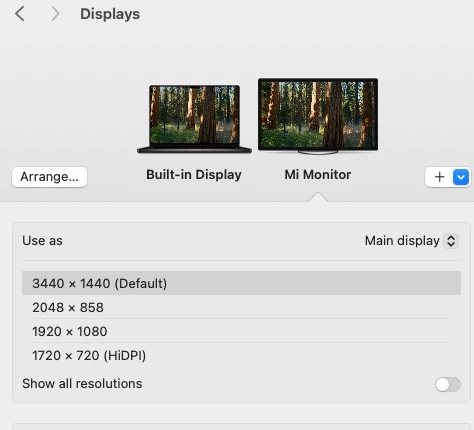
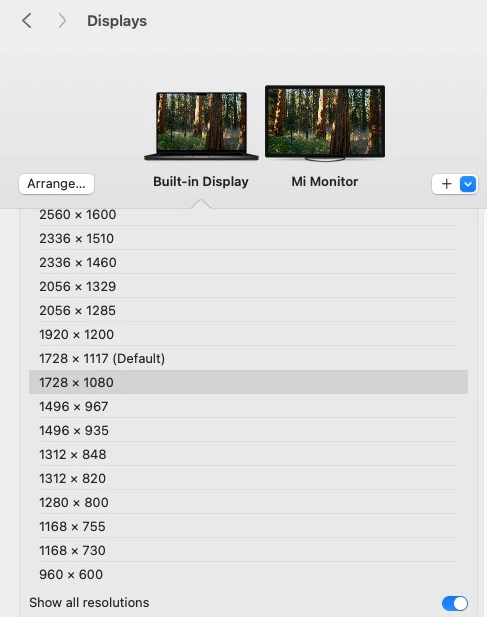
i fix it when i change mac resolution to 1080 with out notching but this is not normal soulation 

6 replies

Participant
April 21, 2025

i have same problem all the time and now Is full screen white nothing show in 2025 and 2024 

I'm using m3 max mac book pro with wide screen hdmi

A.AmmashCorrect answer
Participant
April 21, 2025

i fix it when i change mac resolution to 1080 with out notching but this is not normal soulation 

Community Manager
September 14, 2023

Hi William Jauregui, 


Moving it to Discussions for troubleshooting.

Participating Frequently
August 3, 2023

I use a 2021 16in MacBook Pro with the M1 Max processor. It's connected to a USB-C monitor, which is my main display, so that's where I have my timelines and everything. I have the MacBook display as secondary and that's what I have as my preview display. It works without issue in Premiere, but almost never works with AE. The only way I can get it to work is by resetting preferences to default, but then I lose all customization and saved workspace. And then it stops working when I open a new project.

David I Simonton
Adobe Employee
Adobe Employee
March 3, 2023

If it should stop working again for you, the first thing that comes to mind is to check to see whether part of the application's UI might be spilling over onto the secondary monitor.  If the UI on the big monitor bleeds over onto the secondary monitor, that can interfere with Transmit functionality. 

Participating Frequently
March 3, 2023

I'm using a 2021 Macbook Pro 16 inch, connected to a USB C monitor via USB C, using the larger external monitor as the main display and the macbook display as my video preview. weirdly today it has been working, though

David I Simonton
Adobe Employee
Adobe Employee
March 3, 2023

Hi, William.  Can you provide some more details about your setup?  Are you using a 3rd party device (like from AJA, Blackmagic, Avid...) to send video out via Transmit?  Or to a secondary/tertiary... monitor connected to your graphics card?