Participant
December 21, 2016
Answered

Problem accessing After effect assets files

  • December 21, 2016
  • 1 reply
  • 503 views

A couple days ago I just install the new version of adobe after affects CC 2017. But when I open any of my old projects made from old versions of adobe after effects; a warning message was appears:
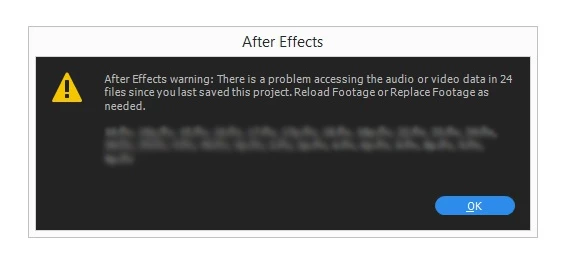
I try to re import the assets, even delete them from the project but the same error keep showing in the beginning.

is there any  one have the same issue ?

and what should I do to solve it ?

Many thanks

This topic has been closed for replies.
Correct answer Moath.Omar

ok I think I had the same issue, and I had to change the location of the folder where I put my assets in, to be on the root where the "*.aep" project located, and re-connect the assets from the new location.

It is recommended to make the assets directory as short as you can to avoid any issue related.

1 reply

Moath.Omar
Moath.OmarCorrect answer
Participant
December 21, 2016

ok I think I had the same issue, and I had to change the location of the folder where I put my assets in, to be on the root where the "*.aep" project located, and re-connect the assets from the new location.

It is recommended to make the assets directory as short as you can to avoid any issue related.