


Participant
June 23, 2024
Answered

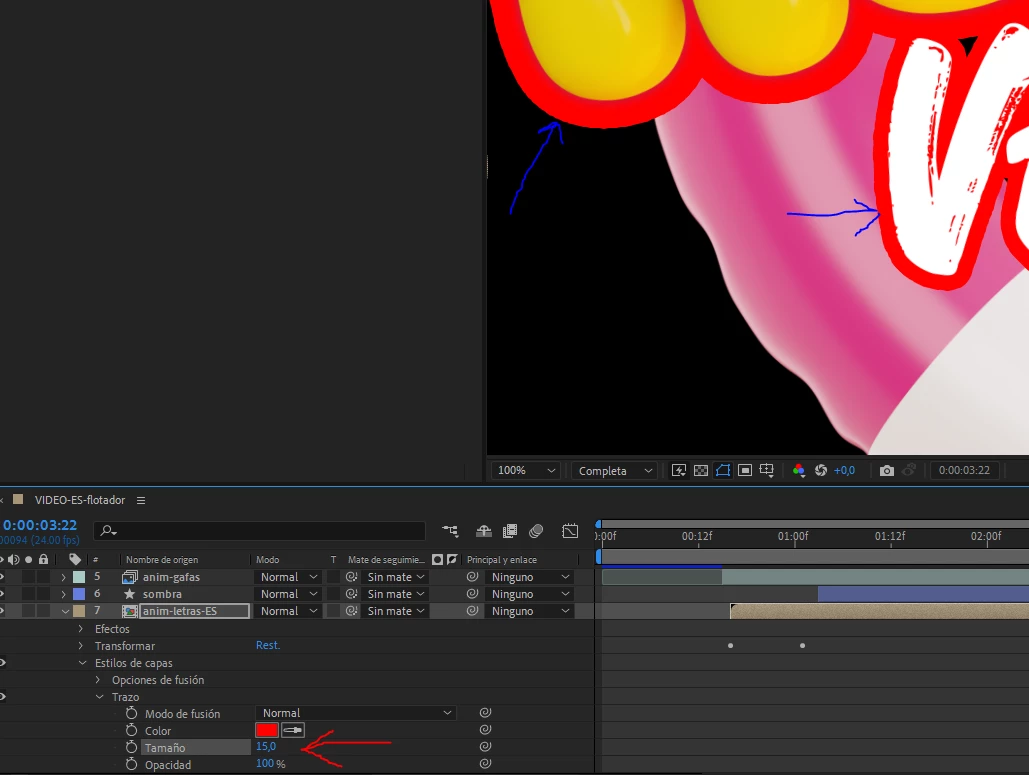
Problem whith composition with different stroke thickness in the elements.

  • June 23, 2024
  • 2 replies
  • 252 views

Hello, I have created a composition, where inside I have a 3d image and a text. To this composition I have added a layer style with a stroke but both elements do not have the same thickness. Why is this happening?

 

This topic is closed to new replies. Start a new post to keep the conversation going.
Correct answer Mylenium

This happens when you have extra semi-transparent pixels somewhere. Layer styles are applied to anything that hasn't a perfect 0 % transparency. and your yellow blobs likely have something around them that causes this. Clean up your artwork.


Mylenium

2 replies

Mylenium
MyleniumCorrect answer
Legend
June 23, 2024

This happens when you have extra semi-transparent pixels somewhere. Layer styles are applied to anything that hasn't a perfect 0 % transparency. and your yellow blobs likely have something around them that causes this. Clean up your artwork.


Mylenium

nishu_kush
Legend
July 11, 2024

Moving the thread from Bug to Discussions. 


Thanks,
Nishu