
ales_moravec
Participant
November 29, 2022
Question

Problem with AE saving on external SSD

  • November 29, 2022
  • 4 replies
  • 1321 views

Hi,

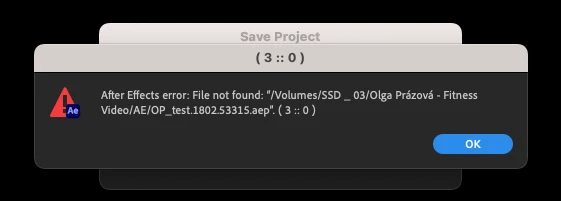
I run with a now macstudio and opened AE lastest version (23) and started with new project. While I tried to save the project on external SSD it wrote me error with saving. When I saved on the local disk into mac, it works. Could you please help me to solve it?

Thank you!
Aleš
This topic has been closed for replies.

4 replies

Participant
January 24, 2023

Hi!


I have exactly the same Issue with my Mac Studio M1 Max 32Gb and Samsung T7 Shield SSD external drive. Everything (Photoshop, Illustrator, Lightroom, etc) works perfectly, except After Effects (V. 23.1). I already checked SSD format and permissions, and everything is OK. I haven't found a solution yet 😞

Participant
January 24, 2023

I Just solved it! Updated the OS to the last version and that's it! (silly I Know) Hope that works for you too 🙂

Piotr5C95
Inspiring
May 17, 2024

well, I will try this

Participant
January 11, 2023

I do have same problem. it only happens with AE or morgrt file in Premiere pro.

I worked on M1max MacBook Pro on same ssd. 

Mylenium
Legend
November 29, 2022

Would reformatting it on the current machine be an option? I get this feeling that this is more of an OS issue. Perhaps some identifiers have changed, perhaps some permissions not updated or it tries to create restore and file version info that your drive cannot support. Do other programs, in particular Adobe ones of course, expose similar issues?


Mylenium 


ales_moravec
Participant
November 30, 2022

Other programes work, it happens only with AE. 

Mylenium
Legend
November 29, 2022

Does the file save on the root level of the drive and other folders? How is the drive formatted? How is it connected to the computer?


Mylenium 

ales_moravec
Participant
November 29, 2022

I tried to save it into subfolder. External SSD (San Disk Extreme Portable) is connected with USB-C and formated on EX-FAT. Anyway I worked on this SSD on old MacBook Pro (2019) without any complications.