Participant
June 7, 2019
Answered

Problem with Copy and Paste function, please help!!!

  • June 7, 2019
  • 1 reply
  • 286 views

Hello, I just realised something weird happened when I try to use the most basic COPY&PASTE function.

Whenever I tried to copy a shape layer (or anything), the new shape layers seems to be masked inside the original one. (see attached photo)

I did not screw with the default layers setting, so I think there might be a bug inside the software?

I have tried uninstall and install the AE and even reboot my mac. But the problem seems to remain unchanged. Now the AE even crashes when I try to open some old files!
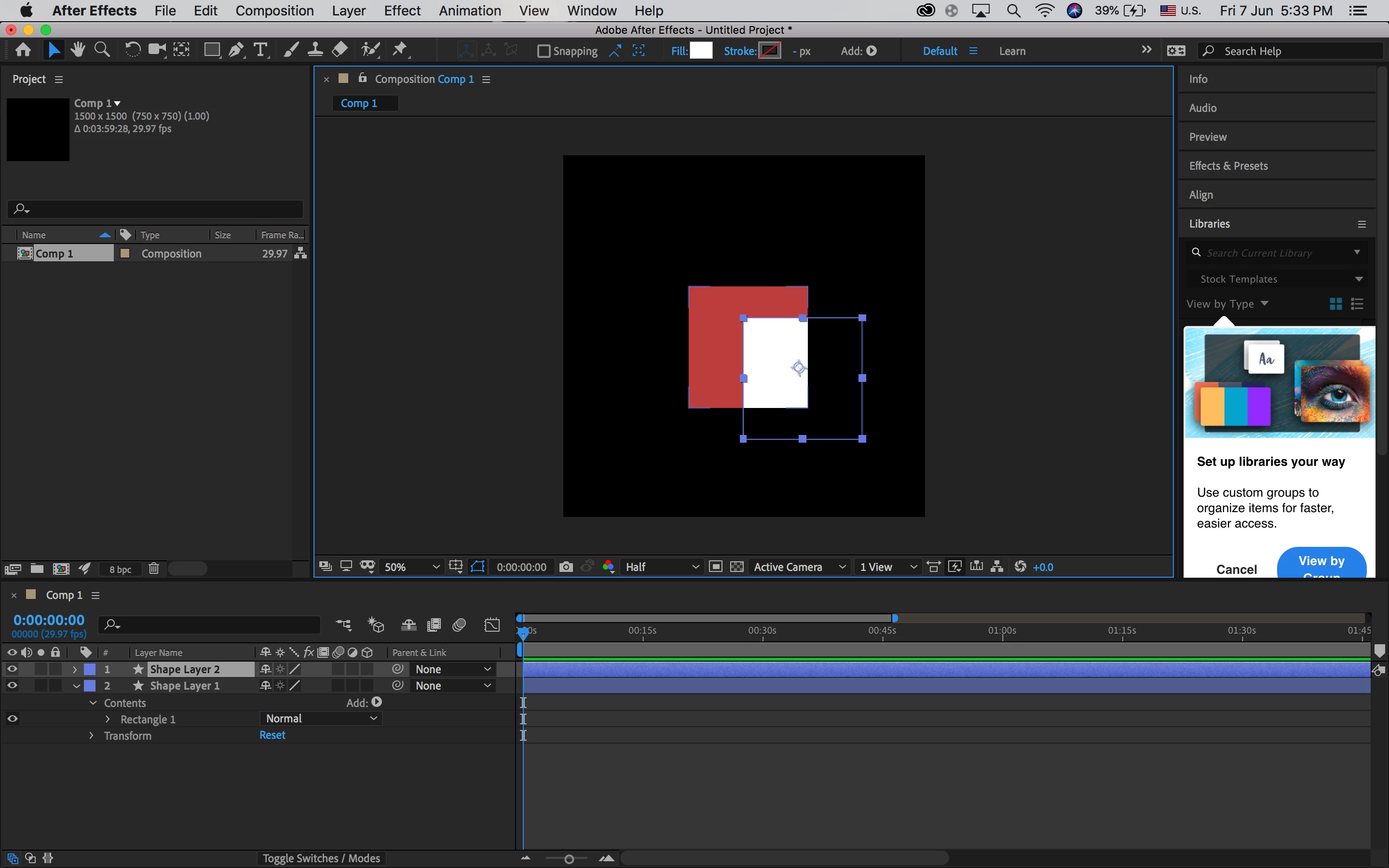
Please does anyone know why? I need to finish my work for my projects. Thank you.

This topic has been closed for replies.
Correct answer Roland Kahlenberg

Looks like one or more of your AE Preference files got corrupted. You need to trash the AEs Preferences - unfortunately, you'll have to trash all of them. Take note that uninstalling and reinstalling AE may not resolve issues related to corrupted preferences If you select options that retain AE's Preferences during uninstalling/reinstalling.

BTW, please file a Bug Report if trashing AE's Preferences helps to solve your issue.

1 reply

Roland Kahlenberg
Roland KahlenbergCorrect answer
Legend
June 7, 2019

Looks like one or more of your AE Preference files got corrupted. You need to trash the AEs Preferences - unfortunately, you'll have to trash all of them. Take note that uninstalling and reinstalling AE may not resolve issues related to corrupted preferences If you select options that retain AE's Preferences during uninstalling/reinstalling.

BTW, please file a Bug Report if trashing AE's Preferences helps to solve your issue.

Very Advanced After Effects Training | Adaptive & Responsive Toolkits | Intelligent Design Assets (IDAs) | MoGraph Design System DEV
Homan820Author
Participant
June 7, 2019

Really appreciate your advice and now it works, I will now file my problem to the adobe team.