Participant
November 12, 2022
Question

Problem with expression

  • November 12, 2022
  • 3 replies
  • 141 views

Hey everyone! 

My knowledge of Ae is limited, which makes my level of expressions even moreso limited. I'm trying to make an effect where we are speeding up the view count for a video on YouTube. YT's viewcount will go up to 999, but then switch over to a decimal system starting at 1k, 1.01k(for 10 views after that) and so on.

So far I have been able to successfully get my numbers to count to 999, but then it gets difficult because I think I need an "If/Else" statement, but so far I have had zero success. Any help would be appreciated.
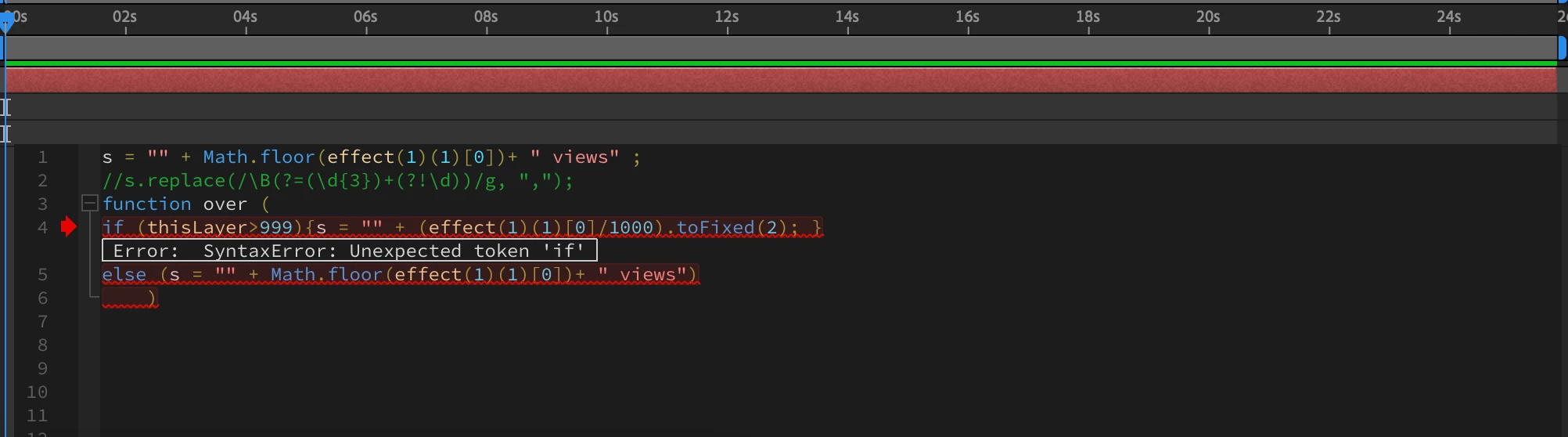
This topic has been closed for replies.

3 replies

Community Expert
November 12, 2022

Add an Expression Control Slider to a text layer and then add this Expression to the Source Text property:

t = effect("Slider Control")("Slider");
if (t < 10)
	n = Math.floor(linear(t, 0, 10, 0, 999));
else if (t => 10)
	n = linear(t, 10, 100, 1, 1000).toFixed(2);
if (t < 10)
	n + " Views"
else if (t >= 10)
	n + "K Views"
Mylenium
Legend
November 12, 2022

thisLayer can't exist on its own. It's always thisLayer.effect(), thisLayer.transform or ihn your case presumably thisLayer.text.sourceText. Anyway, simply refer to this:


http://www.motionscript.com/design-guide/counter.html


No need to reinvent the wheel and sweat your brains out with bad code from some garbage YouTube tutorial or whatever you are using for reference.


Mylenium

Participant
November 12, 2022

For more context, I am trying to map it using the "point control" effect