Inspiring
December 25, 2020
Question

Problem with imported SWF files in After Effects

  • December 25, 2020
  • 1 reply
  • 231 views

Hi all,


I’ve got some cartoon characters which I’m animating in Animate (latest version) then saving as a SWF file and importing into After Effects (latest version).


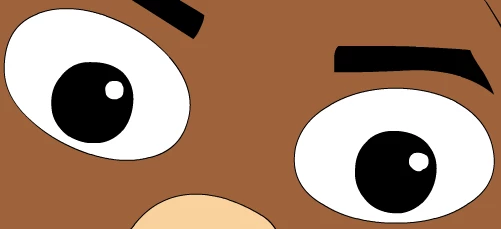
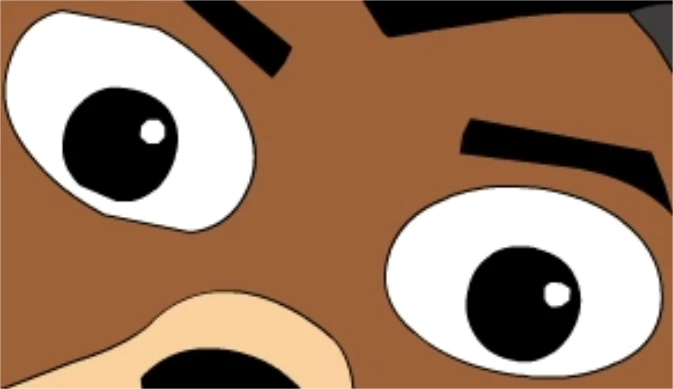
Everything is looking great! With the exception of their eyes or 1 eye. The problem is random sometimes their eyes look fine when imported into AE and other times I end up with the example below.


Does anyone have any ideas please as to what might be happening to cause this? Please let me know if you need any further info/specs which might help.


Many thanks in advance for any assistance.


Adobe Animate original version below - looks fine.
 

Then imported into After Effects as a SWF file version below - Left eye doesn't look right.


This topic has been closed for replies.

1 reply

Mylenium
Legend
December 25, 2020

Simply looks like you mangled the anchor points of the circles while transforming your eyes and the SWF renderer is optimizing some of them away based on the resolution. You may want ot play around with the quality settings as even the smaller circles for the highlights look jagged in fact.


Mylenium

Inspiring
December 26, 2020

Hi Mylenium,


Many thanks for your message, really appreciate your help regarding this issue.


I’ve only just started using Animate and After Effects so quite new to these programs, although really enjoying both of them.


If I could just check please that the quality settings you’re referring to are the Animate settings as shown below? I have tried playing around with these settings but didn’t have any joy this morning. Are there any settings in After Effects which might need changing?


It’s been frustrating trying to fix this issue, the character eyes shown above is my latest attempt in that the characters eyes were redrawn from scratch once again. Nothing else has been done to the eyes (no animation applied at this stage) other than being imported straight from Illustrator into Animate, then exported as a SWF straight into After Effects.


Again really appreciate any further help you can offer, would really make my day if it’s possible to resolve this please.