


Participant
Jul 6, 2024 10:45 AM UTC
Question

Problem with track matte

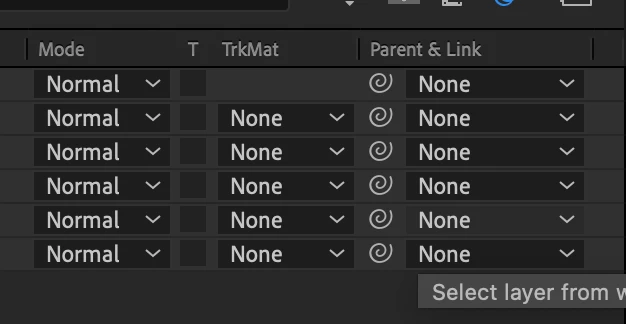
Dear collegues, I have a proble with track matte, it is not displayed on the first line, an empty rectangle is visible, and this function is available on the second line. Tell me how to do the same as on the second line
 

This topic is closed to new replies. Start a new post to keep the conversation going.

2 replies

Community Expert
Jul 6, 2024 1:23 PM UTC

You are using an earlier version of After Effects that only allows a track matte to be applied to the layer below. In the current version, you can use any layer from any position as a Track Matte, and there are two additional small square buttons to the right of the "Track Matte" column heading instead of a dropdown menu to set the matte to Alpha, Alpha Inverted, Luma, or Luma Inverted.

You'll need to update your AE version to be able to use any layer as a Track Matte.


Translate
Participant
Jul 7, 2024 3:42 PM UTC

Oh, thank you! I I couldn't find the reason for a very long time. You are the best!

Translate