Participant
November 11, 2016
Answered

Problem with tracker window

  • November 11, 2016
  • 1 reply
  • 504 views

Hi, I have problem with tracker windows, I use the AE CC 14.0.0.207 and I cannot se everything options in tracker windows as you can see in this picture: https://puu.sh/seCoC/dd1071da85.png I can see just options to select which kind of tracking I would like to use but no more option for tracking, Please where is problem ?

    This topic has been closed for replies.
    Correct answer Roei Tzoref
    I can see just options to select which kind of tracking I would like to use but no more option for tracking, Please where is problem ?

    once again the stacked panel group feature bites users in the a@@. this is not your fault but Ae's faulty interface design. you are using what is called a stacked panel group. this stacks the group in such a way that can hide the panels boundaries if they are not selected.

    if you click on the panel you can see it.
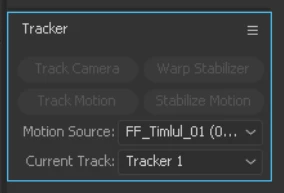
    but if you are not selecting it, it could look like this:
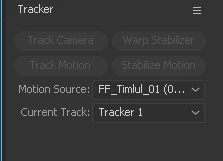
    if you take your mouse cursor to the bottom of the panel
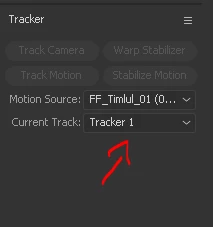
    you will see it changes to a moving boundary symbol. something like this.

    now you can drag it down.
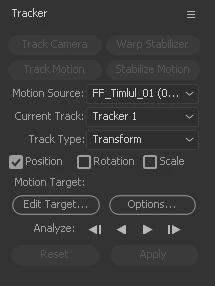
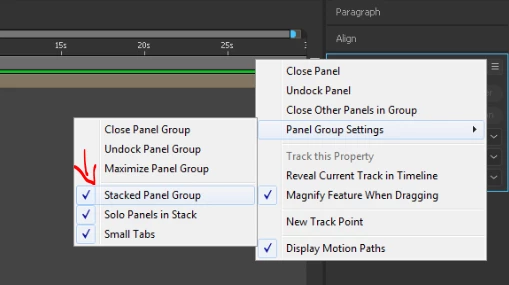
    or maybe do yourself a favor and uncheck this feature option by right clicking any panel option of any panel and in panel group setting uncheck the stacked panel group.

    1 reply

    Roei Tzoref
    Roei TzorefCorrect answer
    Legend
    November 11, 2016
    I can see just options to select which kind of tracking I would like to use but no more option for tracking, Please where is problem ?

    once again the stacked panel group feature bites users in the a@@. this is not your fault but Ae's faulty interface design. you are using what is called a stacked panel group. this stacks the group in such a way that can hide the panels boundaries if they are not selected.

    if you click on the panel you can see it.

    but if you are not selecting it, it could look like this:

    if you take your mouse cursor to the bottom of the panel

    you will see it changes to a moving boundary symbol. something like this.

    now you can drag it down.

    or maybe do yourself a favor and uncheck this feature option by right clicking any panel option of any panel and in panel group setting uncheck the stacked panel group.

    Participant
    November 11, 2016

    thanks a lot it helps, I was looking for solution for 3 hours of my life for this ? :D :D :D

    Roei Tzoref
    Legend
    November 11, 2016

    it's good that we have a forum then