Participant
October 8, 2019
Question

Problems with Color (AE always convert auto to sRGB)

  • October 8, 2019
  • 2 replies
  • 381 views

Hello everyone, 


Recently i have pass problems with Color in AE. I work in agency in Brazil and creativy people share some psd to us and lately we are having problems with color from psd to ae. We discovery that ae converts auto to SRGB, but we want to stop this auto act, because people share different setup of Color. Do someone knows who to stop this in AE?  I knows that i can convert in manually, but when we have a big project doesn`t have time to stop and converte every file.
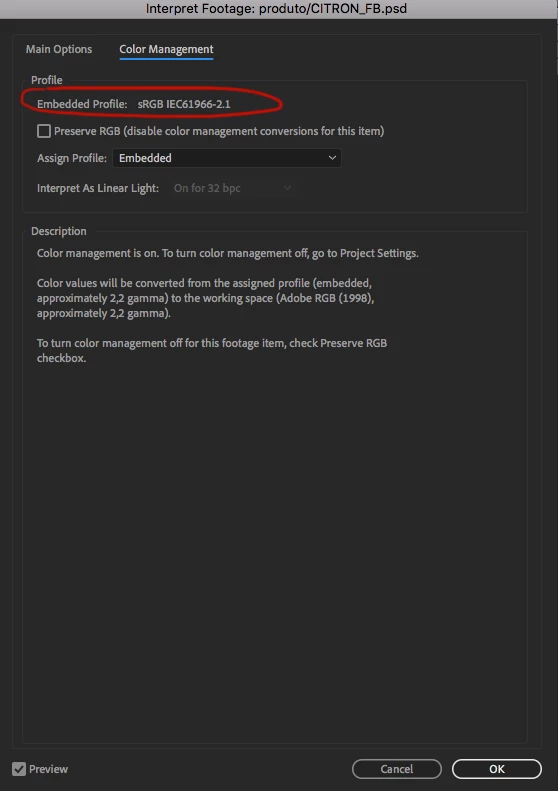
 

Thanks! 

    This topic has been closed for replies.

    2 replies

    ToolfarmJP
    Community Expert
    Community Expert
    October 9, 2019

    You can make a color profile by Photoshop and then import it into After Effects.


    https://helpx.adobe.com/after-effects/using/color-management.html

    Mylenium
    Legend
    October 8, 2019

    It's not clear at all what you mean. What color profiles do the source files in question actually use? To me it seems they are eitehr not using any proper color profiles at all and only have been tweaked on a calibrated monitor or they use custom profiles that are simply not compatible with AE. That said, the flaw most definitely is not with AE, but how the PSDs are created in the first place. It looks like you are trying to force something down AE's throat that it simply not able to handle instead of adapting your workflow to give it something it actually is desigend to use. Sorry, but I really think this is a workflow problem, not a technical issue at all. I would suggest you check the steps and instruct the people from the agency to provide usable files in the first place or you'll forever run into this issue.


    Mylenium