Known Participant
May 2, 2010
Question

ProRes footage not displaying properly in AE CS5 at 8bpc

  • May 2, 2010
  • 3 replies
  • 25675 views

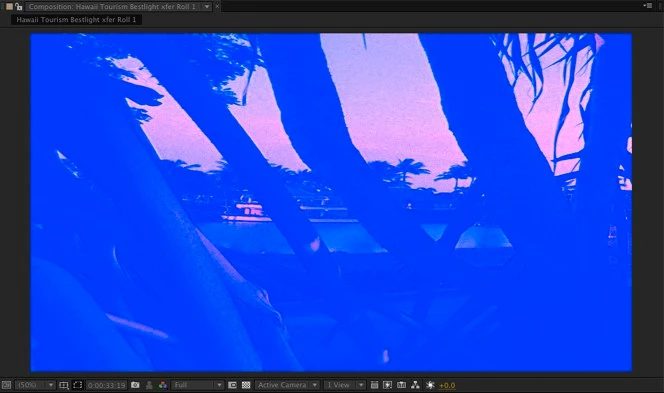
Just installed AE CS5 and am frustrated to find that Apple ProRes 422 footage (all flavors: HQ, SQ, LT, 4x) does not display properly when the project is in 8bpc mode.

In 8bpc mode:
Same frame, in 16bpc mode:
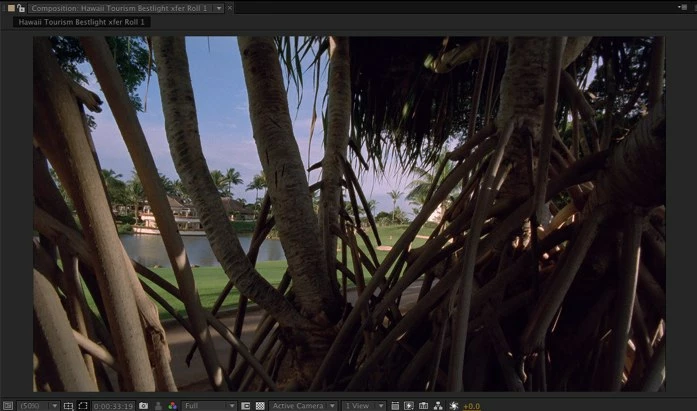
This behavior does not occur with Uncompressed 10-bit Quicktimes. Only ProRes.

Obviously now that CS5 is 64-bit aware, switching to 16bpc mode isnt as much of a problem as it was in previous versions, but I often like to work in 8bpc mode for speed/performance reasons, so its a bummer that I cant do this with ProRes sources.

Is there a workaround for this (other than working in 16bpc all the time, of course)?

    This topic has been closed for replies.

    3 replies

    Participating Frequently
    May 10, 2010

    It's confirmed that this is AJA driver related for me.  If you go into your video preview preference settings, and switch to "Computer Monitor Only," then quit and relaunch AE CS5, the same project will display properly.

    Participant
    May 10, 2010

    I can confirm that switching to monitor only changes display...Does AJA know about this? I have send an email. Please do the same...

    Thanks

    Kevin Watkins.

    Participating Frequently
    May 10, 2010

    Done - submitted a support note on AJA's web site.  I'm glad there's a temporary workaround, although I'd really like to use my video monitor with AE!

    Participating Frequently
    May 10, 2010

    Me too - same exact problem.  AJA LHe on a Mac Pro with FCP 6.  All flavors of ProRes are not displaying in AE CS5.

    Inspiring
    May 2, 2010

    Hi. This is Dan R. from the After Effects team. I'm out of the office for the few weeks, so please excuse me if I don't respond as quickly as I should.

    I'm not discounting what you're experiencing, but the behavior isn't typcial. On my machines, ProRes is working properly at all bit depths. Off the top of my head, I suspect a 3rd party Quicktime codec conflict. Regardless of what is causing your problem, we're committed to making sure this works correctly.

    Do you have Final Cut Pro installed? Do you have any other 3rd party QT components installed? e.g., AJA, Blackmagic, Sheer, etc.

    Please try the following:

    Navigate to your Quicktime codec folder. It's found at harddisk/library/Quicktime and harddisk/username/library/Quicktime. Try dragging the entire contents from these two locations into a temporary location. I use a subfolder on my desktop. e.g. username/desktop/QuicktimeTemp

    Restart After Effects and try using ProRes footage in all bit depths again. Does your problem go away? If so, it's likely an issue with one of the codecs that you have removed. You now should have enough information to isolate the codec that's causing your problems.

    Dan Ramirez

    After Effects

    QA Engineer

    M9_MHMAuthor
    Known Participant
    May 3, 2010

    Thanks for your quick response Dan,

    I went through all the QT codecs in the /Library/Quicktime folder, and pinned it down to the "AJAVideoOutputCodec.component" codec. Everything works fine once I drag this one out of the folder.

    This component is from the latest AJA Kona3 drivers (v7.5.1), released 3/22/10. I did a clean uninstall & reinstall of the 7.5.1 drivers, but the problem persists, as long as this component is in the Quicktime folder. But I cant remove this component, as FCP wont work without it.

    My system specs:

    Mac OSX 10.6.2

    MacPro3,1 (8-core)

    16 GB system RAM

    ATI Radeon X1900

    AJA Kona3, latest firmware installed

    AE CS5 OpenGL settings disabled

    Final Cut Studio 3 (all latest updates installed)

    I have AE CS4 installed on the same partition as CS5, but do not run them at the same time.

    Inspiring
    May 3, 2010

    Glad to hear we're closer to a solution. I'll make sure we contact AJA on our end about this issue. Please report the issue with AJA directly. I've got a Kona3 card in my MacPro and it's possible the issue is hardware specific so your system *may* be a valuable piece of information for them.

    Thanks for participating in the forums!

    Cheers,

    Dan R.

    AE QA