


Participant
December 3, 2016
Answered

PSD file importing to after effect with black background

  • December 3, 2016
  • 2 replies
  • 2299 views

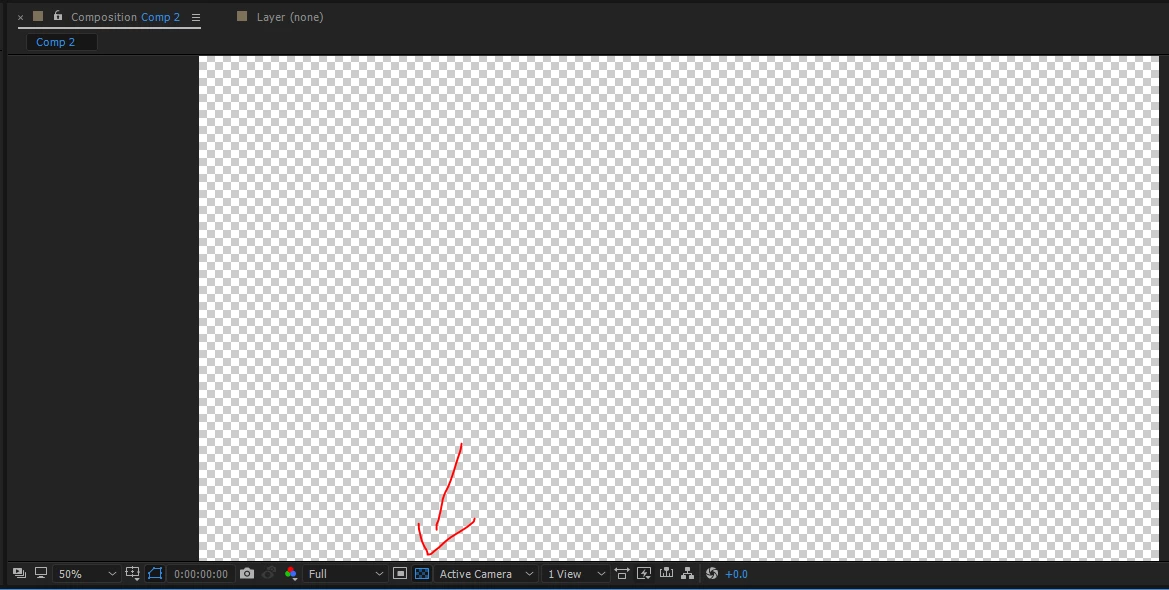
This is driving me crazy! I made a character in photoshop so I can take it into after effects to animate.  The photoshop file has a transparent background.  Overtime I try to open it in after effects it automatically gives it a black background! How do I get rid of this? In tutorials on youtube everyone is working on a transparent background!
    This topic has been closed for replies.
    Correct answer Roei Tzoref

    click the transparency grid to see it on transparent background:

    trying to work intuitively in Ae is like flying an F-18 with your mom and dad in the back seat shouting at you while on L.S.D in a hot summer's night. it's not easy. it's very difficult and can make you go crazy. to not go crazy, you had better visit this page often: After Effects tutorials

    2 replies

    waseem103
    Inspiring
    December 3, 2016

    Roei Tzoref
    Roei TzorefCorrect answer
    Legend
    December 3, 2016

    click the transparency grid to see it on transparent background:

    trying to work intuitively in Ae is like flying an F-18 with your mom and dad in the back seat shouting at you while on L.S.D in a hot summer's night. it's not easy. it's very difficult and can make you go crazy. to not go crazy, you had better visit this page often: After Effects tutorials